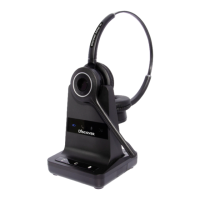
1. Product description
The Discover D904 is a fully wireless
headset solution offering the user the
ability to work ‘handsfree’ with true wireless
mobility.
Main features:
• DECT wireless headset solution
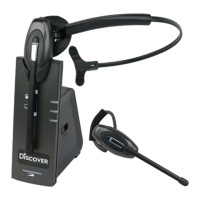
• Convertible into two wearing styles:
headband & earhook
• Up to 6.5 hours talk time without recharging
• Auxiliary port for connecting handset lifter
or electronic hookswitch device
• Noise cancelling microphone for reduced
background noise
• Secure high quality audio
• Receive volume control on headset
• Mute button on headset
• Talk button with LED on headset
• Range up to 400m
• ‘Out of range’ warning
• DECT/GAP compatible
• Second battery storage/charging point on base
• PC/USB connectivity (*)
• Three way conferencing by connecting
additional headset
* Will connect to Apple Mac or PC running
Windows 98, Windows 2000, Windows XP,
Windows Vista and Windows 7.
2. Setup
• Connect the power adaptor supplied with the
product to the base unit (13). The base power
LED (3) will light. If the base is in telephone
mode, the ‘TEL’ LED (7) will light, otherwise,
the ‘PC/USB’ LED (
8) will light.
headsetadvisor.com | 1-800-683-5715


 To Next Page