CIRCUITRY KEYBOARD
ELECTRONIC CIRCUIT EXPERIMENT KIT
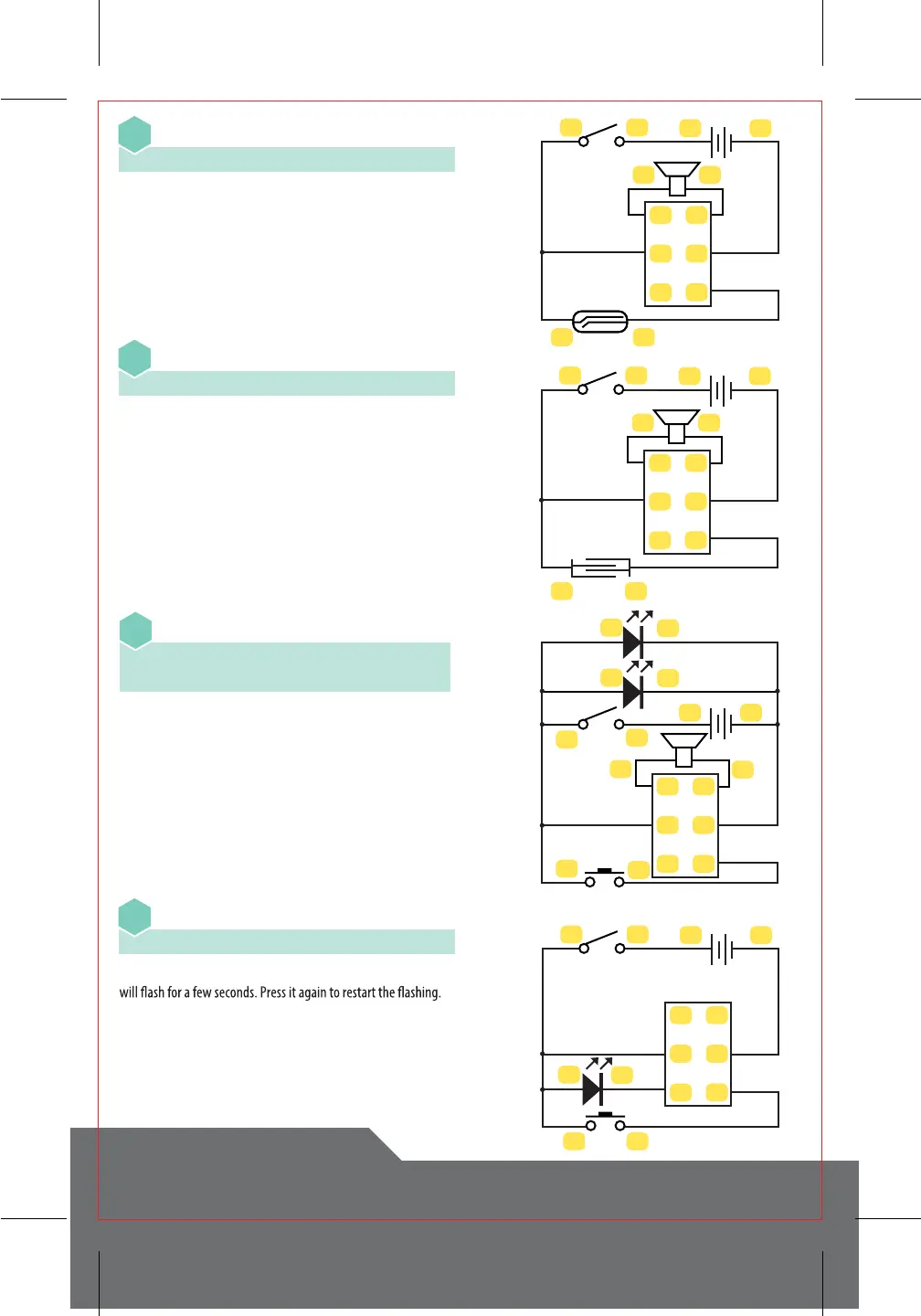
Melody - Magnet Control
16
Flashing LED
4-23 • 24-31-22-6 • 5-30 • 33-21 • 34-3
19
Melody - Touch Control
17
Melody with LEDs
4-23 • 24-31-22-12-10 • 1-35 • 2-32 • 33-21
34-11-9-3
18
34
2324
12
30
31
32
33
34
35
2526
34
23
24
12
30
31
32
33
34
35
1920
34
2324
5
6
2122
30
31
32
33
34
35
34
23
24
9
10
11
12
21
22
1
2
30
31
32
33
34
35
4-23 • 24-31-26 • 2-32 • 1-35 • 25-33 • 34-3
4-23 • 24-31-20 • 2-32 • 1-35 • 19-33 • 34-3
Turn on the Main Switch. Activate the Reed Switch with the
magnet. This will cause music to play. Activating the switch again
will play the next tune stored in the memory.
In this experiment, you will need a ½ cup of room temperature
water, 1 tablespoon of table salt, and a cup (not included). Mix the
water and the table salt in the cup to where the table salt is
completely dissolved. Turn on the Main Switch. Put a drop of salt
water onto the touch plate to begin playing music. To play the
next tune, you will need to wipe the touch plate completely dry
and reactivate it with a new drop of salt water.
Slide the Main Switch to “on”. The Yellow and Green LEDs will light
up. Pressing the Push Switch will play a tune. Pressing it again will
play the next song.
Turn on the Main Switch. Press the Push Switch and the Red LED



 To Next Page