CIRCUITRY KEYBOARD
ELECTRONIC CIRCUIT EXPERIMENT KIT
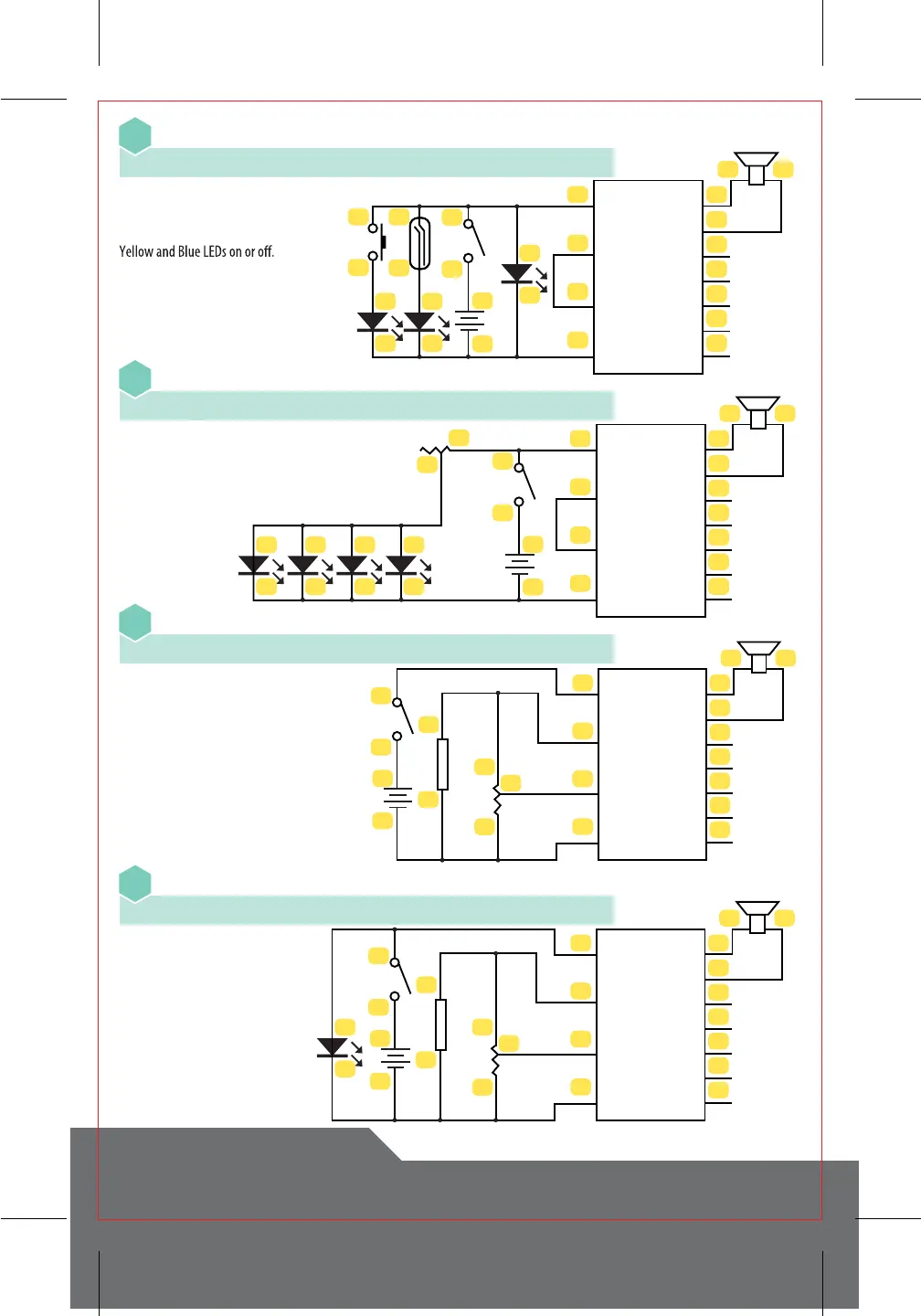
Piano with LEDs and Multiple Switches
28
Piano with Adjustable LEDs
29
Piano with Adjustable Volume
30
Piano with Adjustable Volume and LED
31
23
24
26
25
40 36
37
42
43
44
45
46
38
39
41
21
VCC
POT1
POT2
SPK1
SPK2
LED1
LED2
LED3
LED4
LED5
GND
7
8
9
10
5
6
21
22
3
4
28
29
23
24
40
38
39
41
36
37
42
43
44
45
46
21
VCC
POT1
POT2
SPK1
SPK2
LED1
LED2
LED3
LED4
LED5
GND
3
4
11
12
9
10
7
8
5
6
16
15
28
29
27
23
24
40
38
39
41
36
37
42
43
44
45
46
21
VCC
POT1
POT2
SPK1
SPK2
LED1
LED2
LED3
LED4
LED5
GND
3
4
1KΩ
5
6
16
15
28
29
27
23
24
40
38
39
41
36
37
42
43
44
45
46
21
VCC
POT1
POT2
SPK1
SPK2
LED1
LED2
LED3
LED4
LED5
GND
3
4
1KΩ
4-23 • 25-10 • 21-8 • 24-22-26-6-40 • 39-38 • 37-2 • 1-36 • 41-5-9-7-3
4-23 • 24-29-40 • 28-12-10-8-6 • 39-38 • 37-2 • 1-36 • 41-11-9-7-5-3
4-23 • 24-40 • 39-28 • 29-16-38 • 37-2 • 1-36 • 41-27-15-3
4-23 • 24-6-40 • 39-28 • 29-16-38 • 37-2 • 1-36 • 41-27-15-5-3
Turn on the Main Switch. The Red LED
will light up. The piano is ready to play.
Activate the other switches to turn the
Slide the Main Switch to “on”. The piano
is ready to play and the brightness of
the LEDs can be adjusted using the
Variable Resistor.
Slide the Main Switch to “on”. The piano
is ready to play and the brightness of
the LEDs can be adjusted using the
Variable Resistor.
Turn on the Main Switch. The piano is
ready to play with its volume being
controlled by the knob on the Variable
Resistor.
Turn on the Main Switch. The Red LED
will light up. The piano is ready to play
with its volume being controlled by the
knob on the Variable Resistor.



 To Next Page