CIRCUITRY KEYBOARD
ELECTRONIC CIRCUIT EXPERIMENT KIT
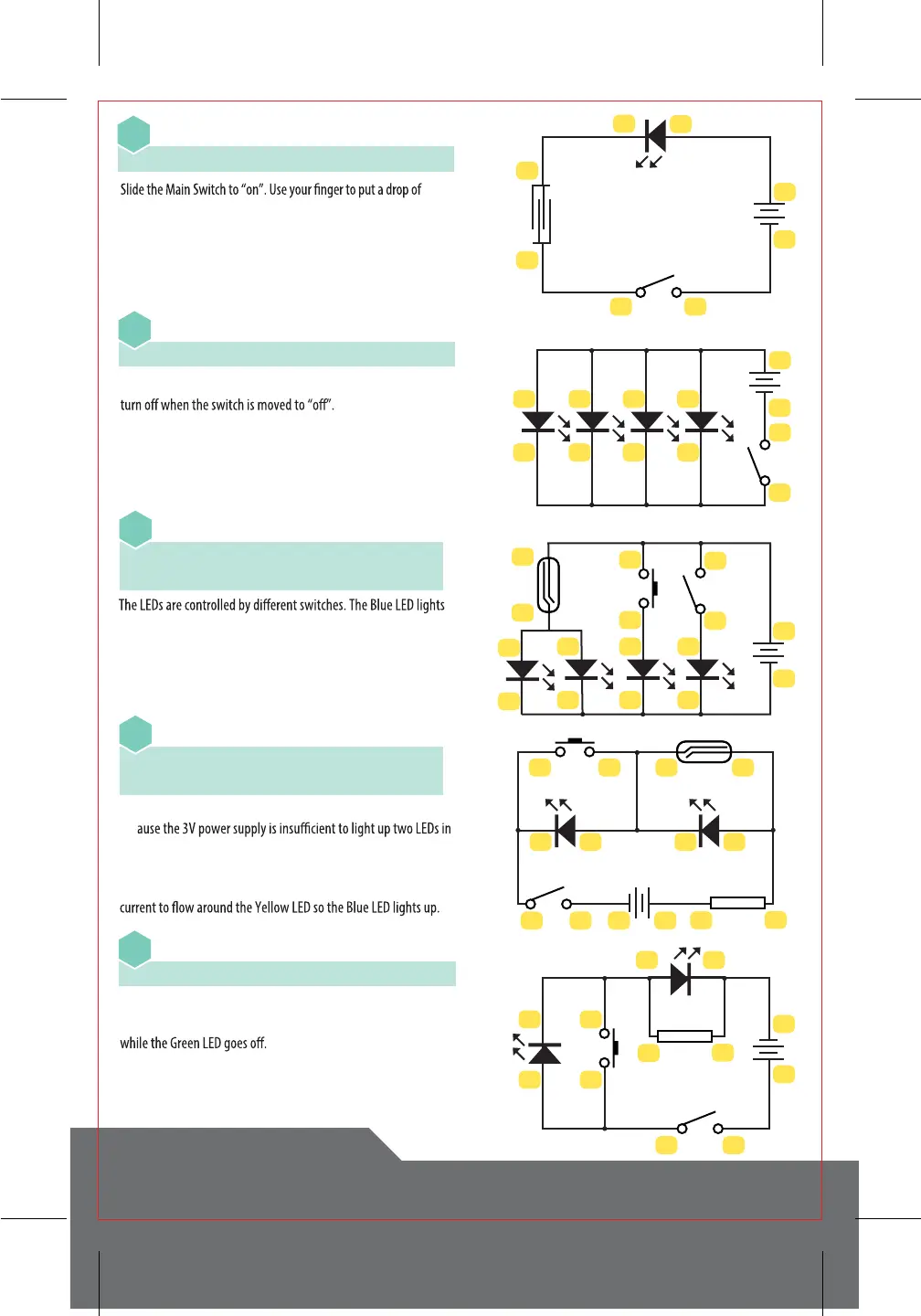
Introducing the Touch Plate
4-10 • 9-20 • 19-23 • 24-3
07
Connecting Four LEDs in Parallel with a Single Switch
4-6-8-10-12 • 11-9-7-5-23 • 24-3
08
Connecting LEDs in Parallel with Separate Switches
4-22-26-24 • 23-6 • 25-12-10 • 21-8
7-9-11-5-3
09
Connecting Two 3V LEDs in Series
4-13 • 14-8-26 • 25-22-7-10 • 9-21-23
24-3
10
Alternating LEDs with Two Switches
4-23 • 24-21-12 • 11-22-14-6 • 5-13-3
11
water onto the Touch Pad (see page 3). The LED will glow dimly.
Water has a large resistance so only a little electricity will pass
through the water and get to the LED. Mix a little salt and water
and repeat the experiment. The LED will glow brighter, showing
that saltwater has a lower resistance.
Turn on the Main Switch and all four LEDs will light up. They will
up when the Push Switch is depressed, and the Main Switch turns
on the Red LED. The Yellow and Green LEDs light up when the
Magnetic Rod is near the Reed Switch.
Turn on the Main Switch and the Green LED lights up, but the red
one does not. Press the Push Switch and the Red LED turns on
The LEDs will not light up when you turn on the Main Switch. This is
bec
series. Activating the reed switch creates a new path, bypassing the
Blue LED so the Yellow one lights up. Moving the Magnetic Rod away
to open the Reed Switch and pressing the Push Switch allows the
3
4
23
24
6
5
8
7
10
9
12
11
21
22
25
26
3
4
23
24
6
5
8
7
10
9
12
11
23
19
20
24
10
9
3
4
3 423 24
9 7 810
21 22
25 26
14
13
100Ω
3
4
2324
56
21
22
12
11
13
14
100Ω



 To Next Page