Page 31
Optional - Connecting VCRs to the System
Optional - Connecting VCRs to the System
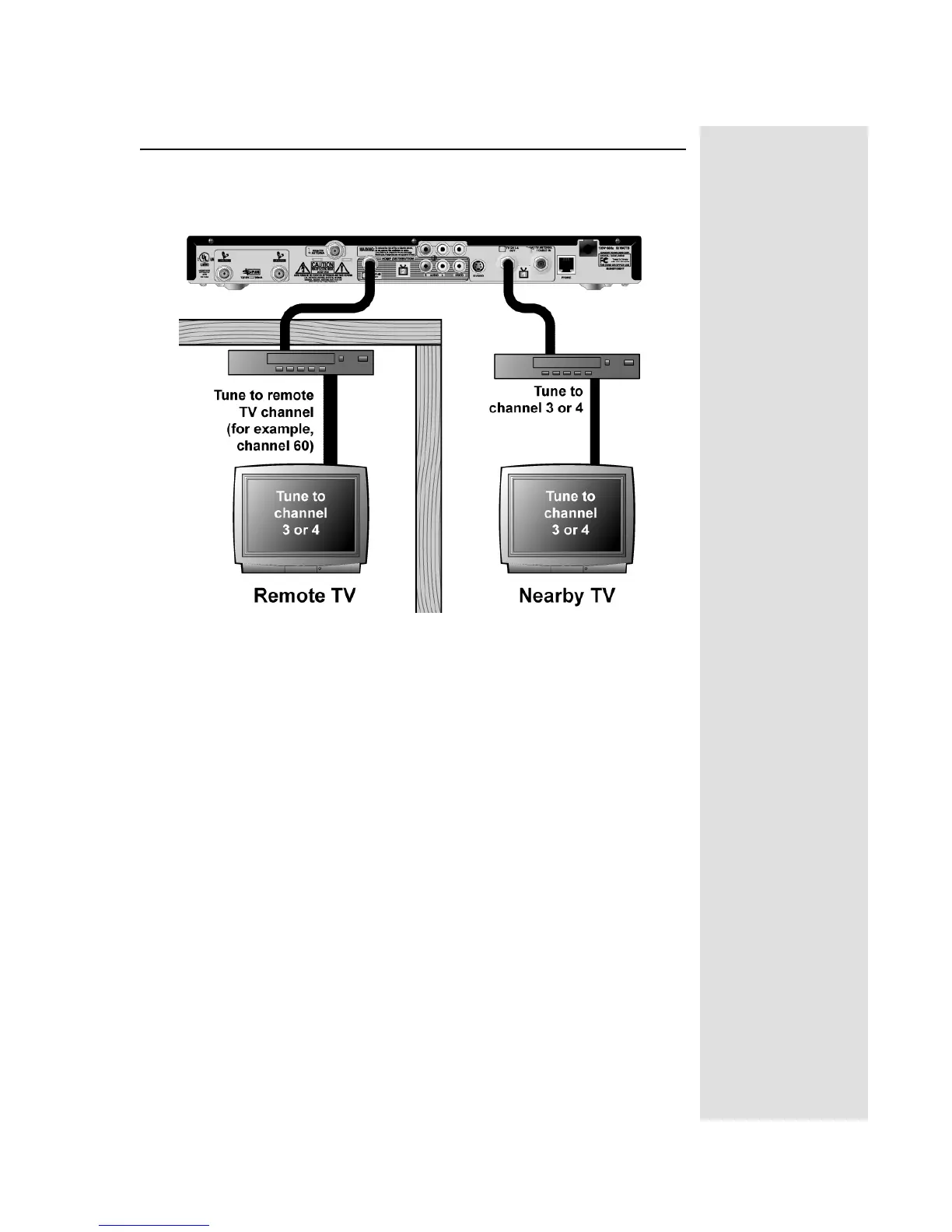
The diagram below provide example of how to connect VCRs to your
satellite TV system. Your installation may be different.
Connecting a VCR to the Nearby TV
1. Connect a coaxial cable from the CH 3-4 OUT output on the receiver to
the nearby VCR’s tuner port.
2. Connect a coaxial cable from the output on the VCR to the nearby TV’s
tuner port.
3. Plug in and turn on the nearby VCR and TV.
4. Set the VCR output to Channel 3 or 4 as set on page 26
5. Tune the nearby VCR and TV to Channel 3 or 4 as set on page 26.
Connecting a VCR to the Remote TV
1. Connect the tuner input of the remote VCR to an existing wall cable
outlet using a coaxial cable.
2. Connect a coaxial cable from the output on the VCR to the remote TV’s
tuner port.
3. Plug in and turn on the remote VCR and TV.
4. Tune the remote VCR to the remote TV channel that you use to watch
satellite TV programming (for example, channel 60) as set on page 26.
5. Set the VCR output to channel 3 or 4.
6. Tune the remote TV to the same channel that you set your VCR to in
step 5.










 To Next Page