EasyManua.ls Logo

Dish Network 52.0 - TV Power; Info;Help; Search; Skip Forward

Dish Network 52.0
8 pages
Print Icon
To Next Page IconTo Next Page
To Previous Page IconTo Previous Page
Loading...
Info
DVR
Guide
Help
CH
2 abc
3 def
5
jkl
0
tuv
wxyz
6
mno
Select
Recall
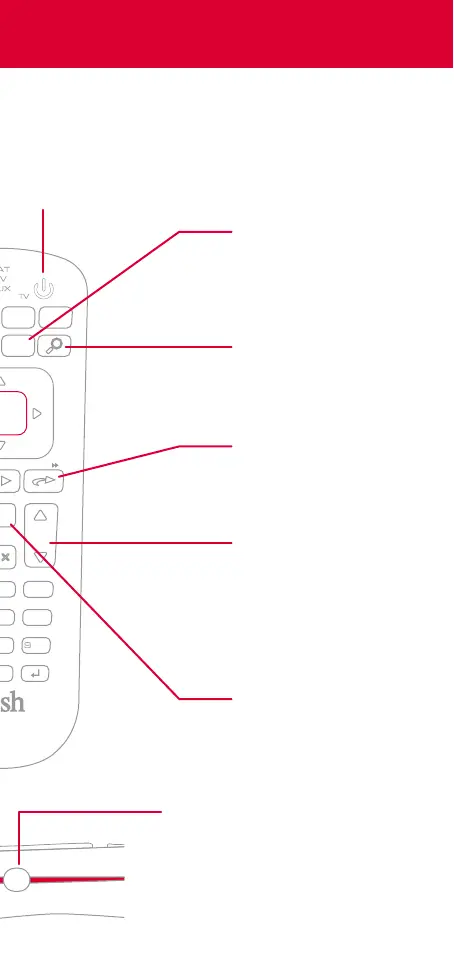
Search
Find your favorite
TV shows, movies,
and sports
Info/Help
Press to get more
information about a
program
Press and hold to
get quick tips on
most screens
Skip Forward
Press to skip forward
30 seconds
Press and hold to
fast-forward
Channel Up & Down
In addition to
changing channels,
use these buttons to
page through menus
such as the Guide
TV Power
When the remote
is paired with your
TV, this button
turns it on and o
Recall
While watching TV,
press to see the
channels you have
watched recently
Input
Change inputs on your TV when
in TV mode
When in SAT mode, use this
button to swap picture-in-
picture or multi-view windows
INPUT

Other manuals for Dish Network 52.0

Related product manuals