EasyManua.ls Logo

Dish Network 52.0 - Explore Your Remote; Home; Device Power; Back;Live TV

Dish Network 52.0
8 pages
Print Icon
To Next Page IconTo Next Page
To Previous Page IconTo Previous Page
Loading...
Explore Your Remote
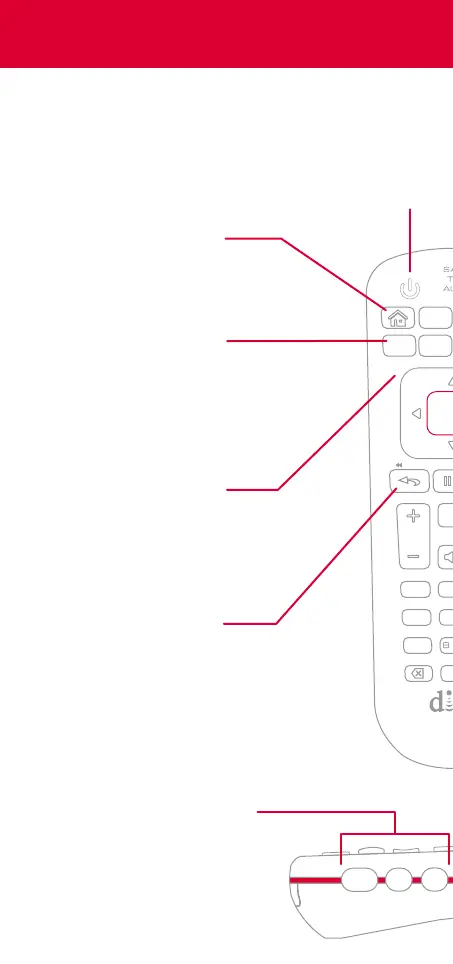
Also, use the skip
buttons to change tabs
Skip Backward
Press to skip back
10 seconds
Press and hold to
rewind
Device Power
Turn on and o
the device you’ve
selected on the
side of the remote
Back/Live TV
Press to go back
one menu
Press and hold to
go to live TV
Home
Easily find movies,
sports, and shows
that are live, on
your DVR, or on
demand—all in
one place
Options
Access additional
options and features
in the current menu
Back
Options
Apps
Live TV
VOL
1
2
abc
4
ghi
5
jkl
0
tuv7
pqrs
Select
Recall
Device Buttons
Use your remote as a
universal remote control by
pairing it with your TV and
an auxiliary device such as
a Blu-ray player or stereo
SAT
TV
AUX

Other manuals for Dish Network 52.0

Related product manuals