EasyManua.ls Logo

Dish Network 6.3 - User Manual

Dish Network 6.3
39 pages
Print Icon
To Next Page IconTo Next Page
Loading...
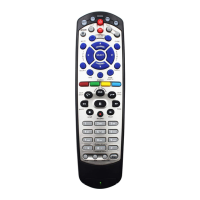
Remote Control
User's Guide
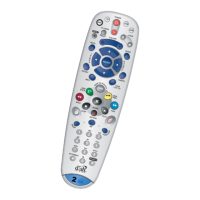
Remote Control
User's Guide
TM
2
UHF
PRO
2
UHF
PRO

Questions and Answers

  • A
    aaronruizJul 30, 2025
    Why is my Dish Network 6.3 not working?
    • T
      tiffany12Jul 30, 2025
      If your Dish Network Remote Control isn't working, it could be due to several reasons: * Ensure the remote is in the correct mode. For example, use SAT mode for the satellite receiver. * If you have a multi-room receiver, verify you're using the correct remote (TV1 or TV2) for your location. * Try replacing the batteries. * For all receivers except DISH Player-DVR 942, ViP222 and ViP622 DVR, make sure the A/B switch is in the A position.
  • A
    Adam WalkerAug 5, 2025
    How to fix Dish Network 6.3 Mute or Volume button?
    • B
      Barbara AlvaradoAug 5, 2025
      If the Mute or Volume button on your Dish Network Remote Control isn't working, it could be due to the following: * The remote control may not be properly set up. * You might be trying to control TV volume, but the remote is set to control a tuner or amplifier in AUX mode. Set up the remote to control either TV volume or tuner/amplifier volume, depending on your preference.
  • A
    Adam AllisonAug 11, 2025
    What to do if Dish Network Remote Control stops during programming?
    • C
      Chris JohnsonAug 11, 2025
      If your Dish Network Remote Control stops working during a programming sequence, it's likely because the programming function shuts off if no button is pressed for 20 seconds. You should start the programming procedure over again.
  • A
    Ashlee ShermanAug 17, 2025
    How to improve Dish Network UHF Pro Remote Control range?
    • M
      Matthew MooreAug 17, 2025
      If your Dish Network UHF Pro remote control's performance is poor from a distance: * Ensure the UHF antenna is connected to the receiver and isn't touching anything. * Adjust the tilt angle of the receiver's UHF antenna. * Move the receiver to different locations, ideally high and above other equipment. * Use a coaxial cable to place the UHF antenna outside the entertainment center. * Keep any nearby off-air antenna away from the UHF remote antenna; don't place it on the receiver.
  • M
    Michael PriceAug 23, 2025
    What to do if Dish Network 6.3 buttons don't work?
    • K
      Katherine SmithAug 23, 2025
      If your Dish Network Remote Control isn't working as expected, there might be a few reasons: * The remote might not be in the correct mode for the equipment you're trying to control. To fix this, press the correct mode button. * Ensure you're pointing the remote directly at the equipment without any obstructions. * Check the batteries. Replace them with fresh AAA batteries, ensuring they're inserted correctly. * The remote might not be set up to control the equipment. Program the remote to control your TV.

Summary

Quick Setup Guide

Confirm Receiver Model and Select Key

Identify receiver model and choose the correct remote key for setup.

Install Remote Key and Batteries

Install the selected key and insert batteries into the remote control.

Pair Remote with Receiver

Steps to ensure successful communication between the remote and your receiver.

Program Remote for TV Control

Guide to programming the remote to operate your television set.

Special Remote Functions: Recover Button

Set up the RECOVER button for TV2 operation to restore satellite programming.

Remote Operation Modes

Limited Mode and Picture Recovery

How to use Limited Mode and the RECOVER button for picture issues.

SAT Mode Operation

Detailed guide for operating the remote in SAT mode for satellite functions.

TV and VCR Mode Operation

Instructions for using the remote control in TV and VCR modes.

Remote Control Functionality and Programming

Remote Control Overview and Modes

General information on remote capabilities and operating modes.

Remote Communication and Programming

How the remote communicates and instructions for programming other equipment.

Advanced Programming Techniques

Setup for Limited Mode and using equipment code tables.

Equipment Code Scanning

Procedure for automatically scanning for compatible equipment codes.

Volume Control and Multi-Receiver Setup

Switching volume control and programming a second receiver.

Reading Remote Control Codes

Method to retrieve programmed remote control codes.

Equipment Codes for Device Control

TV Codes

List of codes for programming the remote to control televisions.

VCR and DVD Player Codes

Codes for programming the remote to control VCRs and DVD players.

Tuner, Amplifier, and Combo Device Codes

Codes for programming tuners, amplifiers, and combination equipment.

Advanced Features and Troubleshooting

Discrete Codes and Conflict Avoidance

Using discrete codes, avoiding conflicts, and changing remote address.

UHF Frequency and UHF Pro Setup

Changing UHF frequency and setting up the UHF Pro remote.

Troubleshooting Common Issues

Solutions for common problems encountered with the remote control.

Warranty and Support

Limited Warranty and Exchange Programs

Details on limited warranty, advance exchange, and accessory warranty.

Getting Help and Support

Contact information and procedures for customer support.

Reference Tables

Remote Reference Tables

Space to record programmed remote addresses and equipment codes.

Dish Network 6.3 Specifications

General IconGeneral
Device TypeRemote Control
CompatibilityDish Network Receivers
Model Number6.3
Batteries2 x AA
Power SourceBattery
WirelessYes
Voice ControlNo
Backlit KeysNo
ColorBlack
BrandDish Network
Model6.3
TypeInfrared Remote

Related product manuals