Page 5
Installation Instructions
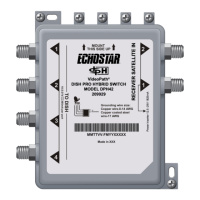
1. Mount the DP34 switch onto the side of a building, or on some
other sturdy structure. Make sure that the mounting location is
stable, and that you fasten the switch tightly to the surface. The
DP34 should be fixed by suitable hardware for the wall or
ceiling.
Note: Mount the switch so that the connections are horizontal
(as shown in Figure 1), and put drip loops in all coaxial cables.
This helps prevent leakage of moisture into the switch.
The DP34 switch can be installed outside your
home or building, because this device is designed
for outside use.
You can have up to 200 feet of cable between a
DISH Pro LNBF and a DISH Pro or DISH Pro Plus
satellite receiver with the DP34 switch connected at
any point along the 200 feet of cable. The cable
must be rated for 950 to 2150 MHz. Some cable is
labeled “Swept tested to 2150 MHz.” If you are
unsure whether your cable is rated to 2150 MHz,
check the container it came in, examine the cable’s
outside jacket, or talk to your retailer.



 To Next Page