Operation
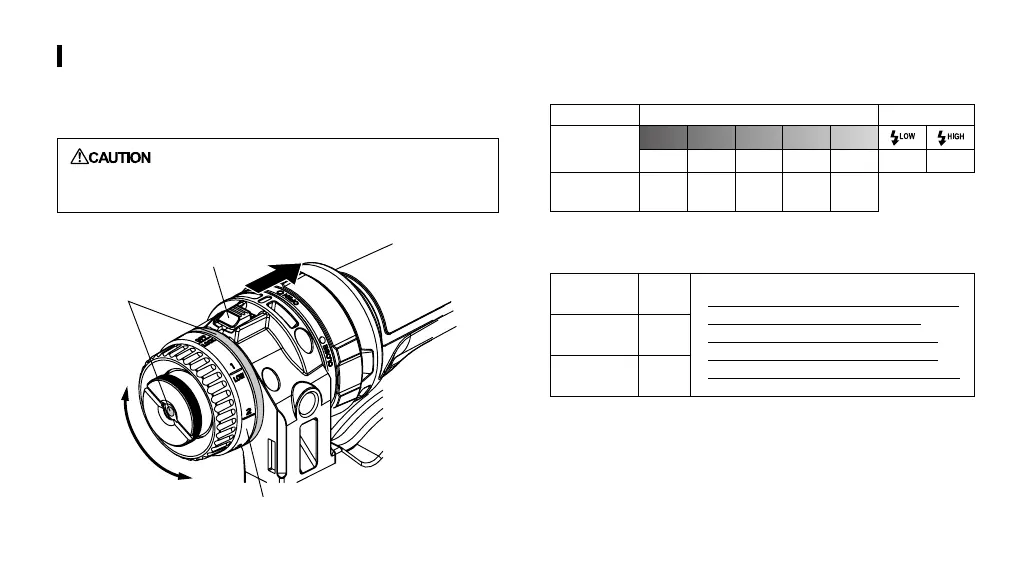
Turn the mode dial to select the mode and light intensity.
When the mode dial index is set to the OFF/LOCK position, turn it
while pressing the mode lock lever (red) in the direction of the arrow.
: When not using the Ring Light Kit (when carrying
or transporting) set the mode dial to the OFF/
LOCK position to prevent accidental lighting.
■
Continuous lighting duration by light intensity
Mode Light mode Flash mode
Brightness
control
1 2 3 4 5
100lm 200lm 300lm 600lm 1200lm 300lm 600lm
Continuous
lighting duration
480min. 360min. 240min. 120min. 60min.
■
Remaining battery power indication
100% - 50%
Blue
* When the remaining battery power drops
below 5%, the light is automatically
dimmed to the minimum intensity and
the brightness control is disabled (this
condition is maintained for about 2 hours).
50% - 5%
Purple
<5%
Red
■
Error waring
When the light from the camera’s built-in ash is detected in the
Light mode, the indicators start blinking rapidly.
Mode lock lever (red)
Indicator
Mode dial shaft
58


 To Next Page