How to Attach the External Flash
■
Using a TG-Series Camera
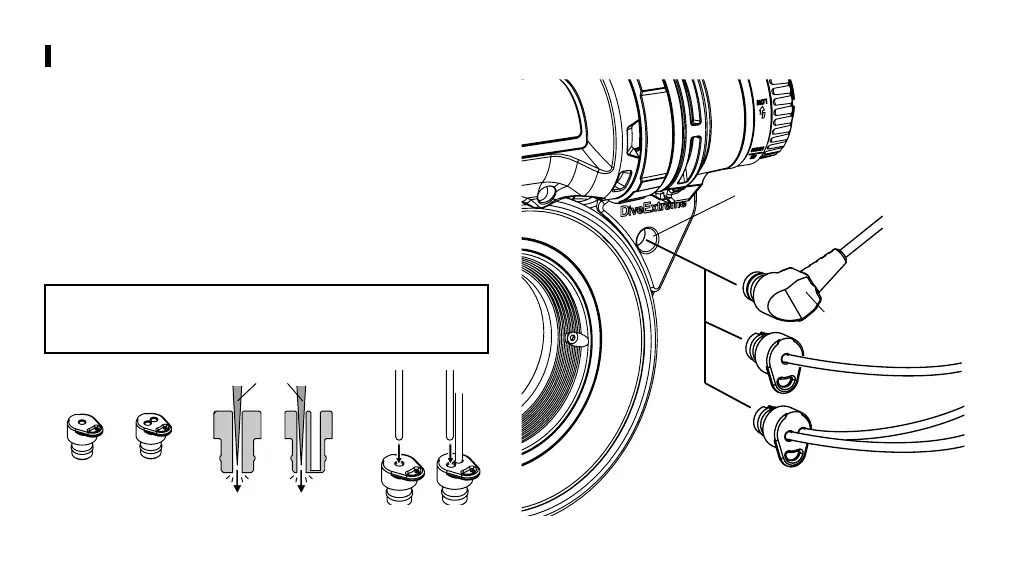
Insert a commercially available optical fiber cable in the external
flash port to connect the Ring Light Kit with the external flash.
· An optical fiber cable with L-shaped plugs (Sea & Sea, Olympus,
etc.) can be directly connected.
· An optical fiber cable without plugs (Inon, etc.) can be inserted into
the provided optical connector cap to connect the external flash
with the Ring Light Kit.
· Use the provided two-hole optical fiber connector cap to connect
a dual flash system to the Ring Light Kit.
Use a tool with a thin, pointed tip to penetrate the hole(s) in
the optical fiber connector cap before inserting the optical
fiber cable into the cap.
Fiber cable with
L-shaped
External flash port
Fiber connector cap
Thin, pointed tool
<Cross section>
1 hole 2- hole
1 hole
2- hole
61


 To Next Page