■
Connecting the Housing
To ensure that the Ring Light Kit and camera shutter are synchronized,
it is recommended to set the camera’s built-in ash as follows.
* Select the mode that activates the built-in ash’s pre-emission.
* When using a system provided with RC ash, set the mode to “RC
ash only” to prevent the camera’s battery from being depleted.
: 1. When the camera’s ash mode is set to manual,
pre-emission may not operate, making it
impossible to synchronize the shutter with the
Ring Light Kit’s emission.
2. To minimize unwanted emissions due to
erroneous synchronization of the Ring Light Kit
with another camera’s ash or with the combined
external ash, the sensor sensitivity of the Ring
Light’s wireless ash light reception port is set to
a low level. If synchronization with a TG-Series
camera’s RC mode ash is not possible, set the
camera’s ash mode to forced emission.
* When the Ring Light Kit is used with a TG-Series
camera, no optical ber cable is necessary.
Using a TG-Series Camera
When the Ring Light Kit is used with a TG-
Series camera, no optical ber cable is
necessary since the light reception port of
the Ring Light Kit directly receives the light
from the camera’s built-in ash. To allow this
to function properly, be sure to mount the
Ring Light Kit on the housing horizontally.
* See P. 53.
Using a Non-TG-Series Camera
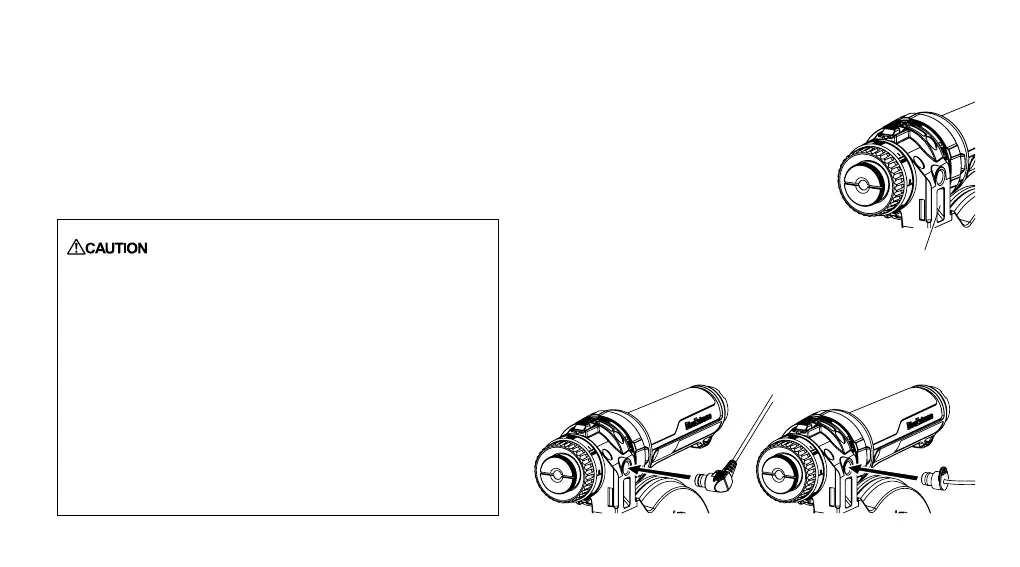
Use a commercially available optical ber cable to connect the
camera’s built-in ash with the ash mode reception port on the
Ring Light Kit.
Wireless ash
light reception port
60


 To Next Page