10
Chapter 2: Camera Configuration
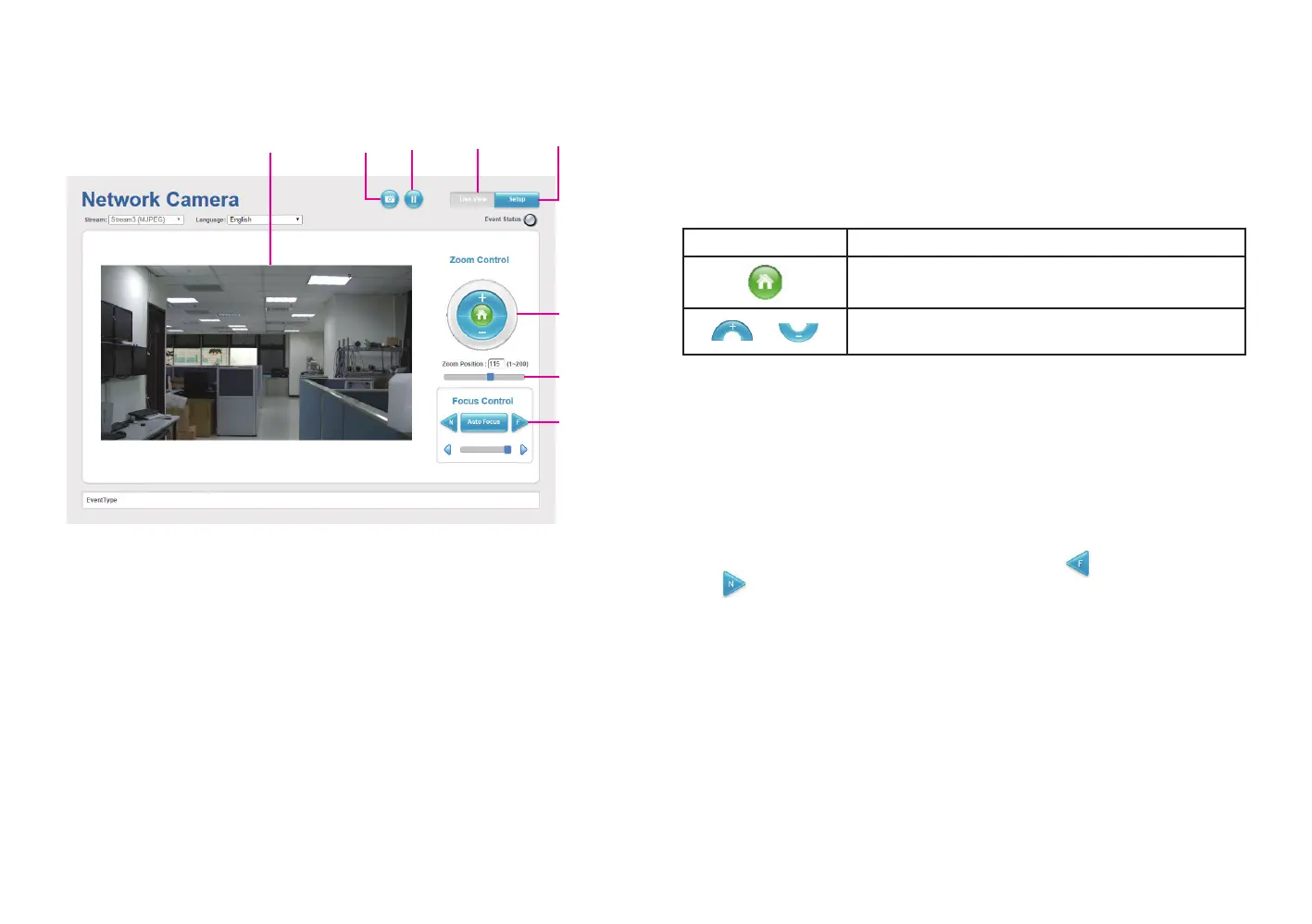
SetupViewerSnapshot Start/Stop
Live view
Motorized Lens
Zoom Control
Buttons used to control zooming function.
Button Description
Returns the camera back to default position.
Adjusts the camera to zoom in or out.
Zoom Position
Adjusts the camera’s zoom level. Move the zoom slider bar left or right to
adjust the zoom level. The value of the zoom position will be reflected in
the text field. However, the zoom position cannot be manually entered in
the text field.
Focus Control
Adjusts the camera’s focus. To adjust the focus automatically, press the Auto
Focus button. To set the focus manually, press the to focus far objects,
and to focus near objects. The focus can also be adjusted through the
slider bar.
Zoom
Control
Focus
Control
Zoom
Slider
Snapshot
Takes a image snapshot from the camera, you will be prompted to store the
image file onto the computer’s hard drive.
Start/Stop
Press to stop the live video, press again to restart.
Viewer
Views the live video of the camera.
Setup
Options for configuring the IP camera.



 To Next Page