
 Need help?
Do you have a question about the DJ-Tech uSolo and is the answer not in the manual?
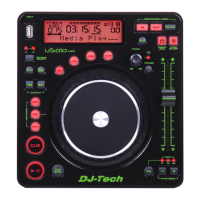
Controls playback and pause operations.
Manually set the track's BPM by tapping.
Sets cue points and allows momentary playback.
Used for pitch bend, frame search, and FX control.
Allows fast backward or forward search through tracks.
Selects single track or continuous play mode.
Switches between elapsed and remaining time display.
Toggles between USB ports A and B.
Port for connecting USB mass storage devices.
Activates reverse play mode for tracks or loops.
Activates and deactivates the ECHO effect.
Activates and deactivates the FLANGER effect.
Activates and deactivates the FILTER effect.
High-quality display showing all functions and status.
Navigates tracks, folders, and displays track information.
Creates continuous audio loops without interruption.
Activates cue playback instantly from the last cue point.
Toggles the pitch slider function on or off.
Switches the tempo lock function on or off.
Switches between folder/track search and repeat modes.
Adjusts the playback pitch percentage.
Temporarily alters track pitch up or down.
Selects pitch adjustment range (6%, 12%, 25%, 100%).
Analogue audio outputs for connecting to mixers.
Second USB port for connecting mass storage devices.
Connects two players for relay playback.
Turns the unit's power on and off.
Connects the power supply cable.
Indicates when the device is in CUE mode.
Shows the number of the currently playing folder.
Visualizes track progress and remaining time.
Indicates when the AUTO BPM counter is active.
Displays the BPM value of the currently playing track.
Shows the track's pitch percentage.
Indicates if tempo lock is activated.
Indicates if the LOOP function is activated.
Shows if a loop is set for relooping.
Indicates if Auto Cue is activated.
Shows chosen time mode in minutes, seconds, and frames.
Displays track/folder names, sampling rate, and other info.
Indicates elapsed or remaining track time.
Shows if the unit is in REPEATED play mode.
Indicates if single or continuous play mode is set.
Shows the number of the currently playing track.
Indicates if the device is in play or pause mode.
Selects the playback source between USB ports A and B.
Allows switching USB source while in pause mode.
Searches for tracks forward or backward using the TRACK knob.
Searches for folders forward or backward using the TRACK knob.
Displays track title, artist, genre, etc., by pressing TRACK knob.
Scrolls through a track frame-by-frame to find cue/loop points.
Automatically sets a cue point to the first music note of each track.
Defines the exact playback start point for tracks.
Loops a section of audio continuously without interruption.
Stops playback of a seamless loop.
Reactivates a previously stored seamless loop.
Modifies the start or end points of an existing loop.
Creates repeating sound effects by restarting loops or cue points.
Allows manual BPM setting by tapping the button.
Enters the system configuration menu.
Enables auto-pilot playback between two connected players.
Displays the unit's internal programming code version.
 General
| Brand | DJ-Tech |
|---|---|
| Model | uSolo |
| Category | MP3 Player |
| Language | English |

 To Next Page
