DJI RS 3 Mini
User Manual
14
©
2023 DJI All Rights Reserved.
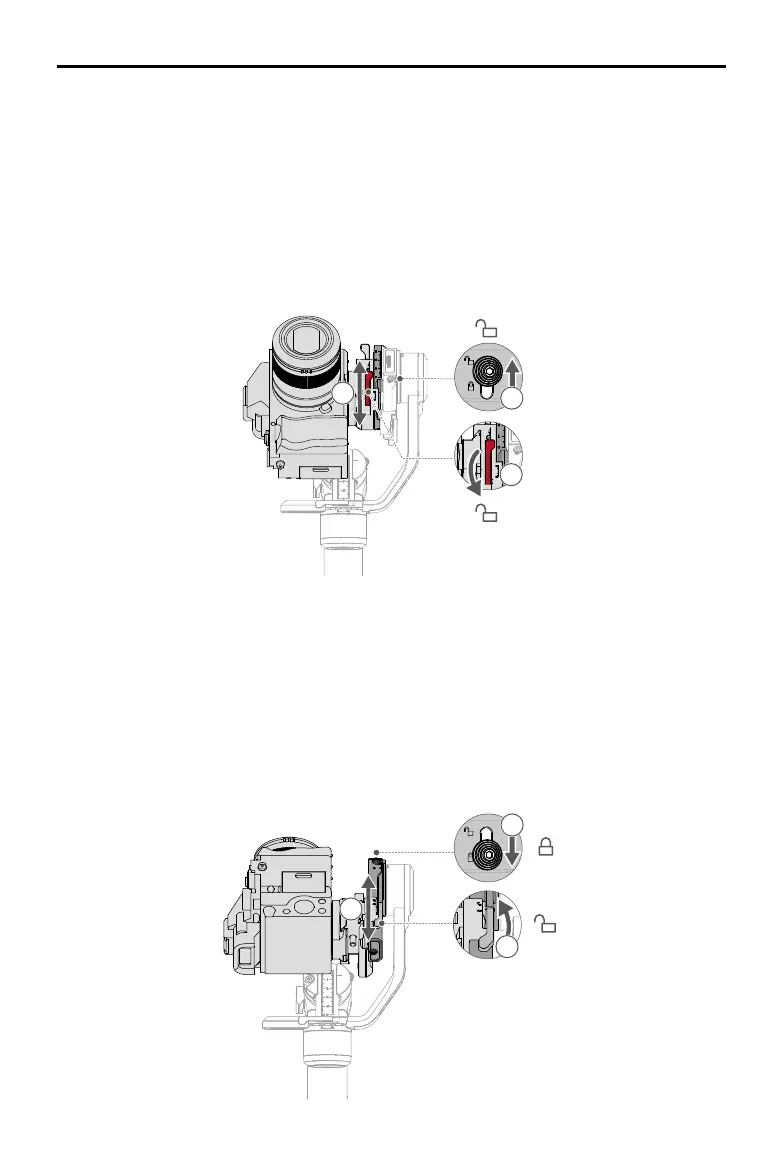
Balancing in Vertical Shooting
1. Balancing the Vertical Tilt
a) Unlock the tilt axis
①
and loosen the red lever on the lower quick-release plate
②
.
b) Rotate the tilt arm, so that the camera lens is in the upward. Check to make sure the
camera is not top or bottom-heavy. If the camera is top-heavy, move the camera
backward
③
. If the camera is bottom-heavy, move the camera forward
③
.
c) Tighten the red lever on the lower quick-release plate. The vertical tilt is balanced when
the camera lens is steady while pointing upward .
2. Balancing Depth for the Tilt Axis
a) Rotate the tilt axis, so that the camera lens points forward. Loosen the lever on the
vertical arm
①
.
b) Check to make sure the camera is not front or back-heavy. If front-heavy, move the
camera backward
②
. If back-heavy, move the camera forward
②
.
c) Tighten the lever on the vertical arm. The tilt axis is balanced when the camera lens is
steady while pointing forward.
d) Toggle the tilt lock to the locked position
③
.
3
2
1
2
1
3


 To Next Page