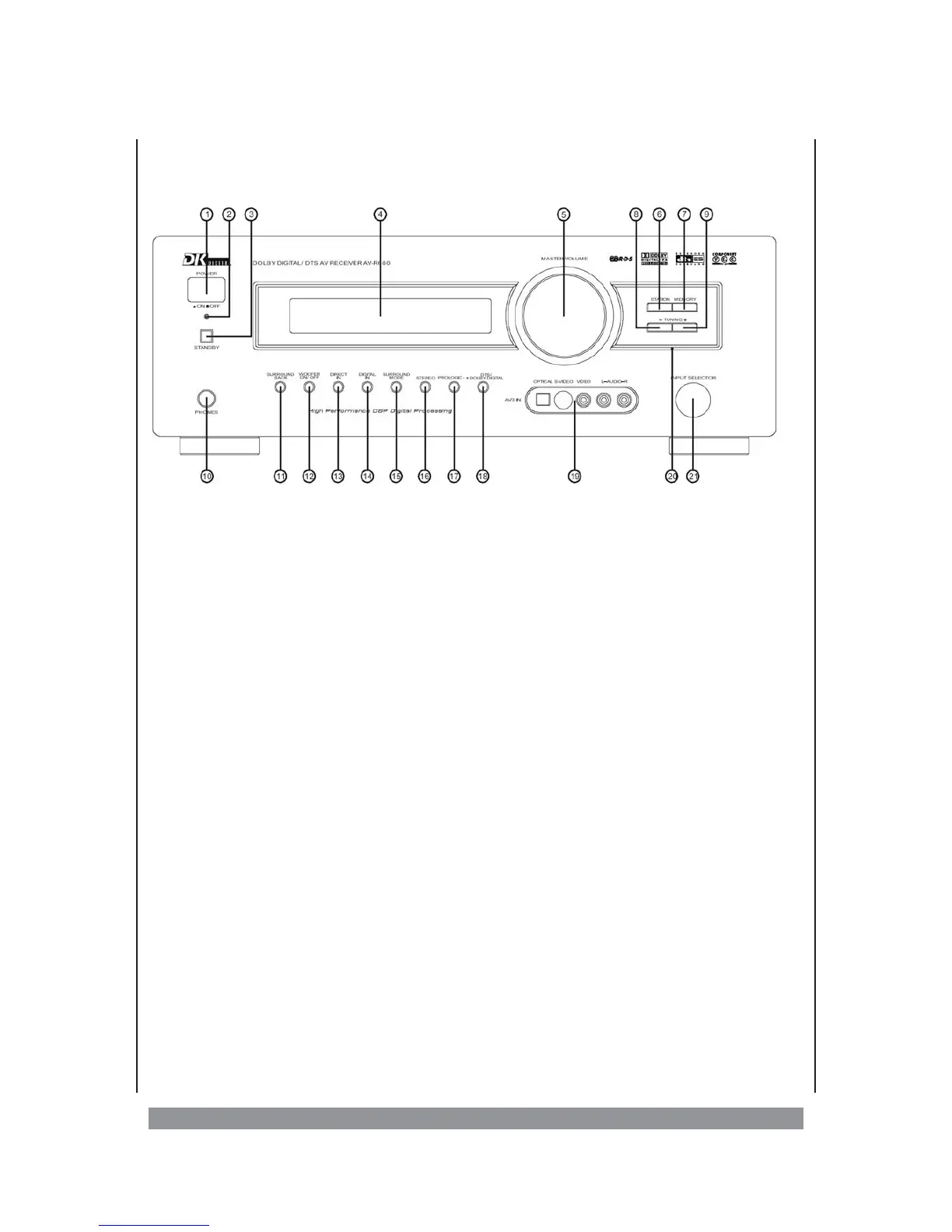
Overview of the control elements
1. POWER - power switch
2. Indicator for standby
3. STANDBY - on / off switch in standby mode
4. Display - Display range for operational information
5. VOLUME - Volume control
6. STATION - for calling the radio station memories
7. MEMORY - for storing the radio stations
8. TUNING — - Station tuning down
9. TUNING + - Station tuning up
10. PHONES - Phones output
11. SURROUND BACK - to switch the rear surround speakers on / off
12. WOOFER ON / OFF - to switch the subwoofer on / off
13. DIRECT IN - activats the discrete analogue 6.1 input
14. DIGITAL IN - - activates the digital path within the respective
input channel (if available)
15. SURROUND MODE - for selecting various surround operation modes
for stereo signals
16. STEREO - to activate the stereo operation (front speaker
and woofer only)
17. PRO LOGIC II - enables the PRO LOGIC II mode
18. DTS / DOLBY DIGITAL - if you reproduce a 5.1-source in stereo, press this
key in order to reproduce the signal as DTS/DOLBY
DIGITAL
19. AV 3 IN - activates the AV-3 input on the front panel
20. RESET - for resetting the device into the delivery state
21. INPUT SELECTOR - for selcting the desired input channel
6


 To Next Page