Connecting the antenna
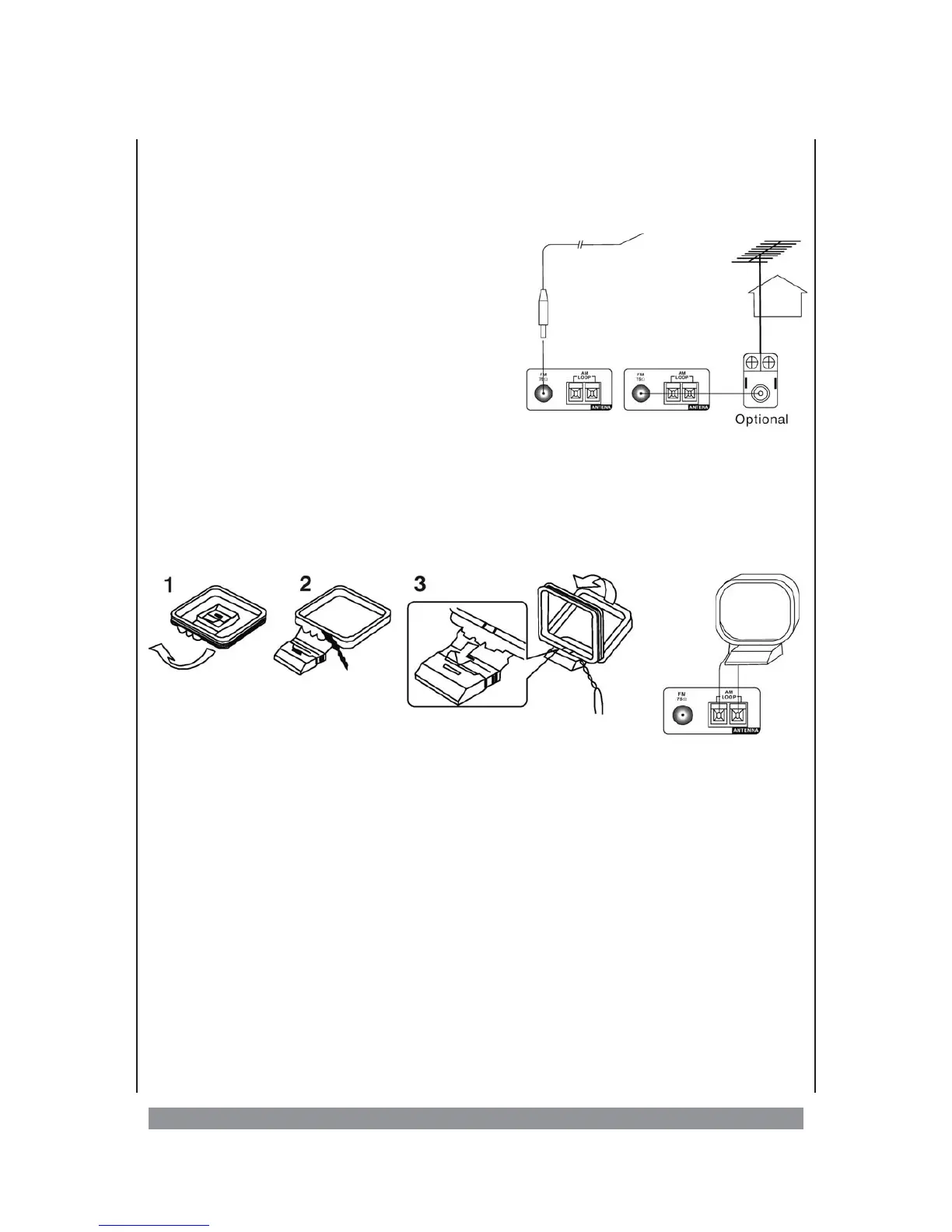
For being able to receive radio programmes, connect the enclosed FM-projection
antenna for FM-reception and the AM-loop antenna for medium wave reception.
FM-antenna
For the FM-reception, please wind off the enclosed
projection antenna completely. Please push the
plug of the antenna on the central pin of the FM 75
? terminal. If your device is later working in
FM-operation, pass the antenna in such a way that
you achieve an optimal, noise-free reception.
If you connect an outside antenna, this an
-
tenna must be grounded against lightning
strikes. It is essential that you discuss this
matter with an antenna expert. Never try to install an outside antenna on
the roof of a house on your own. This is very dangerous and may only
be done by qualified service experts.
AM-antenna
In order to install the enclosed medium wave antenna on a flat plane, assem-
ble it onto the stand as described in the following picture:
Connect the two connection wires of the medium wave antenna with the “AM
LOOP” terminals on the rear side of the receiver. Determine the optimal recepti
-
on position of the antenna.
Tips:
Ø
In order to avoid disturbing noises during medium wave reception, please keep the loop
antenna away from speakers and other technical equipment.
Ø
You can also connect the cable network of the Telekom to the FM 75 ? terminal. In most
cases, it transmits radio programmes as well.
10


 To Next Page