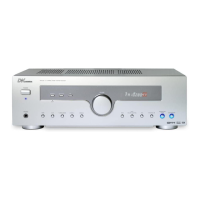
1. POWER - in standby, switches the device on and off
2. MUTE - mutes the speaker and switches it on again
3. TEST TONE - for the fine adjustment of the volumes in Dolby
digital or Dolby Pro Logic operation
4. INPUT MODE - switches the available operation modes
5. DISPLAY - shows information on the operation mode in the
display
6. Input selection keys - for selecting the desired input
7. MEMORY - stores the radio stations into the memory
8. PTY SEARCH - Starts the RDS-Programme Type search
9. STATION +/— - calls the radio station memories
10. Radio operation:
TUNING +/— - Station tuning
BAND - switches the frequency band during radio reception
AUTO/MANUAL - for switching from automatic to manual channel
search
11. CH SELECT - for selecting single speakers for the following fine
adjustment
12. DIRECT IN - activats the discrete analogue 6.1 input
13. LFE TRIM - press this key in ProLogic 5.1 channel or DTS 5.1
operation in order to reduce the volume of the low
frequencies by a maximum of 10dB
14. VOLUME +/— - zur Regelung der Lautstärke
15. BASS - ruft die Einstellung der Tiefen auf, deren Lautstärke
Sie dann mit den +/— Tasten regeln können
16. +/- - for changing the settings for bass, treble, delay
time and LFE adjustment
17. TREBLE - calls the setting for the treble, the volume of which
you can then control using the +/- keys
18. DELAY TIME - for setting the delay time in Dolby digital or Dolby
Pro Logic operation
19. SPK SETUP - activates the input of the speaker’s size
20. DYNAMIC - press this key repeatedly in order to set the
desired dynamic compression
21. DTS/DOLBY DIGITAL - for changing the operation mode to “DTS/Dolby
Digital”
22. SURROUND BACK - to switch the rear surround speakers on / off
23. SURROUND MODE - for selecting various surround operation modes
for stereo signals
24. DOLBY PL II - enables the PRO LOGIC II mode
25. STEREO - for changing the operation mode to “Stereo”
26. SUB ON/OFF - for switching the subwoofer on or off
9


 To Next Page