(No.HD003<Rev.004>)1-37
1 1
2 2
[NEXT]
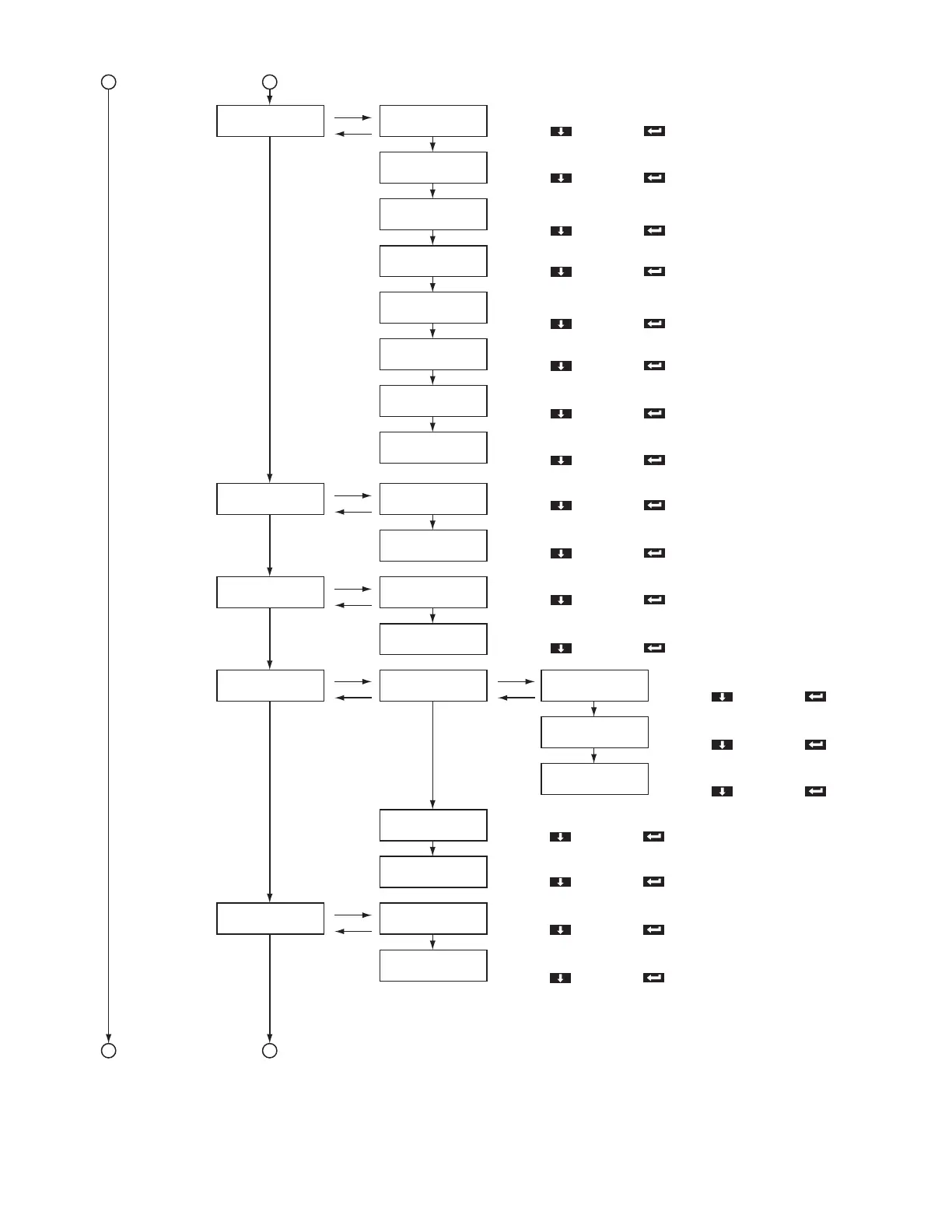
>>Retransfer >>>Temp Level
>>>Speed (Front)
>>>Speed (F-UV)
>>>Speed (Back)
[ENTER]
[EXIT]
[NEXT]
[NEXT]
[NEXT]
[NEXT]
>>>Speed (B-UV)
>>>MG Peel Mode
>>>Standby Mode
>>>Backside Cool
[NEXT]
[NEXT]
[NEXT]
[NEXT]
>>Bend Remedy
[NEXT]
>>Heat Roller
[NEXT]
>>Setting
[NEXT]
>>MG
>>>Temp Level
>>>Speed
>>>Power Saving
>>>HR Control
[ENTER]
[EXIT]
[ENTER]
[EXIT]
[ENTER]
[EXIT]
[ENTER]
[EXIT]
[ENTER]
[EXIT]
[NEXT]
[NEXT]
>>>Display
>>>Buzzer
>>>Unit No.
>>>ISO Type
[NEXT]
[NEXT]
>>>Retry Count
[NEXT]
>>>>Mode
>>>>Counter
>>>>Contrast
[NEXT]
[NEXT]
Setting of the retransfer heating roller temperature
[-2, -1, 0, +1, +2]
Select with [ ] and save with [ ].
Setting of the front side retransfer speed
[-3 ~ -1, 0, +1, +2]
Select with [ ] and save with [ ].
Setting of the retransfer speed of the second panel on the front side
during UV ink printing of retransfer films in two panels
[-3 ~ -1, 0, +1, +2]
Select with [ ] and save with [ ].
Setting of the back side retransfer speed
[-3 ~ -1, 0, +1, +2]
Select with [ ] and save with [ ].
Setting of the retransfer speed of the second panel on the back side
during UV ink printing of retransfer films in two panels
[-3 ~ -1, 0, +1, +2]
Select with [ ] and save with [ ].
Select method for peeling the retransfer film
[Standard, MG Stripe]
Select with [ ] and save with [ ].
Select whether to standby using the front or back side
[Front wait, Back wait]
Select with [ ] and save with [ ].
Select time interval for cooling the card
[On, Off]
Select with [ ] and save with [ ].
Setting of the bend remedy heating roller temperature
[-5 ~ -1, 0, Off]
Select with [ ] and save with [ ].
Setting of the bend remedy speed
[-2, -1, 0, +1, +2]
Select with [ ] and save with [ ].
Setting of the time for the Power Saving mode
[5, 10, 15, 20, 25, 30, 45, 60, Off]
Select with [ ] and save with [ ].
Select display mode
[Counter, Laminator State]
Select with [ ] and save with [ ].
Select counter
[Total Cnt, Head Cnt, Free Cnt, Cleaning Cnt, Error Cnt]
Select with [ ] and save with [ ].
Setting of the contrast
[-3 ~ -1, 0, +1 ~ +3]
Select with [ ] and save with [ ].
Select whether to standby the printer
[Off, On]
Select with [ ] and save with [ ].
Select buzzer
[On, Off]
Select with [ ] and save with [ ].
Setting of the unit number
[No.1 ~ No.10]
Select with [ ] and save with [ ].
Select antimagnetic force when writing data
[Loco, Hico]
Select with [ ] and save with [ ].
Setting of the maximum number of retries
[0 ~ 3]
Select with [ ] and save with [ ].



 To Next Page