Now we will install the printer driver for Windows 7.
※
If you will install the printer driver for Windows XP, Windows Vista and Windows 8, please refer to “Printer Driver
User’s Manual” of each OS on the included CD. The detail of installing the printer driver for Windows 7 is
documented in “Printer Driver User’s Manual”.
First, install the Driver Package.
Turn off the printer.
Check the printer’s LED is all off.
※ Continue to install the printer driver.
Turn on PC, start Windows 7.
Do not connect USB cable till ” ⑧ The printer
connect to the PC with USB cable, turn on”.
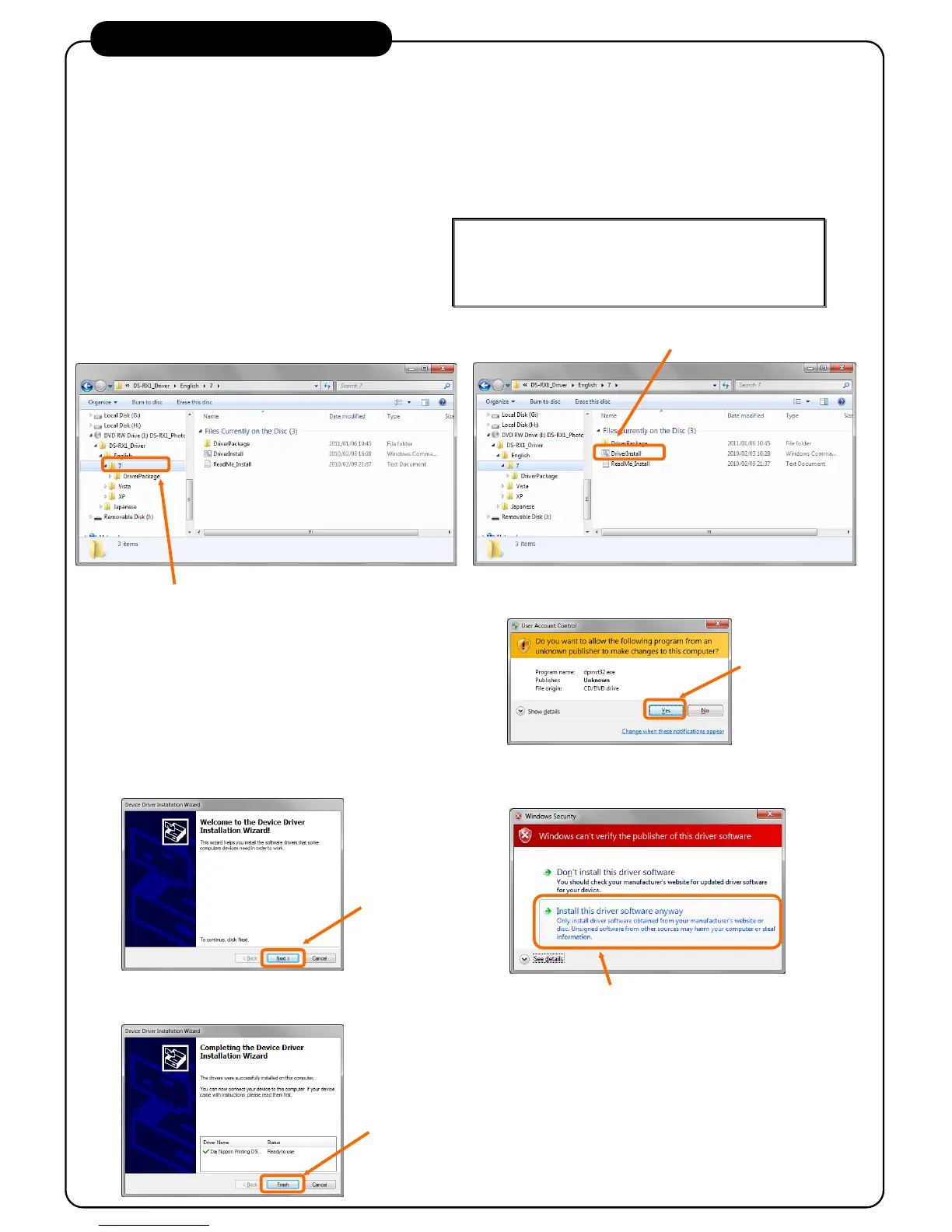
When the following screen is displayed, click “Next”.
Start installing the Driver Package.
When the following screen is displayed, click
“Install this driver software anyway”.
Click “Install this driver software anyway”.
3. Install the Printer Driver
Insert the CD into CD-ROM drive. Move to
folder of printer driver installer.
Double click the installer.
When the following screen (User account control) is displayed,
click “Yes”.
When you connect the printer with turn on to the PC before the
printer driver installation, refer to "1.4 Install Unspecified Device
Driver" of "Printer Driver User’s Manual".
Start Explorer, move to the following folder.
CD :\DS-RX1_Driver\English\7
Double click DriverInstall
The Driver Package installation is complete.



 To Next Page