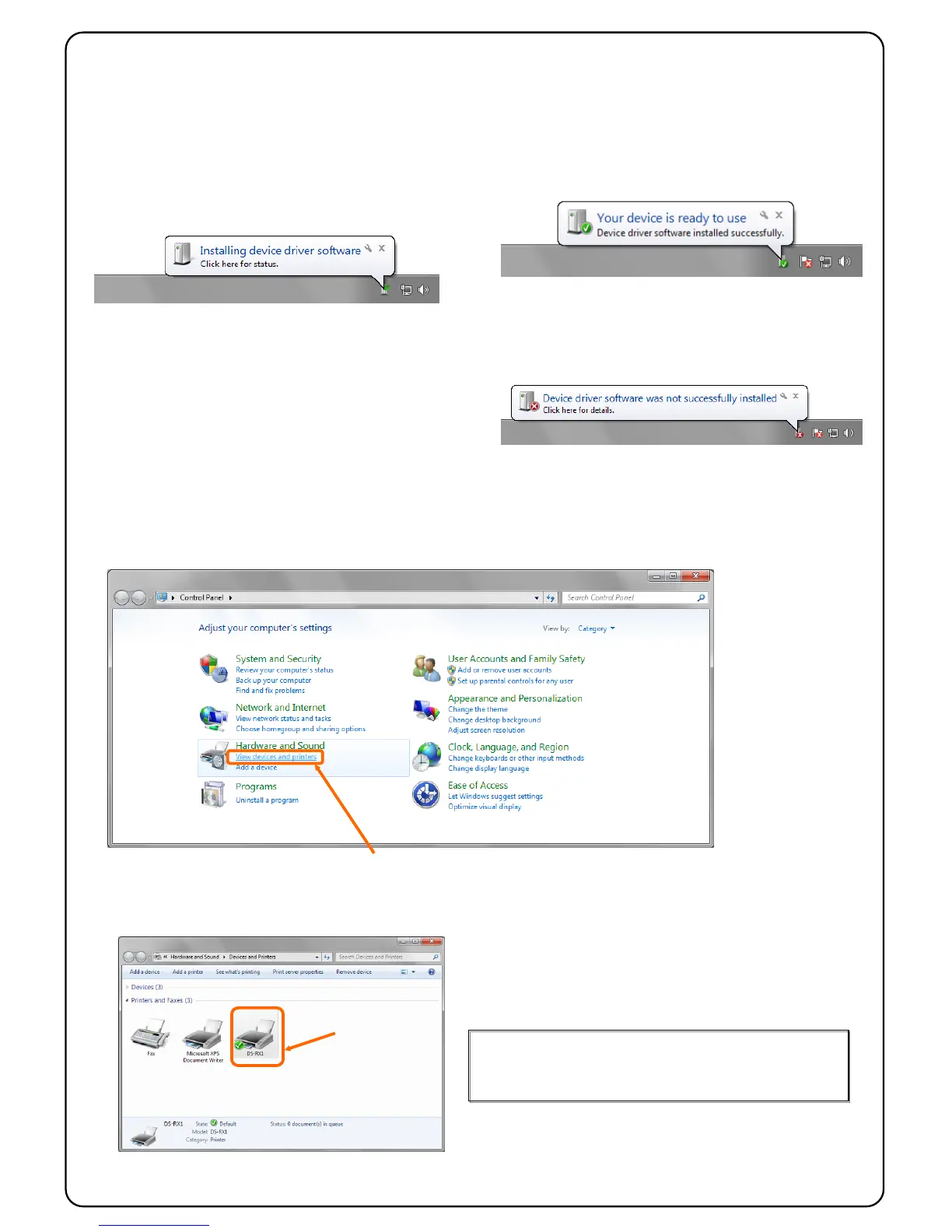
After installing the Driver Package, install the printer driver.
Connect the printer to the PC with USB cable,
When the computer recognizes the printer, it will
display the following screen on the taskbar, and then,
it starts the printer driver installation.
After a while, the following screen is displayed on the
taskbar. The printer driver installation is complete.
If the following screen (The device driver software
was not installed correctly.) is displayed on taskbar,
refer to "1.4 Install Unspecified Device Driver" of
"Printer Driver User’s Manual".
If there is the Printer icon (DS-RX1) on “devices and printers”, the printer is installed correctly.
The printer driver installation is now complete.
When the printer (DS-RX1) is not found on "devices and printers",
refer to "1.4 Install Unspecified Device Driver" of "Printer Driver
Click “View devices and printers”.
On the Start menu, click “Control Panel”. => “View devices and printers”.
The Printer Driver installation is complete.



 To Next Page