Windows is a registered trademark of Microsoft Corp. in the U.S. and other countries.
Adobe and Photoshop are a registered trademark of Adobe Systems Incorporated in the U.S. and other countries.
All other trademarks are property of their respective owners.
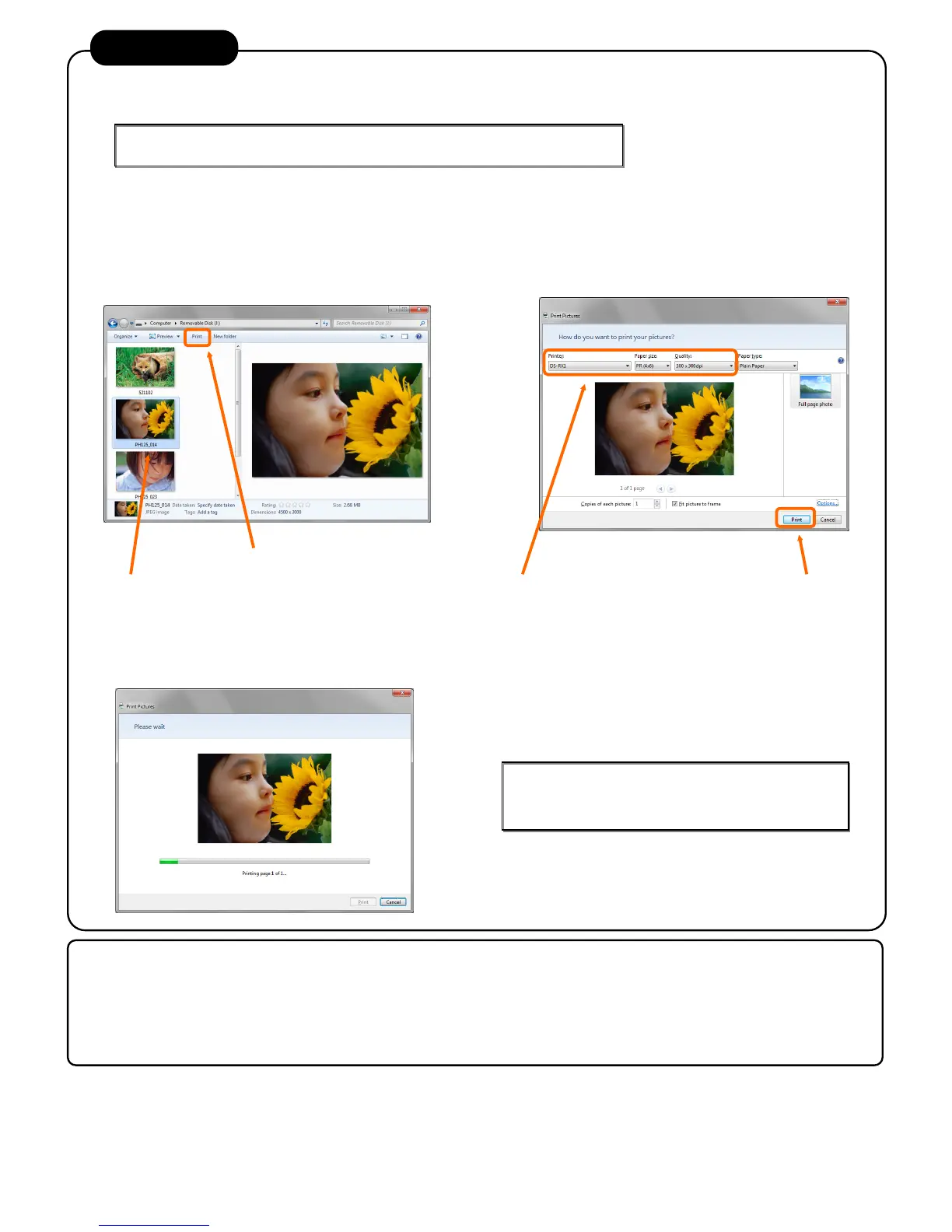
If the computer operating system is Windows 7, you can print from “print” menu of Explorer.
[Note]
If you does not use “print” of Explorer, print with standard applications like [Adobe Photoshop].
Display the data you want to print with “Computer” or
“Explorer”.
Select the data you want to print.
Click the “print” on menu bar.
“Print pictures” screen is displayed.
Select [DS-RX1] on “Printer” .
Select “Paper size” and “Quality” which you
Computer will send image data to printer, in order to start printing.
(After sending image data, “Print Pictures” screen is closed automatically.)
Detail settings about print are documented in "2.2 Explanation
of Print Setting Functions" in “Printer Driver User’s Manual”.
Select the data you want to print.
After you select the data,click ”Print” on menu bar.
Paper Size: Select the print size you can use.
Quality: Select your preferred print resolution.
For more detail instructions on use and troubleshooting, please refer to “User’s Manual” on the
luded CD. Also, regarding the printer driver, refer to “Printer Driver User’s Manual” on the



 To Next Page