DNP Imagingcomm America Corporation 17
Using the WCM2
(iOS Printing)
Printing from your iPhone or iPad Using IPP
(AirPrint)
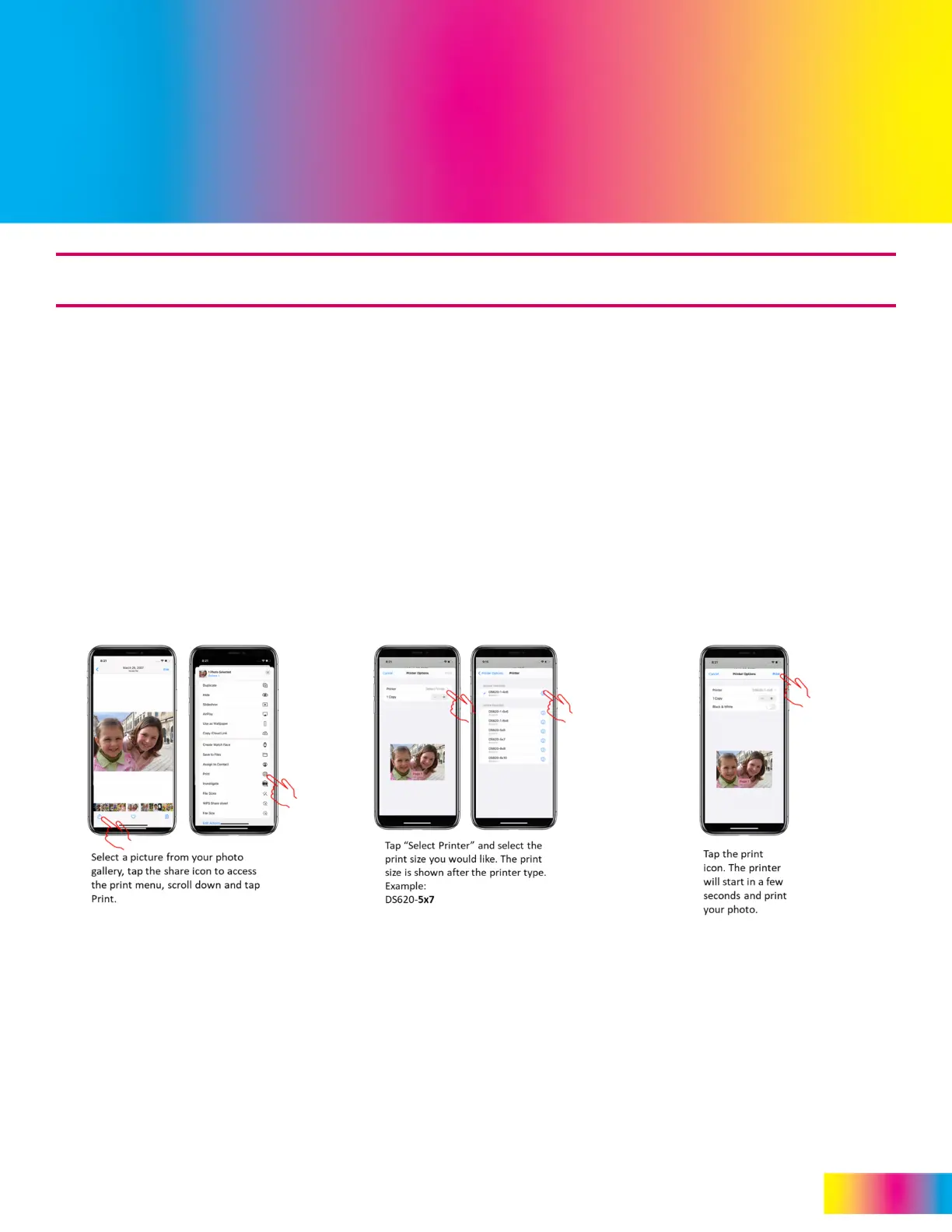
The WCM2 works with Apple AirPrint®. When you connect your iPhone® or iPad® to the WCM2 network, each printer
name (or printer instance) is shown in the standard iOS print menu. Printer names are displayed as printer-print
size (example: QW410-4x6) and are available with any photo app that supports the Print command.
Print functions are available if the iOS device has been connected to the WCM2 Hotspot, if the WCM2 has been connected
to the same local Wi-Fi network the iOS device is connected to, or if the WCM2 is connected by Ethernet to the same
network as the Wi-Fi network the iOS device is connected to. See “Network Settings” on page 9.
Note:
Print times may vary due to the size of the picture file, Wi-Fi interference, and various other
factors.
ATTENTION:
Some photo apps use their own custom sharing menu that does not include a print button. Tapping the More
button often gives the standard menu shown above (center).
Select your Image Choose your Printer Print your Image



 To Next Page