9
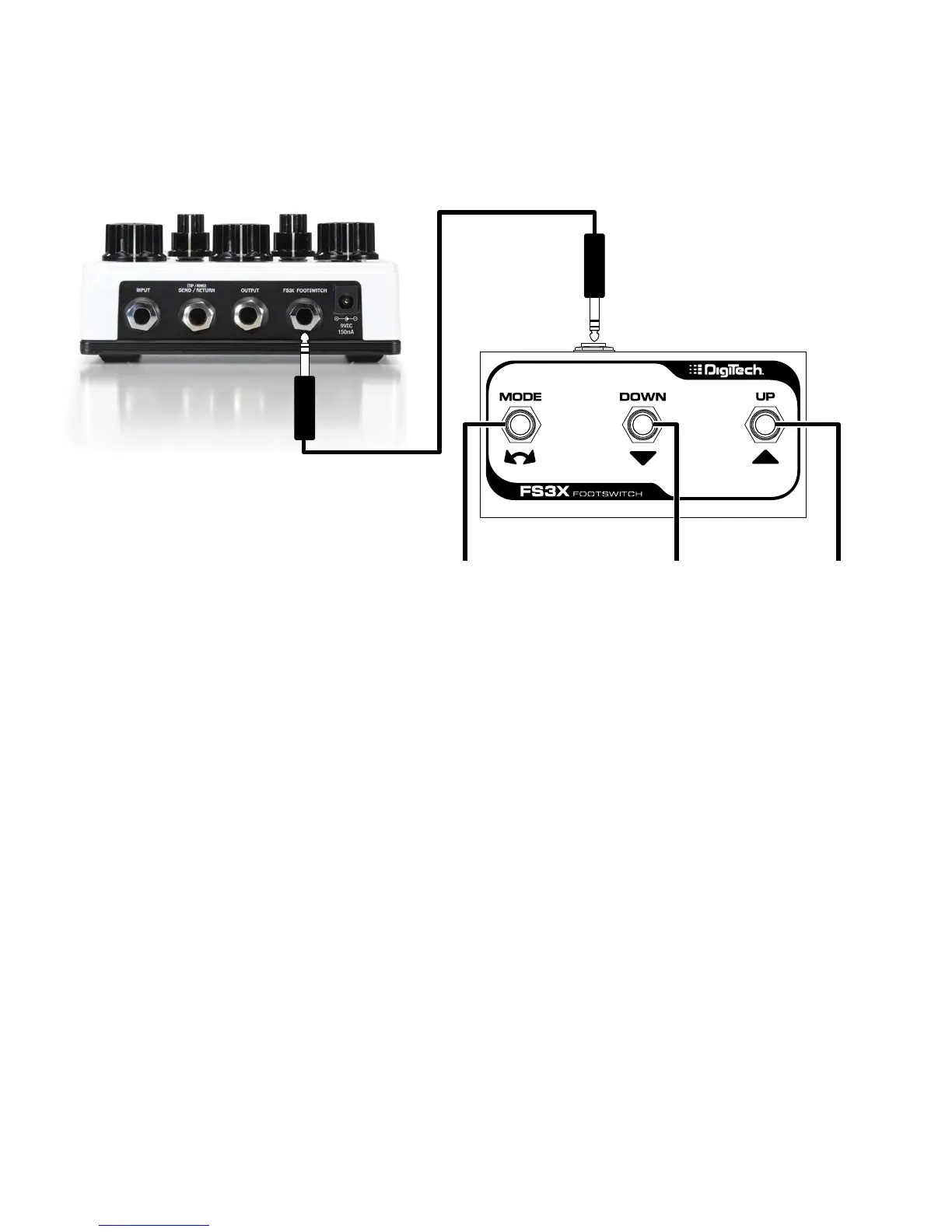
USING AN EXTERNAL FOOTSWITCH
The FOOTSWITCH input jack accommodates an optional DigiTech FS3X Footswitch for remotely controlling
Rubbernecking, Modulation on/off, and Tap Tempo/Regen functions. Other third party momentary
footswitches may be used as well, but may not provide full functionality.
Rubbernecking Modulation On/O Tap Tempo/Regen
TRS Cable
DigiTech FS3X
Footswitch
NOTE: For full functionality, connect the DigiTech FS3X Footswitch using a TRS cable. A TS cable can
be used to control Tap Tempo and Regen when using a third party momentary footswitch (latching
footswitches will not work). When using a third party momentary footswitch with a TS cable, it must first
be connected to the Rubberneck before applying power to allow the Rubberneck to detect it and function
correctly.


 To Next Page