6
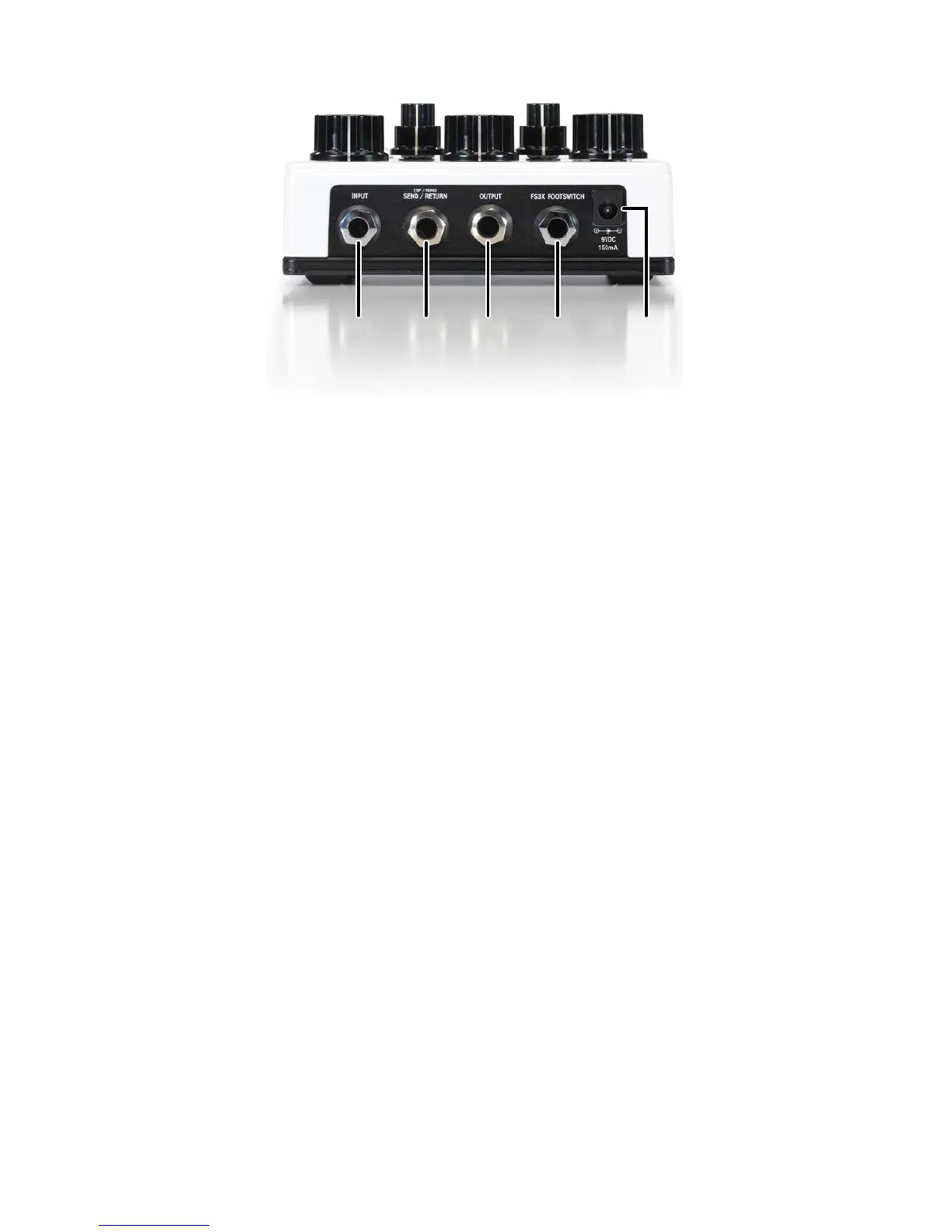
USER INTERFACE – REAR PANEL
1 2 3 4 5
1. Input Jack
Connect your guitar or the output of another pedal to this jack.
2. Send / Return Jack
This TRS jack provides a loop send/return path for inserting effects into the feedback path of the delay
circuit. Tip is send and Ring is return. The Loop Send/Return jack operates at instrument level, so it is
designed for use with most effect pedals.
3. Output Jack
Connect this output to the input of your guitar amplifier or the next effect in line.
4. Footswitch Jack
Connect an optional DigiTech FS3X Footswitch to this jack to remotely control functions such as
Rubbernecking, Modulation on/off, and Tap Tempo/Regen. See ‘Using an External Footswitch’ on
page 9 for more information.
5. Power Jack
Connect a Harman PS0913DC 9VDC or equivalent power adapter here. Rubberneck does not run on a
battery and requires a power adapter for operation.


 To Next Page