Under the automatic control, the system selects the
appropriate mode (airflow outlets) and fan speed.
Operation of the system is quite simple.
1. Begin by pressing the AUTO button and the word
“AUTO” will illuminate in the front ATC display, along
with three temperatures for Driver’s, Passenger, and Rear
seats. The system will then automatically regulate the
amount of air flow.
2. Next, adjust the temperature you would like the
system to maintain by adjusting the driver’s, passenger,
and rear seat rotary temperature knobs. Once the desired
temperature is displayed, the system will achieve and
maintain that comfort level automatically.
3. When the system is set up for your comfort level, it is
not necessary to change the settings. You will experience
the greatest efficiency by simply allowing the system to
function automatically.
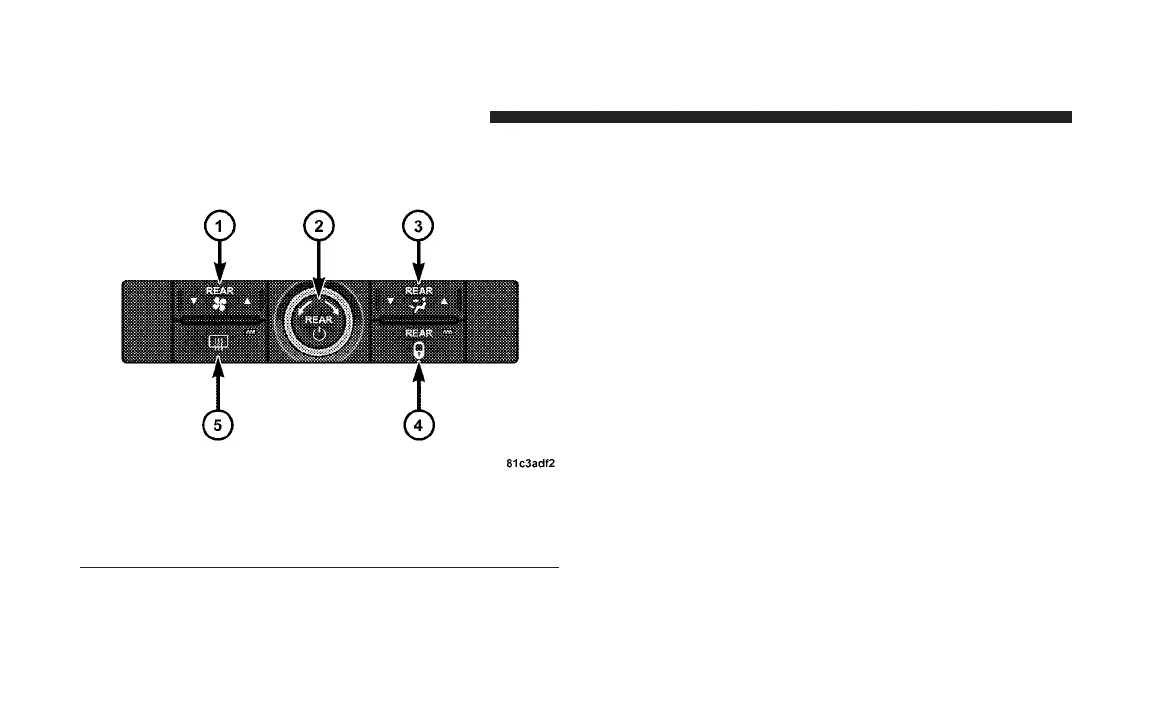
Front Lower ATC Panel
1 - Blower Speed Select 4 - Rear HVAC Lock
2 - Rear Temp/Rear On/Off 5 - Rear Window Defrost
3 - Rear Mode Select
294 UNDERSTANDING YOUR INSTRUMENT PANEL














 To Next Page