DOLMAR GmbH
7
4
5
7
6
8
10
11
1
2
1
3
9
10
8
12
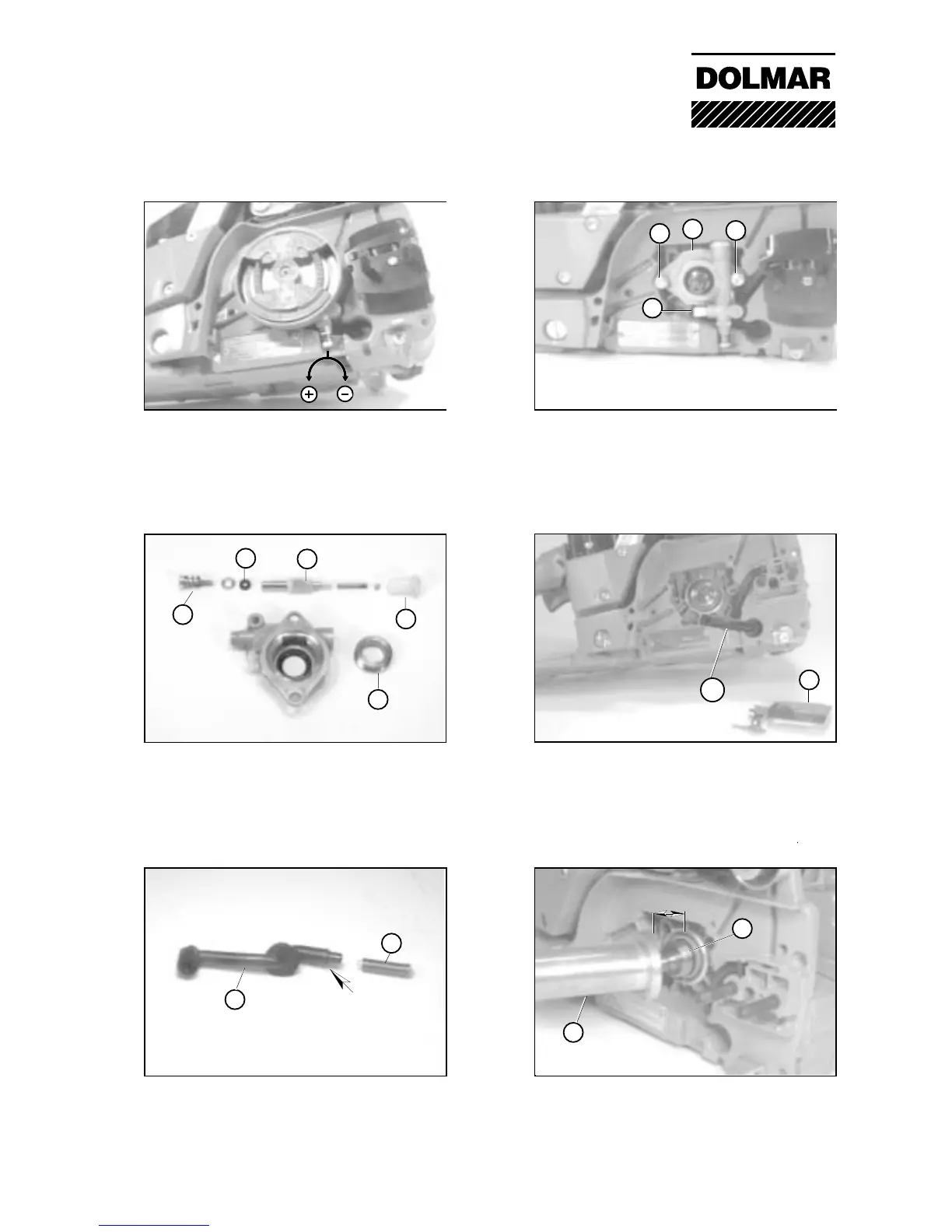
03-02 Adjusting the oil pump delivery
Turn the screw:
clockwise for less chain oil
anti-clockwise for more chain oil.
03-02 Removing the oil pump
Unscrew screw (1) and remove the pump
housing (2) from the crankcase. Separate the
intake pipe from the angular nipple (3).
03-03 Checking the oil pump for wear
Unscrew the set screw (4) and check the
condition (5). Unscrew the guide bush (6) and
check the pump plunger (7) for damage.
Replace defective parts and clean the housing
prior to assembling.
03-04 Removing the intake pipe
Unscrew the chain guide plate (9) and
withdraw the intake pipe (10) from the oil
reservoir.
03-03 Cleaning the intake pipe
Withdraw the oil filter (11) prior to cleaning the
intake pipe (10).
When installing the oil filter, pass the spring
over the intake pipe against the stop (arrow).
03-05 Withdrawing the worm
To remove the worm (8), screw the tool (12)
onto the worm against the stop. Withdraw the
worm from the crankshaft by tightening the
screw.
Caution: Use the protective cap!
03 Oil pump


 To Next Page