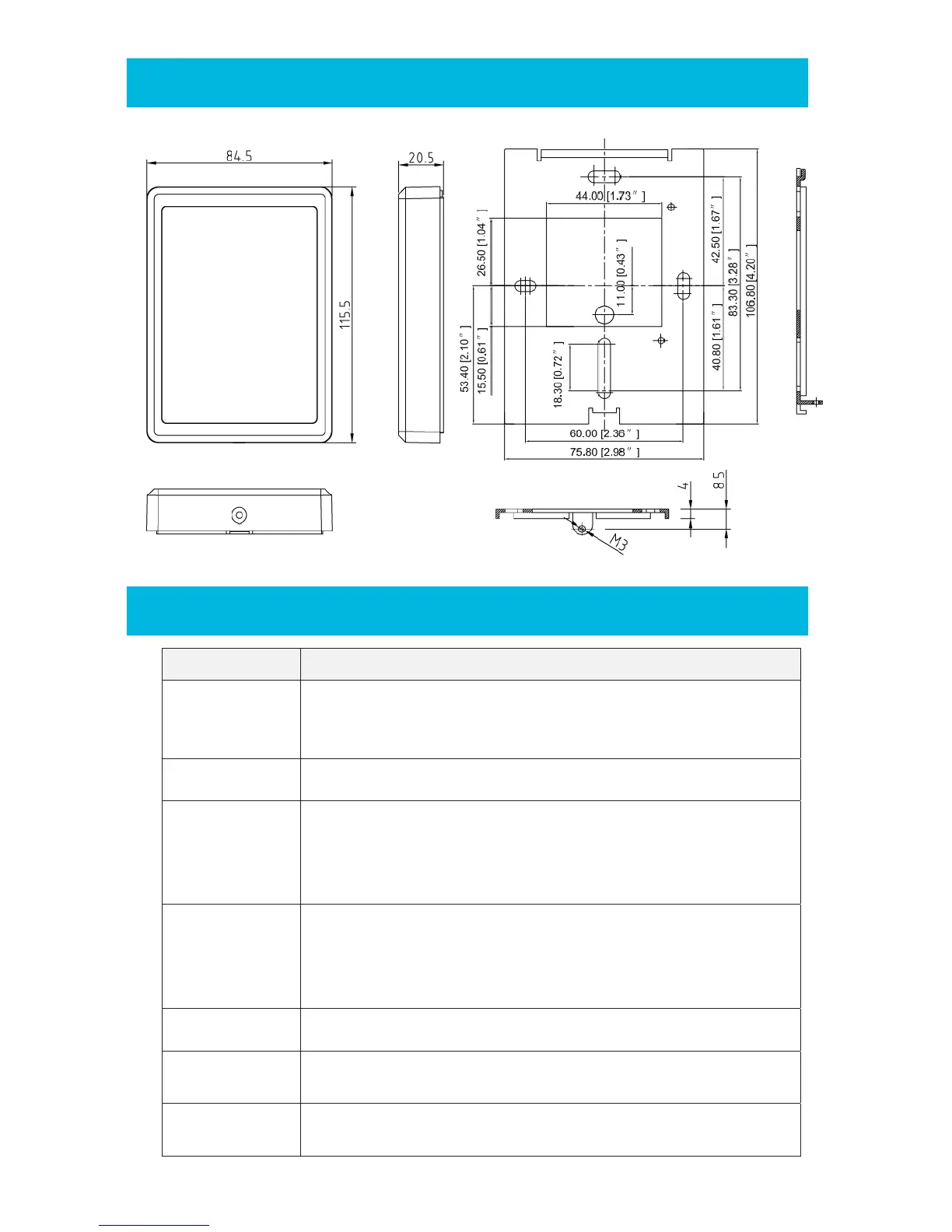
PHYSICAL DIMENSIONS
TROUBLESHOOTING
Trouble List Solution
No Response
when Power Up
Disconnect the power and confirm that the power supply cable is
correctly connected (See “Wiring” above).
Check the input voltage is sufficient (See “Specifications” above).
Auto Restart
Check that the input voltage is sufficient (See “Specifications” above).
Cannot read card
number correctly
Check the format setting on the controller if it is the same as the card
format. Use approved card (known format and Facility Code) to test.
Check if the shield cable is correctly connected to Ground at
ONE point only.
Reader beeps but
No card data info
Check if data 0 & data 1 cables are correctly connected (See “Wiring”
above).
Check the input voltage at the card reader is correct (See
“Specifications” above).
Buzzer error Check if the buzzer cable is correctly connected (See “Wiring” above).
Back Lit Error
Check that the LED cable is correctly connected (See “Wiring” above).
Use Default Configuration Card to set it back to normal.
Keypad
No Response
Power off reader for 5 seconds and power on again


 To Next Page