8
6.3.2 Changing flush modes
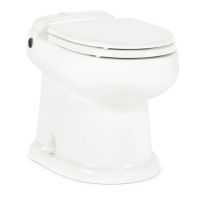
Dometic 8700 series MasterFlush toilets offer two ush settings to help manage water consumption:
Normal flush – Uses 0.85 gal. (3.2 liters) per ush. Adds water to bowl after every ush.
Dry Bowl flush – Uses 0.45 gal. (1.7 liters) per ush. Does not add water to bowl after ush.
To change from Normal to Dry Bowl ush setting, press ush handle for about ve seconds.
When “Power On” light (g.
5
1) begins ashing, release ush handle.
Flush mode has been changed to Dry Bowl setting. Change mode to
Normal ush by following the same procedure.
Maintenance, Winterizing Dometic 8700 Series MasterFlush Toilet
FLUSH
ADD WATER TO BOWL
6.3.1 Normal toilet operation -
Dometic flush handle and status panel
ADDING WATER TO TOILET BOWL
Lift ush handle until desired water level is achieved. (Water ow will shut off
automatically if switch is pressed too long to avoid overow.) More water is
usually added only when ushing solids.
FLUSHING TOILET
Press ush handle down, then release it. This activates a powerful macera-
tor pump that siphons water and waste from the bowl, macerates, and
propels the efuent through the discharge line to the holding tank.
Caution – Do Not Flush Foreign Objects!
Flush only water, bodily wastes and rapid-dissolving toilet
tissue. Do not ush wet wipes, sanitary napkins, condoms,
diapers, paper cups, cotton swabs, food, hair or liquids such
as oils or solvents as clogging or damage to the toilet or toilet
system may occur.
Note
Make sure all guests understand toilet operation before use.
6.3.3 Indicator lights
“POWER ON” INDICATOR
On the Dometic DSS status panel, a steady green “Power On” light
(g.
5
1) indicates when electrical power to the toilet is activated.
A momentary ashing green light indicates when ush mode is changing.
TANK LEVEL INDICATOR
The Dometic DSS status panel includes a bi-color “3/4 Full” (amber) and “Full” (red) Tank Level light
(g.
5
2) to indicate when the holding tank is 75% or 100% full (if connected to a two-level tank
monitoring system) and should be pumped out. When the red light is illuminated, electrical power to
the toilet automatically shuts off to prevent overll of the holding tank.
5
1
2
DSS STATUS PANEL


 To Next Page
 Loading...