11
MAINTENANCE
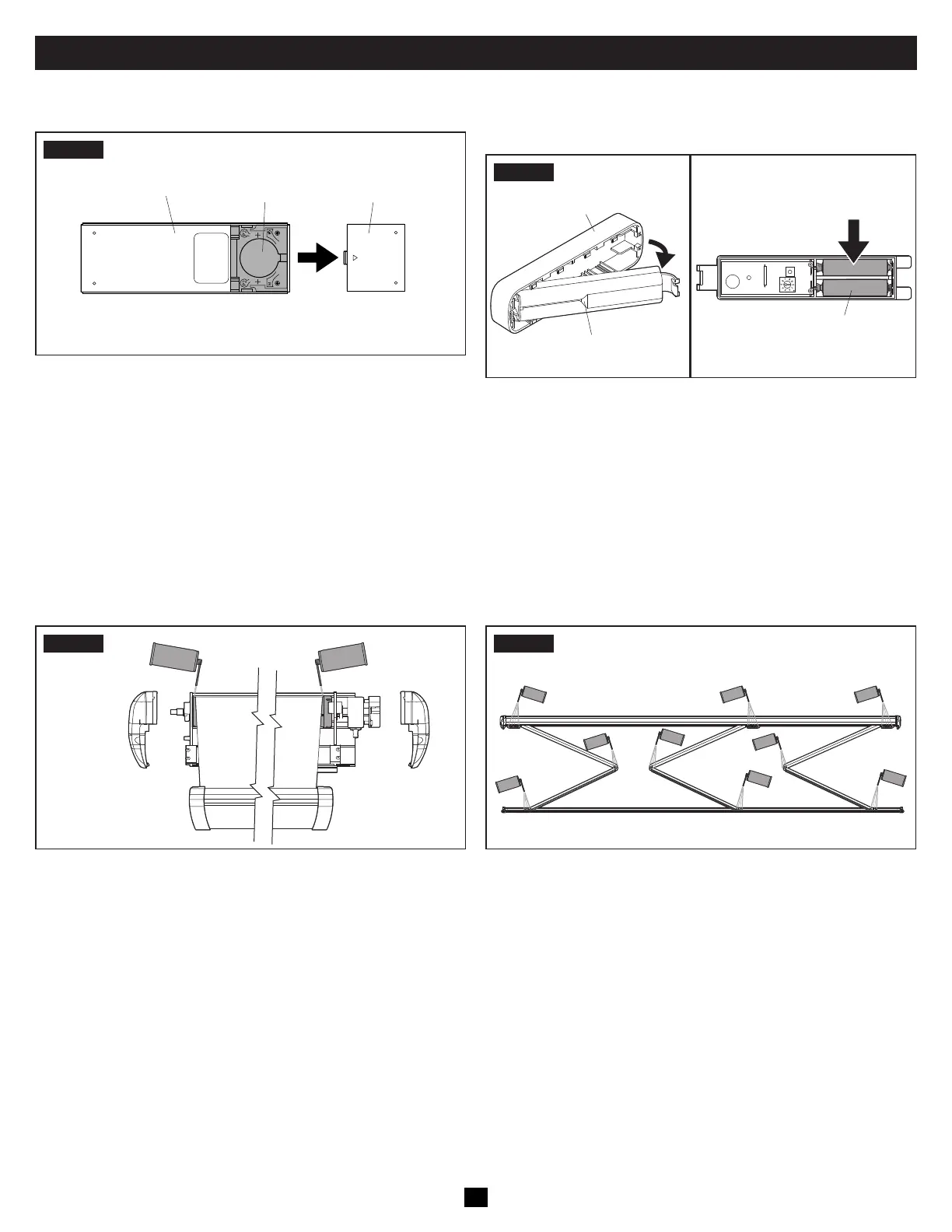
A. Changing The Batteries In The Remote
STEP1
Battery CoverBattery
Remote
(Back Of Remote)
• Insert one CR2430 Li-MnO2 battery. Replace battery cover.
B. Changing The Batteries In The Vibration
Sensor
STEP1
Sensor Cover
Vibration Sensor
Batteries
• Remove the vibration sensor from the sensor base on the lead
rail and pull slide off the sensor cover.
• Insert two AAA disposable batteries. A short beep will emit
from the sensor when the batteries are in place.
• Replace the sensor cover and reattach the vibration sensor.
C. Maintaining The Hardware
Failure to obey the following notices could damage product or property:
• Do NOT use strong chemicals or abrasives to clean parts, as their protective surfaces will be damaged.
• Do NOT use silicone sprays near labels. Otherwise, the adhesive bond to product surfaces could weaken.
FIG.1
• Spray silicone lubricant on the moving parts of the awning.
FIG.2
• Spray silicone lubricant at the joints of the arm assemblies.


 To Next Page