6
OPERATION
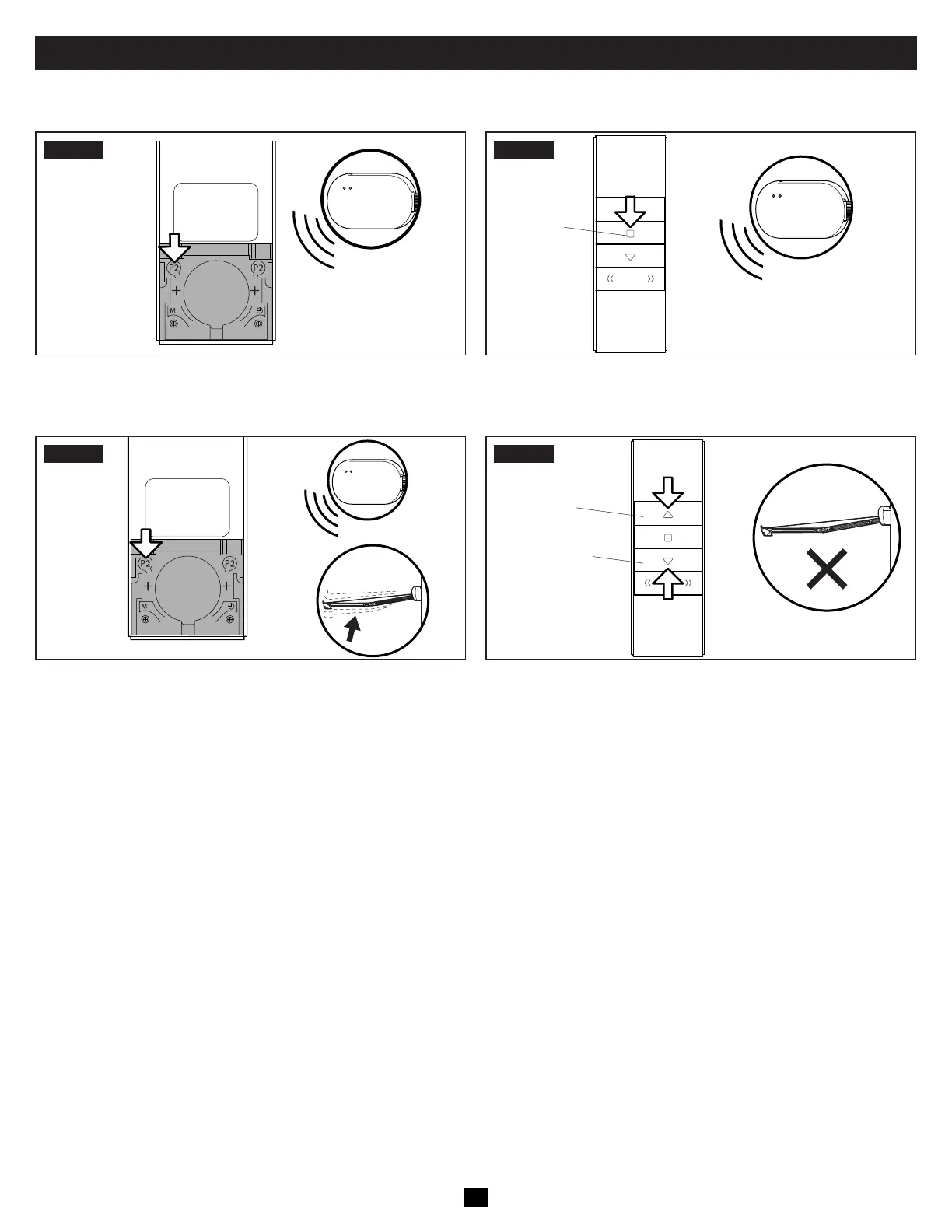
D. Resetting The Receiver
STEP1
x1
• Press the P2 button on the remote. The receiver
beeps once.
STEP2
x1
Stop Button
• Press the Stop Button on the remote. The receiver
beeps once.
STEP3
x3
• Press the P2 button on the remote. The receiver beeps three
times and the awning jogs.
STEP4
Awning Extend
(Down) Button
Awning Retract
(Up) Button
• On the remote, press the Up button, then the Down button.
• If the awning does not move, the receiver is reset.
• If the awning moves, repeat Steps 1 through 3 until the
awning does not move when the Up and Down buttons
are pressed.
• Refer to Section “B. Programming The Remote Control” on
page 4 to reprogram the remote to the receiver.
E. Testing The Awning Before Travel
Failure to obey the following warnings could result in death or serious injury:
• IMPACT OR CRUSH HAZARD. Do NOT transport RV if awning fabric is torn or damaged, even if awning closes successfully. Dam-
aged awning fabric could compromise awning’s stability and could allow awning to extend quickly and unexpectedly during
transit.
• IMPACT OR CRUSH HAZARD. Verify ignition interlock is working correctly before traveling with RV. If awning responds to remote
with ignition in ON position, accidental operation during transit could occur. The awning MUST be disabled, then serviced by a
qualified service technician.
• Inspect the awning for damage. If the fabric is torn, tie the lateral arm assemblies tightly before travel. Then contact a qualified service
technician for repairs.
• Test the ignition interlock system by turning the ignition to the ON position. Attempt to retract the awning. If the awning operates, refer to
“Troubleshooting” on page 14.


 To Next Page