5
OPERATION
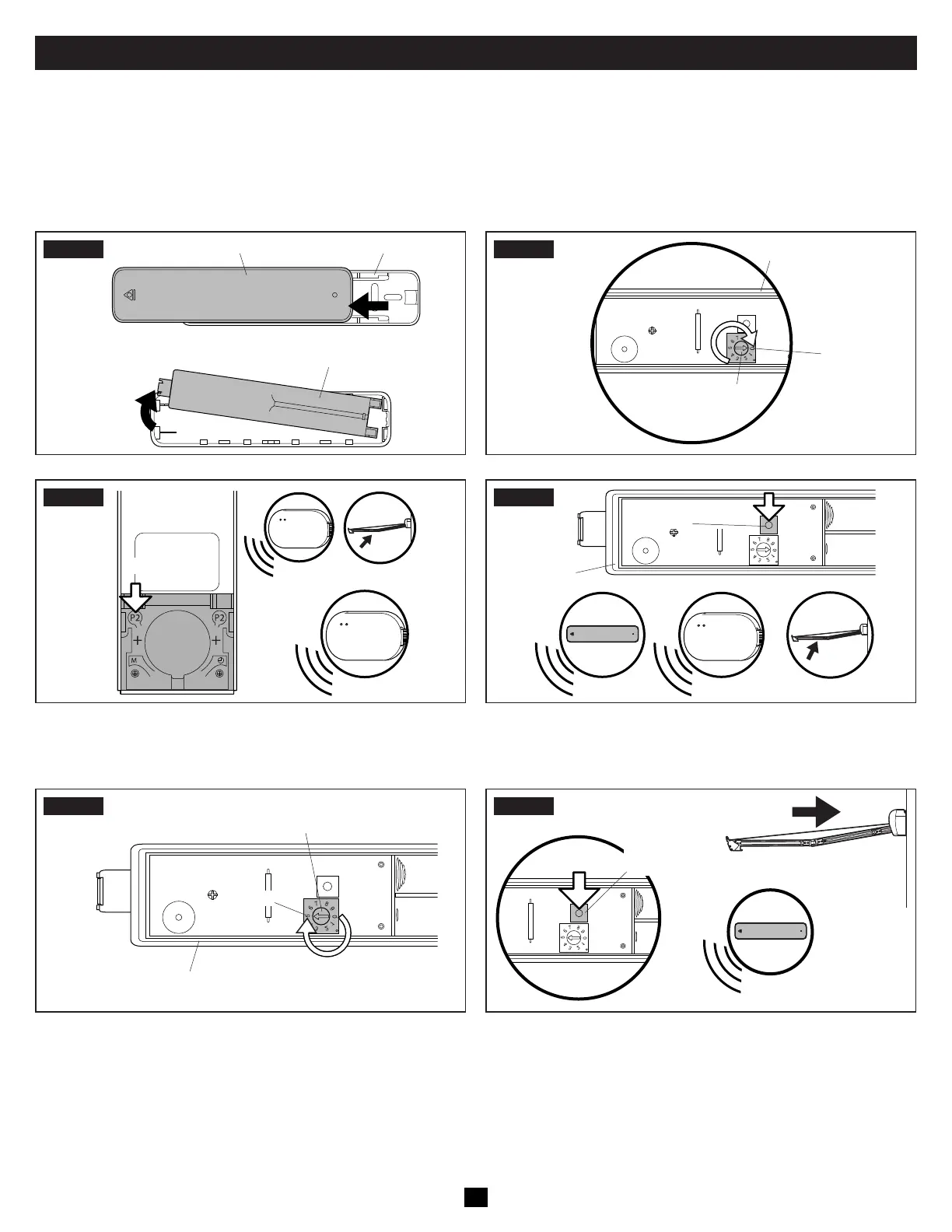
C. Programming The Vibration Sensor
Complete each programming step within four seconds of the previous step to keep the receiver in pairing mode. If the receiver resets,
restart the programming process.
• When installing a vibration sensor, complete the steps in Section “B. Programming The Remote Control” immediately before begin-
ning Step 1 of this procedure.
STEP1
Sensor Base
Battery Compartment
Vibration Sensor
Back Of
Sensor
STEP2
Set To 0
Sensor
Dial
Battery Compartment
STEP3
x2
a.
b.
x1
x1
x1
Back Of
Remote
Control
a. Press the P2 button once. The wireless receiver beeps once
and the awning jogs.
b. Press the P2 button a second time. The receiver beeps once.
STEP4
Programming
Button
x1
x1 x5 x1
Battery
Compartment
• Press the vibration sensor programming button. The sensor
beeps once, the wireless receiver beeps five times, and the
awning jogs.
STEP5
Set To 5
Sensor Dial
Battery Compartment
STEP6
Programming
Button
Awning Retracts
x1
• Set the vibration sensor dial to the desired level of detection
(see Section “A. Adjusting The Vibration Sensor” on page
9).
• Press the vibration sensor programming button once. The
sensor beeps once and the awning retracts.


 To Next Page