4
OPERATION
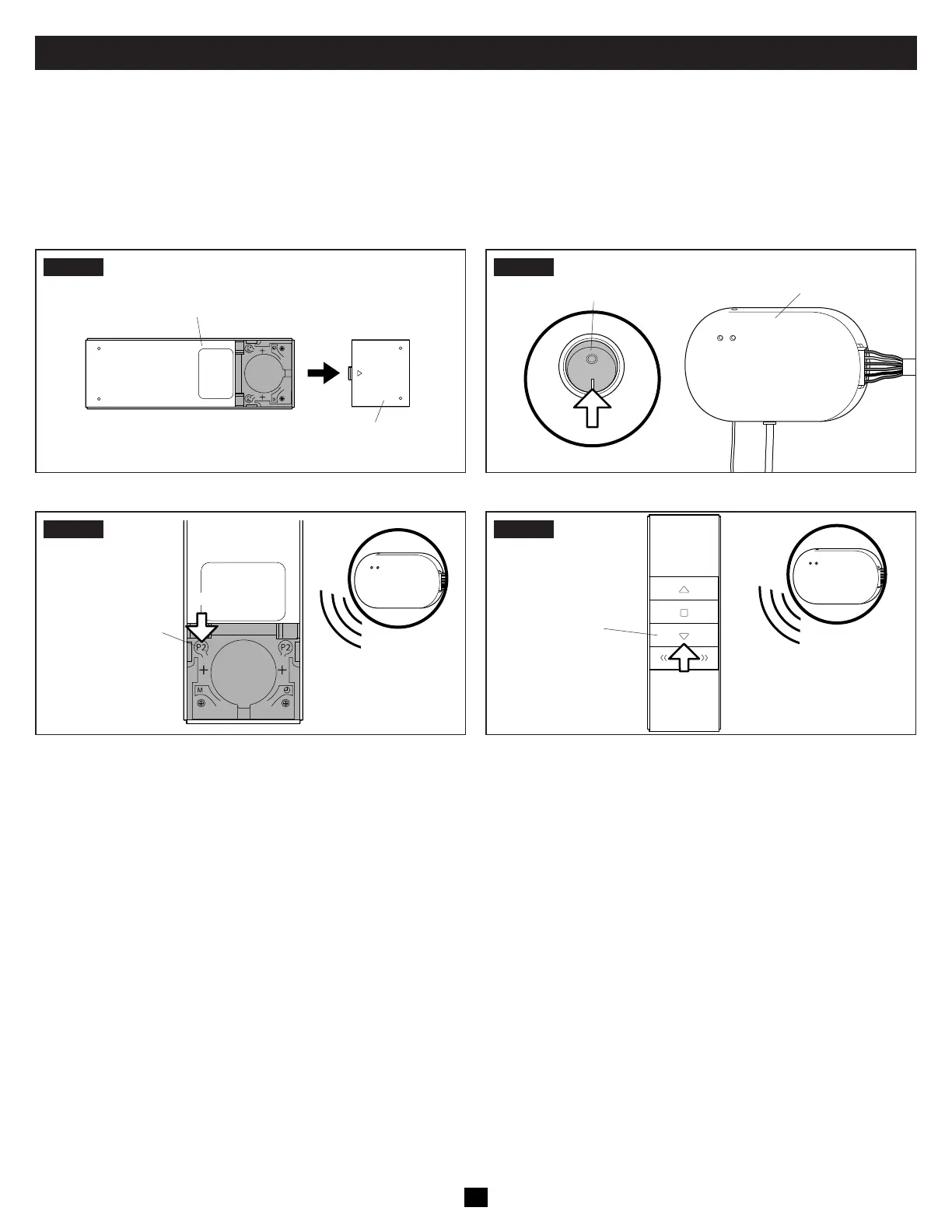
B. Programming The Remote Control
IMPACT OR CRUSH HAZARD. Make sure the awning retract button and the awning extend button operate the awning in
the intended direction. Failure to obey this warning could result in death or serious injury.
Complete each programming step within four seconds of the previous step to keep the receiver in pairing mode. If the receiver resets,
restart the programming process.
• Disconnect all power to the receiver and wait 10 seconds before reconnecting to begin the programming process.
STEP1
Battery Cover
Remote Control (Back)
STEP2
Wireless
Receiver
12 VDC Power
Supply To Receiver
ON
STEP3
Press the P2 button
two times.
The Receiver beeps
twice aer each
press of the button.
x2
x2
STEP4
Awning Extend
(Down) Button
x4
x1
• Refer to Section “A. Opening And Closing The Awning” on
page 3 to test the remote control.
When Step 4 is completed, proceed immediately to Section
“C. Programming The Vibration Sensor” on page 5.


 To Next Page