27
EN
CapTouch Cabin Control Operation
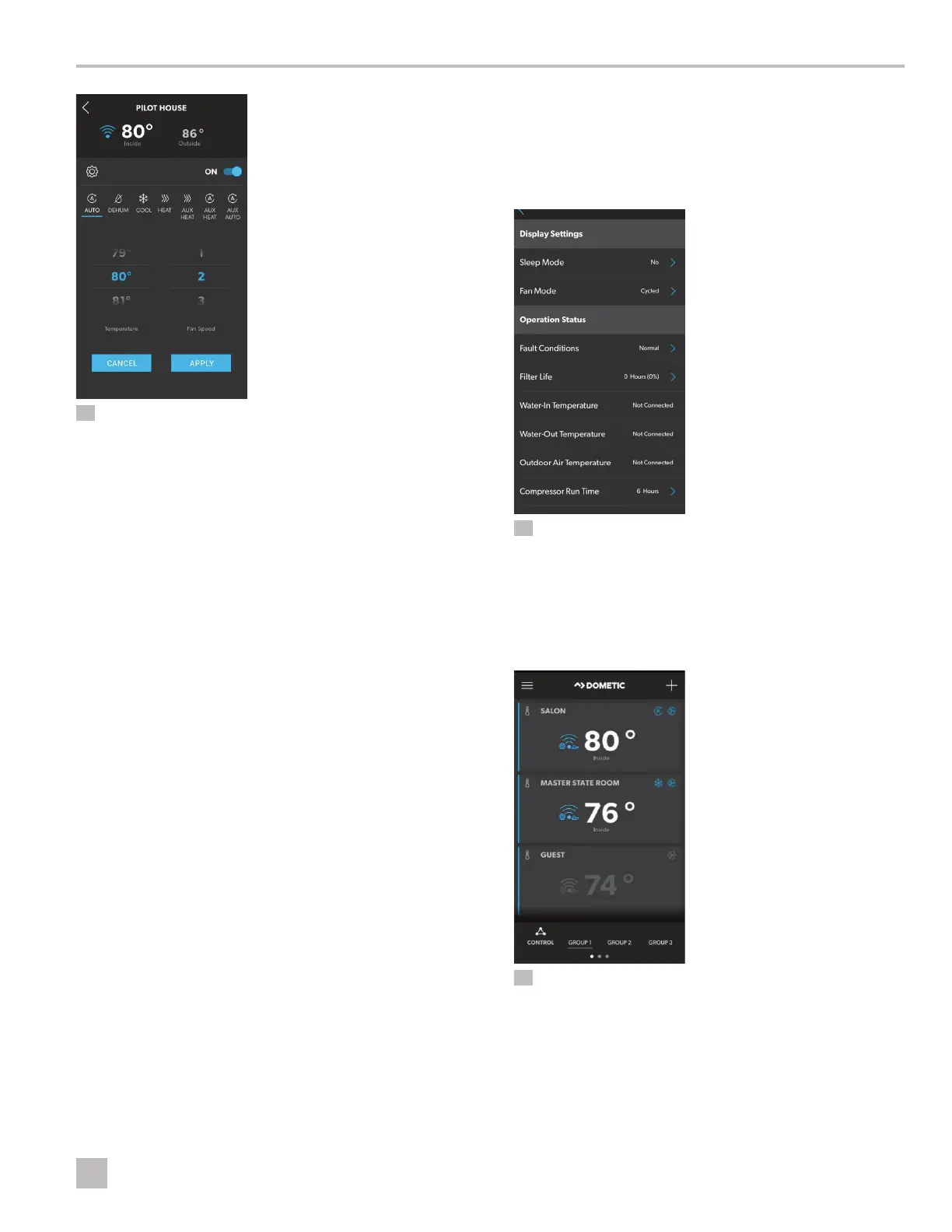
30 Viewing the Thermostat Status
5. Perform an action.
– Change a mode
– Change the temperature setting or fan speed
– Access the thermostat settings
Complete the following steps to change a mode:
1. Select a mode.
– AUTOMATIC
– DEHUMIDIFY
– COOL
– HEAT
– AUX HEAT
– AUX HEAT (AUTO)
– AUX AUTO
I
The DEHUMIDIFY mode requires the use of
a humidity sensor recognized by the system
and runs automatically without user selection.
DEHUMIDIFICATION mode (Refer to “Choosing
the Control Operation” on page 11) is based on
a temperature setting and is time-based for running
a cycle.
2. Tap Apply.
Complete the following steps to change the temperature
or fan speed:
1. Scroll up or down in the numbered column above
the setting to be changed to reach the desired value.
2. Tap Apply.
Complete the following steps to access the thermostat
settings:
1. Tap the gear icon at the top of the status screen.
31 Viewing the Thermostat Settings
2. Tap a setting to view or change the thermostat status
for that setting. Refer to “Selecting a Parameter” on
page 15 for details on the settings.
7.5.10 How to Change/Add a Group
32 Changing or Adding a Group
1. Tap Control to display the list of groups available or
to add/create another group.
2. Select a grouping from the main screen.
The Group screen appears.












 To Next Page