EasyManua.ls Logo

Dometic Qht - User Manual

Dometic Qht
28 pages
Print Icon
To Next Page IconTo Next Page
Loading...
COPYRIGHT © 2007-2017 Dometic Corporation. All Rights Reserved.
No part of this publication may be reproduced, translated, stored in a retrieval system, or transmitted in any form or by any means
electronic, mechanical, photocopying, recording or otherwise without prior written consent by Dometic Corporation. Every precaution
has been taken in the preparation of this manual to ensure its accuracy. However, Dometic Corporation assumes no responsibility for
errors and omission. Neither is any liability assumed for damages resulting from the use of this product and information contained
herein.
The Q3 and Qht Digital Controls
For Direct Expansion Systems
OPERATIONS MANUAL
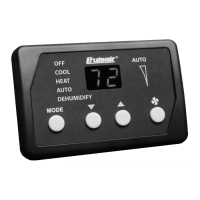
Q3 Control Qht Control (with bezel)
Dometic Marine
Rev. 20170710
Part Number 0880107
L-2516 English


Table of Contents

Questions and Answers

  • B
    Bryan MartinAug 20, 2025
    How to reset Dometic Qht when 'Ar / FL' is flashing?
    • A
      Alyssa BergerAug 20, 2025
      If 'Ar / FL' is flashing on your Dometic Control Unit (Filter Reminder), clean or replace the filter. Reset and stop the flashing by pressing the FAN, UP, and DOWN buttons simultaneously.
  • M
    Melanie BarronAug 21, 2025
    How to troubleshoot Dometic Control Unit that will not start?
    • L
      lewisclaudiaAug 21, 2025
      If your Dometic Control Unit system won't start, try the following: 1. Ensure the air conditioner circuit breaker is on at the ship’s panel. 2. Make sure the digital control is turned on by pressing the Power button. 3. Check the wiring at the terminal strip against the wiring diagram and correct if necessary. 4. Verify the input-line voltage is sufficient by checking the power source for proper voltage and inspecting wiring/terminals. Use a voltmeter to confirm the power at the unit matches the power source. 5. Inspect push-on connectors or butt splices for disconnections; disconnect the power supply and open the electric box, check wiring diagram, and correct if needed.
  • H
    hmendezAug 26, 2025
    Why does my Dometic Qht system run continuously?
    • C
      Christy WhiteAug 26, 2025
      If your Dometic Control Unit system runs continuously, it might be due to the following causes: * The set point temperature is improperly set. Raise or lower the set point. * Make sure all port holes and hatches are closed. * The air sensor location might be incorrect. Verify the air sensor location with criteria found in the control manual.
  • S
    Sean DodsonAug 27, 2025
    How to fix low airflow in Dometic Qht?
    • M
      Michael BrownAug 27, 2025
      To address low airflow in your Dometic Control Unit, try the following: * Remove any obstructions in the return-air stream. * Clean the return-air filter and grille. * Check for crushed or restricted ducting, ensuring it is as straight, smooth, and taut as possible. * If the fan speed is set to manual low, press and release the Fan button until the desired fan speed and airflow are reached. * For automatic fan speed control, press and release the Fan button until the letter “A” displays.
  • S
    skennedyAug 30, 2025
    What to do if Dometic Qht Control Unit fan coil is iced?
    • K
      Kelly ChapmanAug 30, 2025
      If the fan coil in your Dometic Control Unit is iced, consider the following: * Raise the thermostat set point if it's too low. * Remove any obstructions in the return air stream and clean the return air filter and grille. * Check for crushed or restricted ducting, ensuring it is straight, smooth, and taut. * Redirect supply air so that it is not blowing into the return air stream. * Seal any air leaks on the duct. * Close hatches and doors. * Switch the air conditioning unit to heat until the ice melts, or use a hair dryer to melt it.
  • B
    brandywalterAug 31, 2025
    How to troubleshoot Dometic Qht Control Unit when digital display panel is not lit?
    • S
      starkmichaelAug 31, 2025
      If the digital display panel of your Dometic Control Unit is not lit: * Turn the circuit breaker on. * Ensure the control is connected to a Q-Logic or U-Board, as it will not work with an SMXII Power Board. Replace with Q-Logic or U-Board if necessary. * Replace CXP or TSEP cables if necessary. * As a last resort, replace the control, Q-Logic, or U-Board.
  • D
    Donna DukeSep 2, 2025
    Why is the Dometic Qht temperature display erratic?
    • G
      Gary VillegasSep 3, 2025
      If your Dometic Control Unit's temperature display is erratic: * Try shutting the power to the unit off and then back on. * Perform a Restore Factory Settings. * Check the sensor cable and connections. * Ensure the temperature sensor is installed properly. * Calibrate the temperature. * Replace the Q-Logic or U-Board.
  • N
    Nancy FischerSep 4, 2025
    How to fix erratic system operation of Dometic Qht Control Unit?
    • A
      Angela DavisSep 5, 2025
      To address erratic system operation in your Dometic Control Unit: * Shut the power to the unit off and back on. * Check the CXP cable and connections. * Check the temperature sensor, cable, and connections. * Replace the control. * Replace the Q-Logic or U-Board.
  • J
    John BrownSep 6, 2025
    Why does the fan run continuously on my Dometic Qht Control Unit even when set to cycle with the compressor?
    • M
      Michelle WiseSep 6, 2025
      If the fan runs continuously on your Dometic Control Unit, even when set to cycle with the compressor, it may indicate a failed triac on the circuit board. Consider sending it for repair or calling a local service technician.
  • P
    Paul CarterSep 8, 2025
    How to increase duration of Anti-Icing Routine on Dometic Qht?
    • J
      Jonathan WilliamsSep 9, 2025
      To increase the duration of the Anti-Icing Routine on your Dometic Control Unit, change Programmable Function 21.

Summary

Introduction to Q3 and Qht Controls

Read This Manual Before Proceeding

Contains essential information for operating the control system; keep for future reference.

Controls Overview

Describes the two different controls, Q3 and Qht, for operating the system.

Features

Lists standard and optional features of the Q3 and Qht controls.

How It Works

Explains the basic principle of air conditioning and heat transfer in marine systems.

Importance of Seawater Temperature

Details how seawater temperature affects system efficiency and capacity.

Power Interruptions

Description of the Controls

Q3 Control Panel and Indicators

Details the layout and function of the Q3 control display panel and its indicators.

Qht Control Panel and Indicators

Installation and Operation

Important Programming Notes

Provides critical notes for installers and end-users regarding programming and system setup.

Mounting the Display

Instructions for physically mounting the Q3 and Qht display panels on a control surface.

Mounting the Sensors

Guidelines for properly installing ambient and seawater temperature sensors for accurate readings.

Operator Controls and Display Panel

Modes of Operation

Explains the available operating modes like Cool, Heat, Auto, and Dehumidify.

Control Features and Settings

Adjusting the Set Point

How to view and adjust the desired room temperature set point using the control buttons.

Fan Operation and Control

Details manual and automatic fan speed settings, control, and operation.

Display Modes and Features

Covers display dimming, sleep mode, and lockout display mode for user convenience.

Programming the Control

Programming Procedure

Step-by-step guide to enter and navigate the programming mode for system customization.

Programmable Functions Overview

Introduces customizing functions, restoring factory defaults, and function descriptions.

Description of Functions

Detailed explanations of individual programmable functions and their settings.

Fault and Error Messages

High-Pressure Shutdown (HI; PS)

Explains shutdown due to high discharge pressure and its behavior in Cool/Heat modes.

Low-Pressure Shutdown (LO; PS)

Details shutdown due to low suction pressure, its causes, and behavior in Cool/Heat modes.

Low-Voltage Shutdown (LO; AC)

Describes shutdown due to sustained low AC line voltage and the need for calibration.

Fault Codes and System Start Up

Fault Codes and Indicator Codes Summary

Provides a table summarizing fault codes, their descriptions, and the resulting system action.

Initial System Start Up

Outlines the essential steps for the initial start-up of the air conditioning system.

Troubleshooting

General System Troubleshooting

Common problems and solutions for general system operation issues not related to digital controls.

Digital-Controls Troubleshooting

Maintenance of System Components

Condensate Drains & Return-Air Filter

Guidance on checking and cleaning condensate drains and replacing or cleaning the return-air filter.

Seawater System Components

Covers maintenance for seawater connections, pump, and strainer to ensure proper flow.

Component Maintenance and Winterization

Refrigerant, Reversing Valve, Condenser Coil

Maintenance for refrigerant status, reversing valve operation, and cleaning the condenser coil.

Winterization Methods

Describes various methods for winterizing the air conditioning system to prevent freeze damage.

Specifications

Operational Specifications

Details set point range, sensor accuracy, voltage, frequency, and power consumption of the system.

Dimensions and Cable Lengths

Provides physical dimensions for panels and standard cable lengths for sensors and displays.

System Inputs

Lists the various system inputs monitored by the control, such as temperature and pressure sensors.

Sample Wiring Diagrams

U-Board Wiring Diagram

Illustrates the typical wiring connections for the U-Board system, including sensors and components.

Obsolete Board Wiring Diagram

Shows typical wiring connections for an older or obsolete version of the control board.

Dometic Qht Specifications

General IconGeneral
BrandDometic
ModelQht
CategoryControl Unit
LanguageEnglish

Related product manuals