EN CFX5
10.16 Replacing the DC fuse
1. Disconnect the power supply to the cooling device.
2.
Pry out the fuse cover ( Fig. on page10 3) with a screwdriver.
3. Reverse the fuse cover and use hook to remove the defective blade fuse.
4. Push in a new fuse of the same type and rating.
• Single zone devices: 10A
• Dual zone devices: 15A
5. Re-fit the fuse cover.
6. Reconnect the power supply to the cooling device.
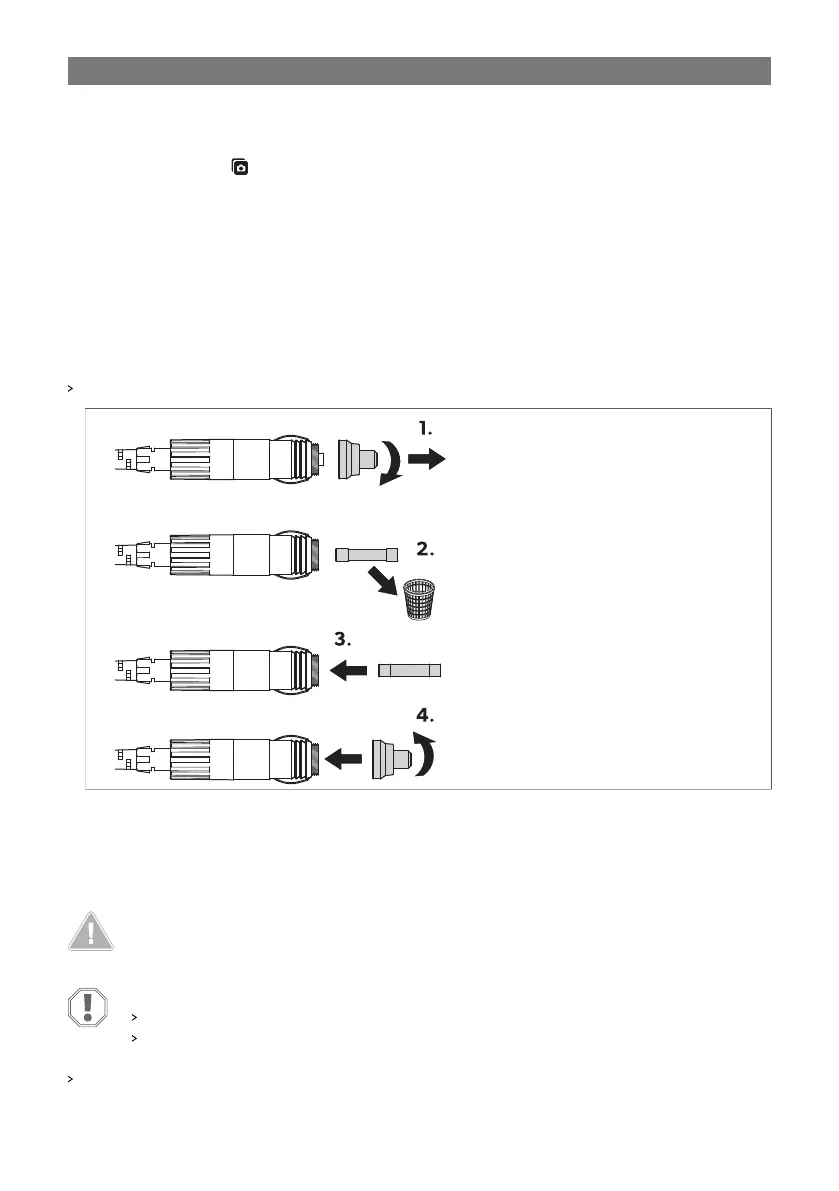
10.17 Replacing the DC plug fuse
Replace the defective fuse with a new fuse of the same type and rating as shown.
• Single zone devices: 10A
• Dual zone devices: 15A
11 Cleaning and maintenance
CAUTION! Electrocution hazard
Ensure that the cooling device is disconnected from the power supply before any cleaning or
maintenance work.
NOTICE! Damage hazard
Never clean the cooling device under running water or in dish water.
Do not use abrasive cleaning agents or hard objects during cleaning.
Occasionally clean the device interior and exterior with a damp cloth.
26


 To Next Page