CFX5EN
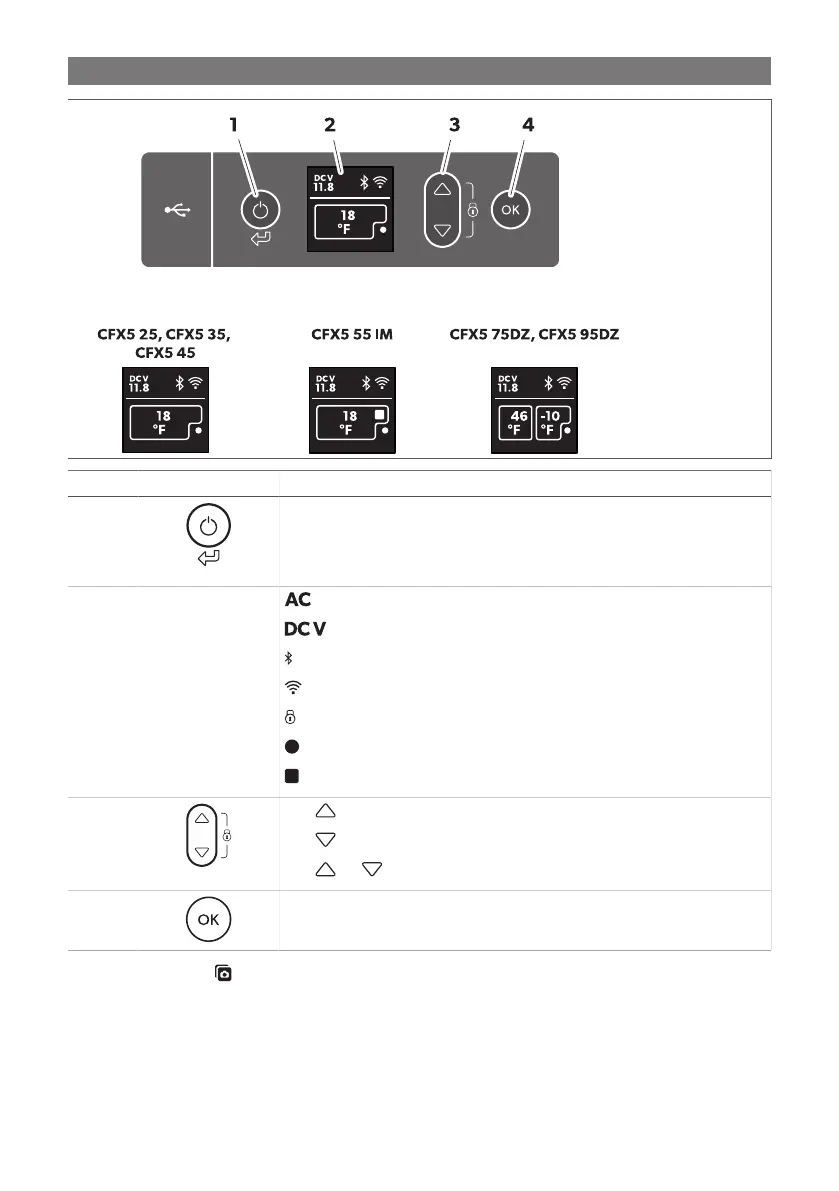
Item Description Explanation
1 Switches the cooling device on when the button is pressed briefly
Switches the cooling device off when the button is pressed for three seconds
Returns to the previous menu
2 Display
: AC power supply is connected
: DC power supply is connected
: Bluetooth is activated
: Wi-Fi is activated
: Display is locked
: Compressor is working
: Ice maker is working (CFX5 55IM only)
3
Press to navigate upwards or to increase the selected value.
Press to navigate downwards or to decrease the selected value.
Press and simultaneously for 3s to lock or unlock the display.
4 Press to select a menu or to save the selected value.
Connection sockets ( Fig. on page10)
9


 To Next Page