Using the safe proSafe
22
8.6 Emergency opening using the anti-tamper system
(security against manipulation) (optional)
If an anti-tamper system (security against manipulation) is activated on the safe this
blocks the safe as soon as the master key (optional) is used or the cover of the lock
mechanism is removed (optional) (e.g. also when the battery is replaced).
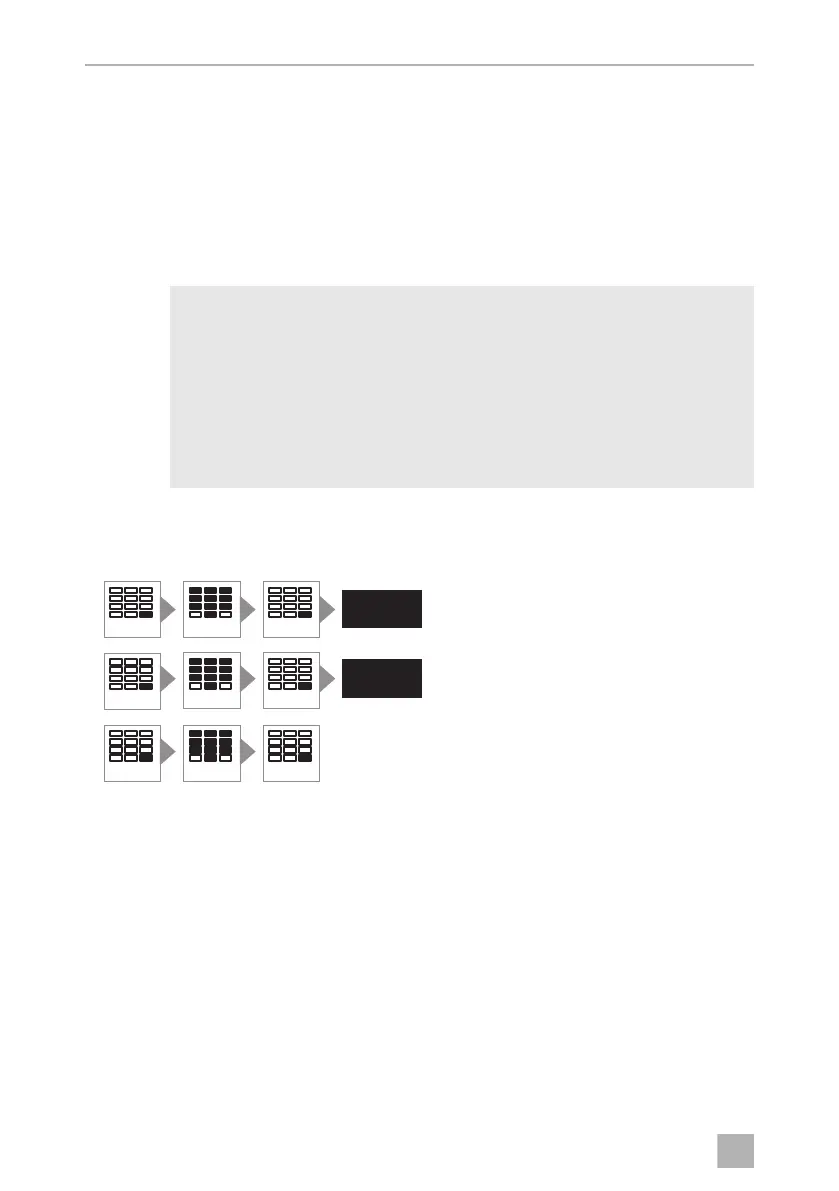
Changing the anti-tamper code
A
You can change the factory-set anti-tamper code (355408). The safe must be locked
for this.
➤ Press the ENTER button twice.
➤ Enter the six digit anti-tamper code.
➤ Press the ENTER button.
✓ The display shows the message DELAY.
➤ Press the ENTER button.
➤ Enter a new six digit anti-tamper code within ten seconds.
NOTICE!
• If you forget your anti-tamper code, nobody can access the safe any
more (not even the manufacturer). No resetting, or similar action, is
possible.
• Therefore note down the anti-tamper code and store it very carefully
in a safe location.
• The safe has a factory-set anti-tamper code. Change this code for
security reasons.
PIN 6X
ENTER
PIN 6X
ENTER
ENTER
PIN 6X
ENTER
ENTER
ENTER2X
Reos Code
XXXXXX
Wait 10
Reos Code
Repeat 10
DELAY
REPEAT
MD-IO-16s.book Seite 22 Freitag, 4. August 2017 9:25 09


 To Next Page