Using the safe proSafe
24
Using the anti-tamper system for the cover (optional)
As an option, the cover concealing the locking mechanism and internal components
can also be blocked.
➤ Remove the cover concealing the lock mechanism (fig. 6 3, page 4).
✓ The display shows the message A-001.
✓ The safe is blocked by the anti-tamper system.
I
➤ Reattach the cover.
Deactivating the anti-tamper system (optional)
A
In order to deactivate the anti-tamper system following removal of the cover for the
locking mechanism, the anti-tamper code (factory-set code: 355408) must be
entered:
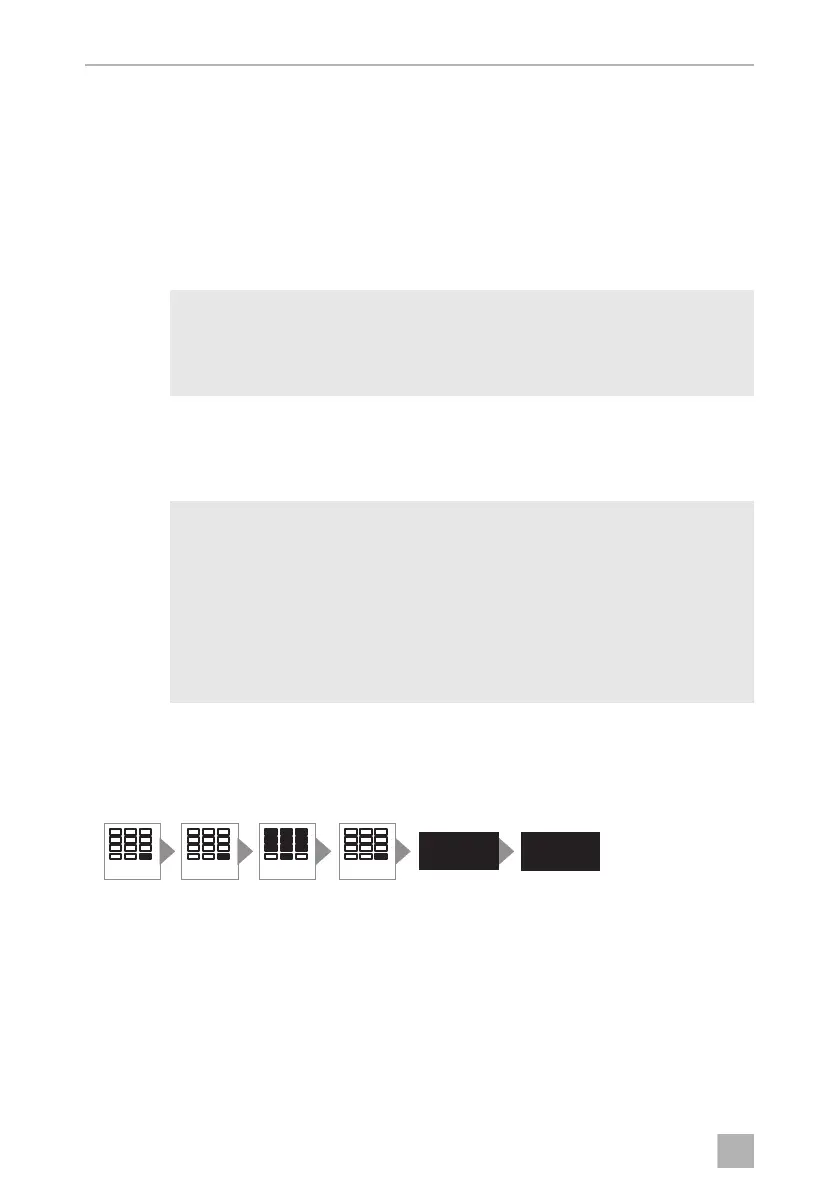
➤ Press the ENTER button twice.
➤ Enter the six digit anti-tamper code.
➤ Press the ENTER button.
✓ The display shows the message DELAY.
NOTE
When you press the ENTER button on the blocked safe three short
beeps will sound. When you press ENTER again the display shows the
message CODE.
NOTICE!
• If you forget your anti-tamper code, nobody can access the safe any
more (not even the manufacturer). No resetting, or similar action, is
possible.
• Therefore note down the anti-tamper code and store it very carefully
in a safe location.
• The safe has a factory-set anti-tamper code. Change this code for
security reasons.
ENTERENTER
PIN 6X
ENTER
DELAY
OPEN
MD-IO-16s.book Seite 24 Freitag, 4. August 2017 9:25 09


 To Next Page