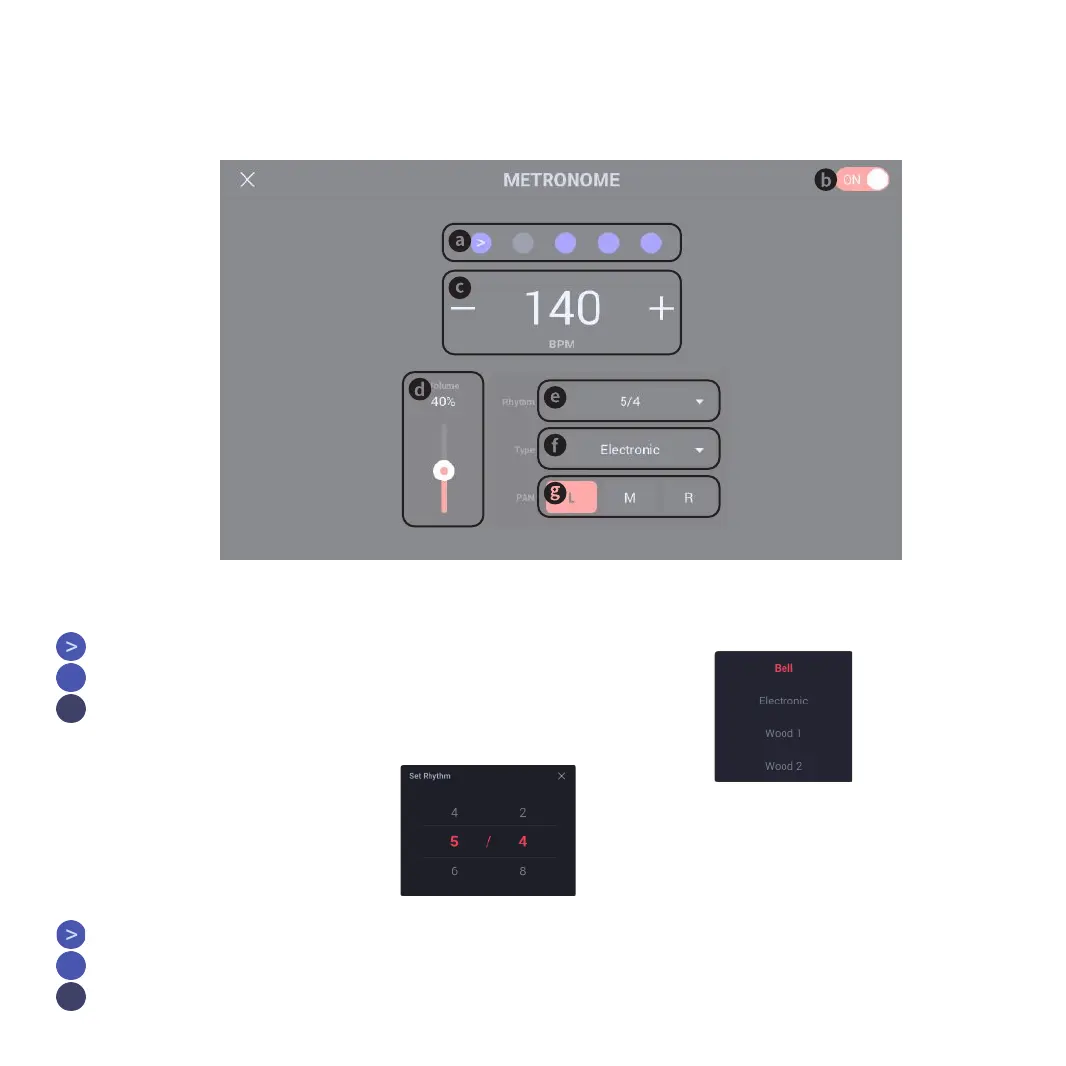
2. Enable Metronome and Metronome Settings
❹
Metronome CLICK Setup Button:
Click to enter CLICK settings
4-b. Metronome CLICK switch display:
Click it to switch statuses
Enable metronome CLICK (ON)
Disable metronome CLICK (OFF)
4-d. Metronome VOLUME
Click and drag or highlight it to use the
encoder for parameter adjustment.
Encoder adjustment parameter: 0%-100%
4-g. Metronome sound PAN display:
Click it to change metronome sound PAN output
4-e. Metronome BEAT display:
Click the pop-up window to change current
BEAT
Metronome BEAT settings:
Click any figure or drag it to change
current value
Top Number 1-9
Bottom Number 2, 4, 8
4-f. Metronome sound type display:
Click the pop-up window to change current sound
type
Metronome sound type settings:
Click the sound type to change metronome sound
COW BELL
ELECTRONIC
WOOD 1
WOOD 2
TRADITION
06
4-a. Metronome BEAT display:
Click it to switch statuses, including:
NO BEAT
UP BEAT
DOWN BEAT
4-c. Metronome BPM display:
Click it to switch statuses
NO BEAT
UP BEAT
DOWN BEAT



 To Next Page