INSTALLATION GUIDE
4
MY ELECTRONIC DRUM
Push the sound bracket in the
right direction to jam the
sound sodule box
02
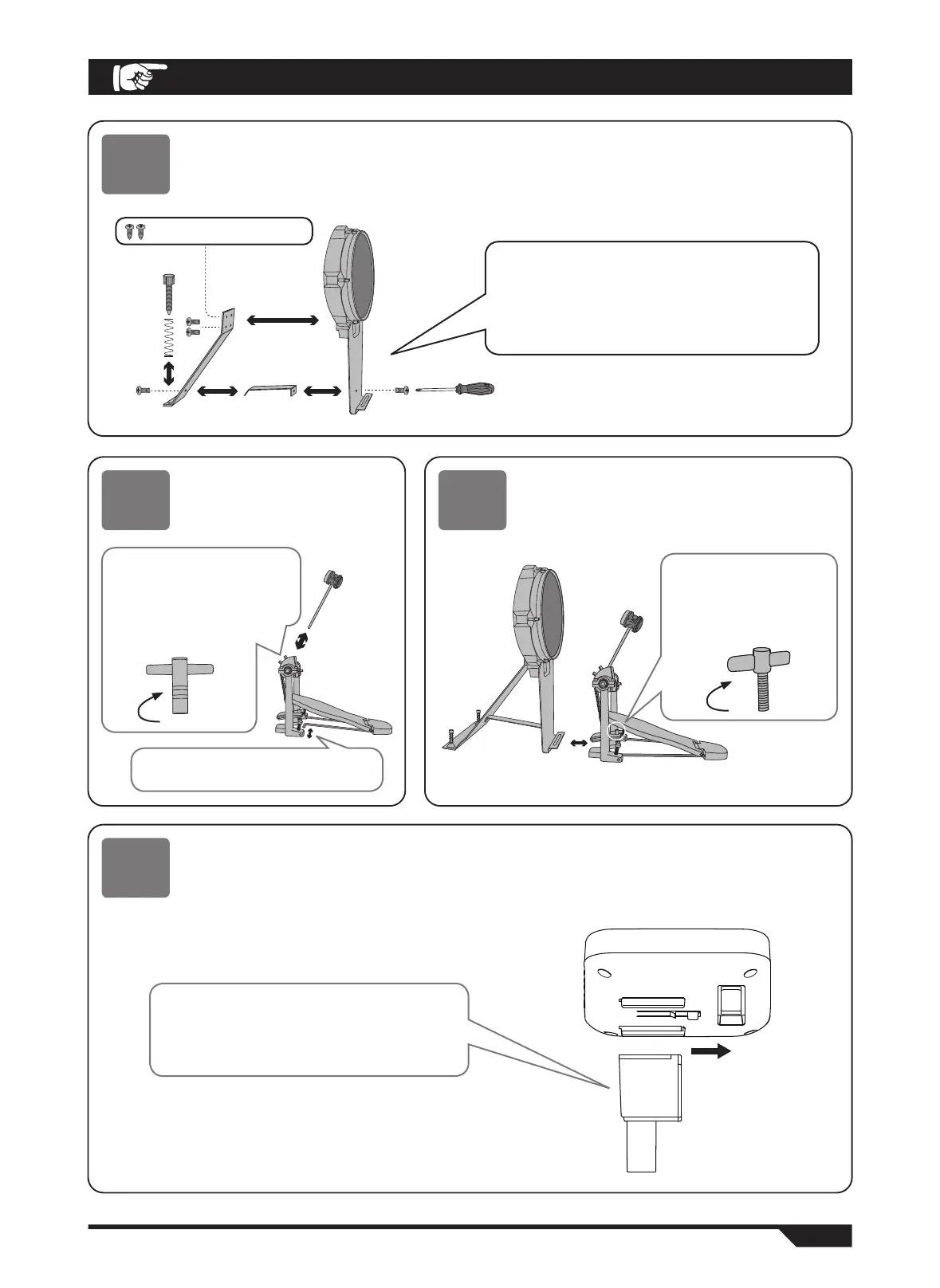
Kick drum installation
● During installation, tighten the screws and be careful not to pinch your finger!
Use screwdriver to lock the kick drum, fixing
parts and supporting parts with 6 small screws
according to the figure.
Then insert two springs into two anti-skid screws,
lock in the bottom of the support until it is against
the ground.
05
Installation module bracket
03
Install hammer stick
● Tighten the screw to avoid
loosening.
04
Kick drum and pedal fixation
● Bottom drum and pedal should be fixed and
tightened to avoid falling off.
The top two are pointed screw
Insert the hammer rod into
the round hole according to
the figure, rotate the wool
hammer head to align it with
the drum face, and tighten
it with the drum key.
Insert the fixed iron bar into the hole
position according to the figure.
The protruding edge of
the bottom drum is
inserted into the pedal
fixing clamp and the
screw is tightened.


 To Next Page