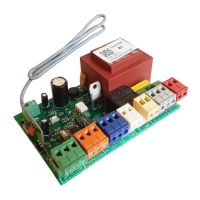
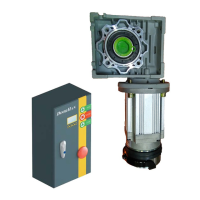
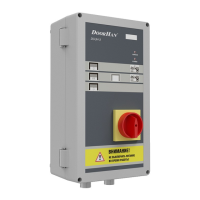
The DoorHan DCUH-2/3 Control Unit is designed for the operation of electro-hydraulic dock levelers with a hinged lip, specifically those in the DLHH/DLHHI series. This control unit is engineered to provide reliable and safe management of dock leveler movements, enhancing efficiency and safety in loading and unloading operations. A key safety feature of the unit is its uncontrolled movement protection system, which activates automatically if the dock leveler experiences an unexpected halt or if the power supply fails. This system ensures that the leveler remains in a safe state, preventing potential accidents or damage. Once all necessary electrical connections are securely established, the control unit is ready for immediate operation.
Function Description
The primary function of the DCUH-2/3 control unit is to manage the raising and lowering of an electro-hydraulic dock leveler, including the extension and retraction of its hinged lip. It facilitates precise control over the leveler's position to align with various vehicle bed heights, thereby creating a smooth transition for goods.
The DCUH-2/3 units offer a range of operational features that cater to different logistical requirements:
- Automatic Return to Stored Position: This feature allows the dock leveler to return to its default stored position by simply pressing the 'P' button, streamlining the end-of-operation process.
- Traffic Light Integration: The unit supports connections for both external and internal traffic lights. These lights provide visual cues to truck drivers and warehouse personnel, indicating the status of the dock leveler and ensuring coordinated and safe vehicle movement.
- Dock Leveler Lighting: The control unit can manage dock leveler lighting, improving visibility during operations, especially in low-light conditions.
- Interlock Functionality: For enhanced safety, the DCUH-2/3 includes interlock features. It can lock the leveler when the door is closed and, conversely, lock the door when the leveler is in an open or active position. This prevents simultaneous conflicting operations and reduces the risk of accidents.
- Additional Safety Devices: The unit is designed to connect with other safety devices, allowing for a comprehensive safety system tailored to specific site requirements.
- Service Indicator: A dedicated service indicator provides visual notification when maintenance is due, helping to ensure the longevity and optimal performance of the dock leveler.
- Menu Screen (LCD Display): The DCUH-3 model features an LCD display that provides a menu screen, offering detailed information and facilitating easier navigation through settings and operational statuses. The DCUH-2 model also displays operations on its menu screen.
- Door Control: The DCUH-3 unit includes functionality for door control, allowing for integrated management of both the dock leveler and the sectional door. This can include "Door OPEN," "Door STOP," and "Door CLOSE" buttons.
- Inflatable Dock Shelter Control: The DCUH-3 also supports the control of inflatable dock shelters, further integrating dock equipment management.
Usage Features
Operating the DCUH-2/3 control unit involves a straightforward sequence of actions designed for safety and efficiency.
To Raise the Leveler:
- Vehicle Positioning: Ensure the transport vehicle, with an open body, is parked squarely against the dock bumpers.
- Wheel Chocking: Chock the vehicle's wheels to prevent any accidental movement or departure during loading/unloading.
- Power On: Turn the main power switch on to activate the leveler.
- Initiate Raise: Confirm that the power LED on the control unit is lit, then press and hold the "RAISE" button.
- Lip Extension and Lowering: Continue holding the "RAISE" button until the leveler deck is fully raised and the lip is extended. Once the lip is extended, release the button and allow the leveler deck to lower onto the vehicle bed. It is crucial to ensure that the lip has a minimum overlap of 100 mm on the vehicle bed surface for secure operation.
- WARNING: The main power switch must remain ON until the leveler completes its operation and returns to the stored position.
To Store the Leveler:
Once loading or unloading is complete, the dock leveler needs to be returned to its stored position.
- Retract Lip: Press and hold the "RAISE" button until the lip folds vertically downwards.
- Return to Stored Position: Release the "RAISE" button and wait for the leveler to fully return to its stored position.
- Power Off: After the leveler is stored, turn the main power switch OFF.
Auto Parking of the Leveler:
For convenience, the leveler can be automatically parked.
- Activate Auto Park: Briefly press the "P" button.
- Wait for Storage: Allow the dock leveler to automatically return to its stored position.
- Power Off: Once stored, turn the main power switch OFF.
Emergency Stop:
In case of any emergency during operation, the dock leveler can be immediately halted by turning the main power switch OFF.
- WARNING: To resume operations after an emergency stop, turn the main power switch ON and briefly press the "RAISE" button.
Programming Features:
The control unit offers programming options via DIP switches and a menu screen (LCD display on DCUH-3, or simple display on DCUH-2).
- DIP Switches: These are used to select between operating modes (DCUH-2 or DCUH-3) and to access the advanced menu.
- WARNING: Always turn the power supply OFF before switching DIP switches.
- Programming Menu: To enter the programming menu, turn the main power switch ON, ensure the power indicator is lit, then press and release the "RAISE" button. Subsequently, press and hold both the "P" and "RAISE" buttons simultaneously for 5 seconds. A flashing "UH" message confirms successful entry.
- Navigation: The "RAISE" button is used to switch between parameters, and the "P" button is used to change the value of the selected parameter.
- Exit Programming: The device automatically exits the programming mode and saves changes after setting the last menu item and pressing the "RAISE" button.
- Dock Leveler and Sectional Door Operation Programming: Three variants of operation can be programmed for the dock leveler and sectional door, involving "dL" (automatic closing of the door after the leveler is parked) and "Ar" (activation of auto parking function) parameters:
- Variant 1 (Default): Dock leveler auto parking OFF, door auto closing OFF (dL=n, Ar=n).
- Variant 2: Dock leveler auto parking ON, door auto closing OFF (dL=n, Ar=Y).
- Variant 3: Dock leveler auto parking ON, door auto closing ON (dL=Y, Ar=Y).
Maintenance Features
The DCUH-2/3 control unit includes features to assist with maintenance and troubleshooting, ensuring continuous and safe operation.
Service Indicator and Fault Indication:
- Service Due: When maintenance is required, the operation indication is blocked, a "SEr" message is continuously displayed on the menu screen, and the service LED is lit. To clear this, the advanced programming menu must be accessed.
- Faults: If a fault occurs during operation, an "EX" message (where X is the fault number) will be displayed before the system de-energizes. The number of the last fault can be viewed in the advanced programming menu.
Troubleshooting Guide:
The manual provides a comprehensive troubleshooting table to diagnose and resolve common issues. This table lists symptoms, possible causes, and recommended solutions.
By adhering to the operational guidelines and utilizing the troubleshooting resources, users can maintain the DCUH-2/3 control unit and associated dock leveler in optimal working condition, ensuring safety and efficiency in all loading and unloading activities.


 To Next Page

 General