# Description Commands
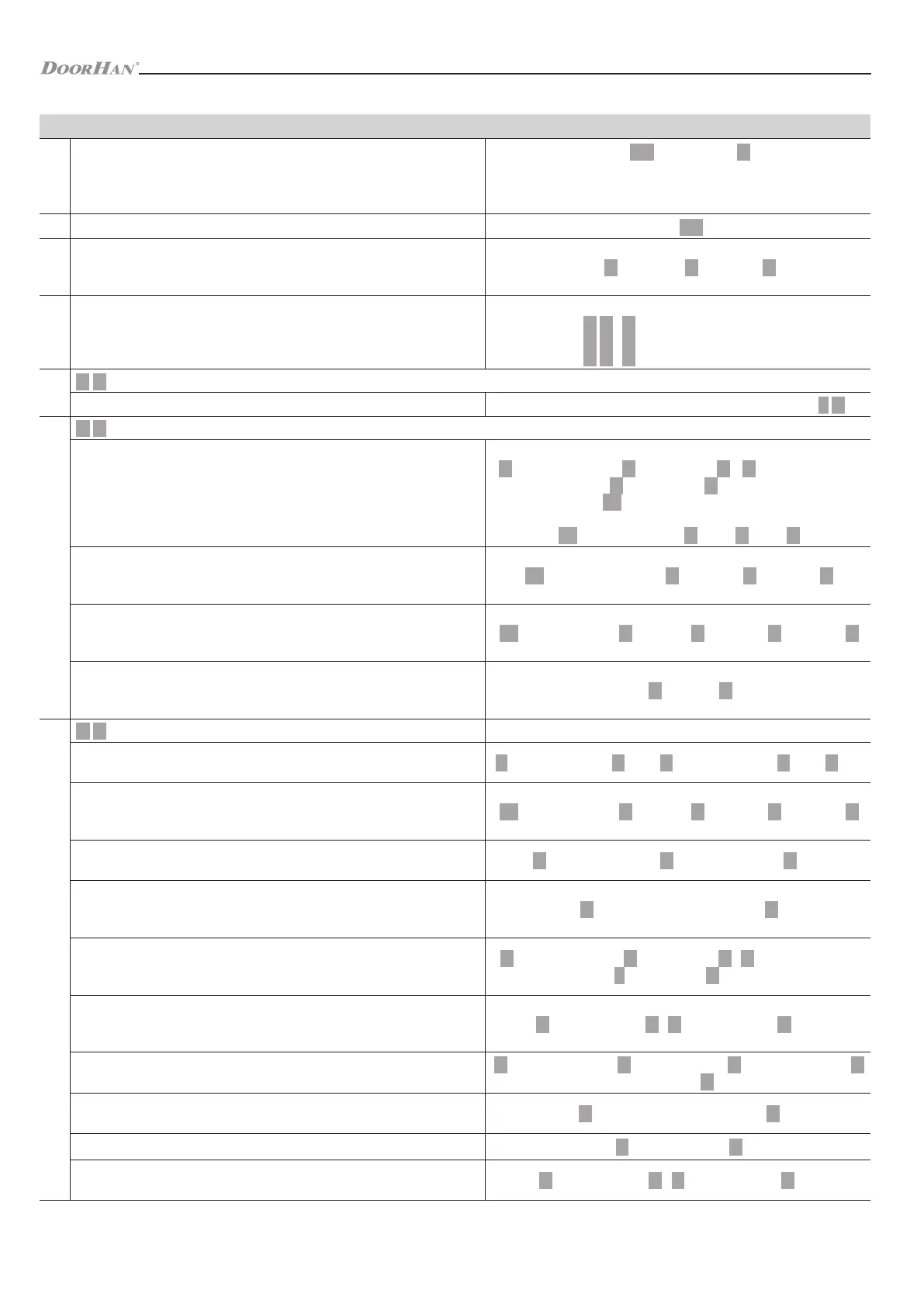
1
Entering the programming mode
999999 – preset factory master code
Master code #
The indicator will blink green and light up red. If the code has been
entered incorrectly then triple audible signal will be heard.
2 Exit from the programming mode
3
Change of master code
It is recommended to change it after the first log-in. New code should have
from 6 to 8 symbols
0 New code # New code #
4 Operating modes of the controller
Log on, select one of the three modes:
3 0 # Access with cards only
3 1 # Access with cards and PINs
3 2 # Access with cards or PINs
5
3 0 mode programming
Card addition and deletion
To add or delete a card follow the steps described in mode 3 2
6
3 1 mode programming
Add a user card and a PIN
Users can be constantly added without quitting the programming mode
To add a user card press:
1 User ID number 1 # Read card 1 # 1 User ID number 2
# Read card 2 # etc.
Press to exit the programming mode.
To add a PIN press:
Read card 1234 # PIN # PIN #
Change a user PIN (Method 1)
This operation is performed outside the programming mode, i.e. users can
perform it independently
Read Card Old PIN # New PIN # New PIN #
Change a user PIN (Method 2)
This operation is performed outside the programming mode, i.e. users can
perform it themselves
User ID number # Old PIN # New PIN # New PIN #
Delete a user card and a PIN
To delete a user card and a PIN it is necessary to delete the user from the
controller memory
2 User ID #
7
3 2 mode programming
Add a user PIN
Users can be constantly added without quitting the programming mode
1 User ID number 1 # PIN # User ID number 2 # PIN # etc.
Change a user PIN
This operation is performed outside the programming mode, i.e. users can
perform it themselves
User ID number # Old PIN # New PIN # New PIN #
Delete a user PIN
Users can be deleted without quitting the programming mode
2 User ID number 1 # User ID number 2 # etc.
Add a user card (Method 1)
Users can be constantly added without quitting the programming mode. User
ID number is generated automatically
1 Read card 1 Read card 2 etc. #
Add a user card (Method 2)
Users and cards can be constantly added without quitting the programming
mode.
1 User ID number 1 # Read card 1 # 1 User ID number 2
# Read card 2 # etc.
Add a user card (Method 3)
Users and cards can be constantly added without quitting the programming
mode. User ID number is generated automatically
1 Card number 1 # 1 Card number 2 # etc.
Add a user card (Method 4)
Users can be constantly added without quitting the programming mode
1 User ID number 1 # Card number 1 # User ID number 2 #
Card number 2 # etc.
Delete a user card
Users can be deleted without quitting the programming mode
2 Read Card 1 Read Card 2 etc. #
Delete a User ID number
2 User ID number #
Delete a card user using the card number
Users can be deleted without quitting the programming mode
2 Card number 1 # 2 Card number 2 # etc.
CONTROLLER PROGRAMMING
Table 6. Advanced programming
13


 To Next Page
 Loading...