
 To Next Page
R
Ryan SmithAug 16, 2025
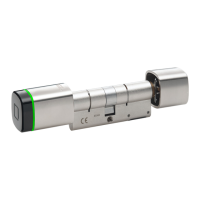
How to fix Dormakaba digital cylinder Locks when the battery is low?
- LLinda FitzgeraldAug 16, 2025
If your Dormakaba lock displays a 'Low' battery warning, the solution is to replace the batteries.

How to fix Dormakaba digital cylinder Locks when the battery is low?
If your Dormakaba lock displays a 'Low' battery warning, the solution is to replace the batteries.
What to do if Dormakaba digital cylinder Locks alarm shows 'Battery Empty'?
If your Dormakaba lock is alarming and displaying a 'Battery Empty' message, you should replace the batteries.
What to do if Dormakaba digital cylinder show 'No power supply'?
If your Dormakaba lock has no power, check the batteries or the power supply to ensure they are functioning correctly.
What to do if Dormakaba Locks self-test could not be completed?
If the self-test on your Dormakaba lock fails, check or replace the coupling unit.
What does it mean if my Dormakaba Locks say 'Medium not programmed'?
If your Dormakaba lock displays 'Medium not programmed', you need to program the medium.
What should I do if my Dormakaba digital cylinder say 'Outside the time window'?
If your Dormakaba lock indicates that it is 'Outside the time window', you should check the time profiles to ensure they are correctly configured.
What does it mean if my Dormakaba digital cylinder say 'Internal clock in component has failed'?
If your Dormakaba lock displays a message indicating that the 'Internal clock in component has failed', you should check the programming and clock time to ensure they are correctly set.
What to do if Dormakaba digital cylinder display 'E-module already programmed'?
If the Dormakaba lock displays 'E-module already programmed', perform an INI reset.
What should I do if my Dormakaba digital cylinder say 'E-module knob and MC insert are not compatible'?
If your Dormakaba lock indicates that the 'E-module knob and MC insert are not compatible', you should check the compatibility of these components.
Why does the battery life of my Dormakaba digital cylinder deviate significantly from expectations?
There are several reasons why the battery life of your Dormakaba lock might be shorter than expected: * More accesses than anticipated: Read out traceback and check. * Low temperatures. * Firmware version not up-to-date: Update to the current firmware version. * Programming/configuration with non-used functions: Adjust programming/configuration. * Battery was not new: Insert a new, recommended battery. * Batteries that look identical can contain different amounts of energy: Insert a new, recommended battery. * E-module knob with battery installed was stored separately from digital cylinder: Install a new battery, and store the e-module knob without the battery in the future. * Defective electronics. * Activation of digital cylinder without RFID medium, e.g. by holding yo...
Explains different risk levels: Danger, Warning, Caution, and Notice.
Defines the intended use of the product and manufacturer liability.
Details safety considerations for specific lock types and door functions.
Lists specifications for dimensions, power, radio, environment, and standards.
Provides detailed drawings and measurements of the cylinder.
Step-by-step guide for installing digital cylinder version A.
Step-by-step guide for installing digital cylinder version B.
Procedures for checking functionality after installing panic cylinders.
Procedures for performing an INI reset using master media.
Detailed steps to open the lock using authorized user media.
Step-by-step guide for replacing the battery.
Detailed steps for replacing the e-module.
Introduction to the INI reset procedure.
Instructions for performing INI reset using master media.
Instructions for performing INI reset using the programmer.
Instructions for performing INI reset using tweezers.
Table detailing symptoms, possible causes, and measures for errors.
Analysis of symptoms and causes related to battery life.



 General