English
3. Use or to select the city in the list.
4. Select Wallpaper and select On (to view the weather in standby
mode).
5. Press OK to confirm.
For more options select an existing entry, and press Options
Edit or
Delete.
Additional functions
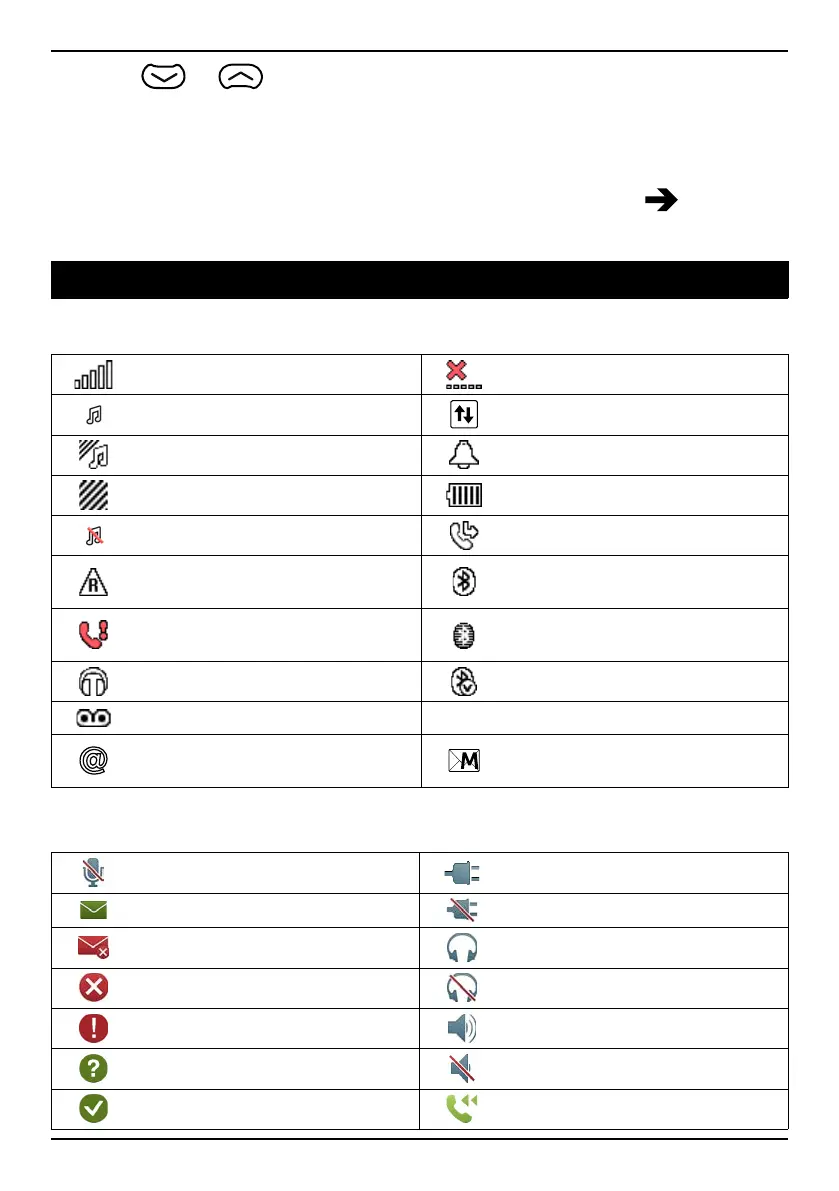
Display status symbols
Signal strength
No network coverage
Ring only
Data transmission
Ring + vibration
Alarm active
Vibration only Battery level
Silent Call divert activated
Roaming (in other network)
Bluetooth on, visible to
others
Missed call
Bluetooth on, invisible to
others
Headset connected Bluetooth connected
Voice mail message received
5
Unread text message/SMS
Unread e-mail
Unread picture message/
MMS
Display main symbols
Mute
Charger connected
Message sending success Charger removed
Message sending failed
Headset in
Error
Headset out
Warning
Speaker on
Query
Speaker off
Done (confirmed)
Incoming call
52



 To Next Page