English
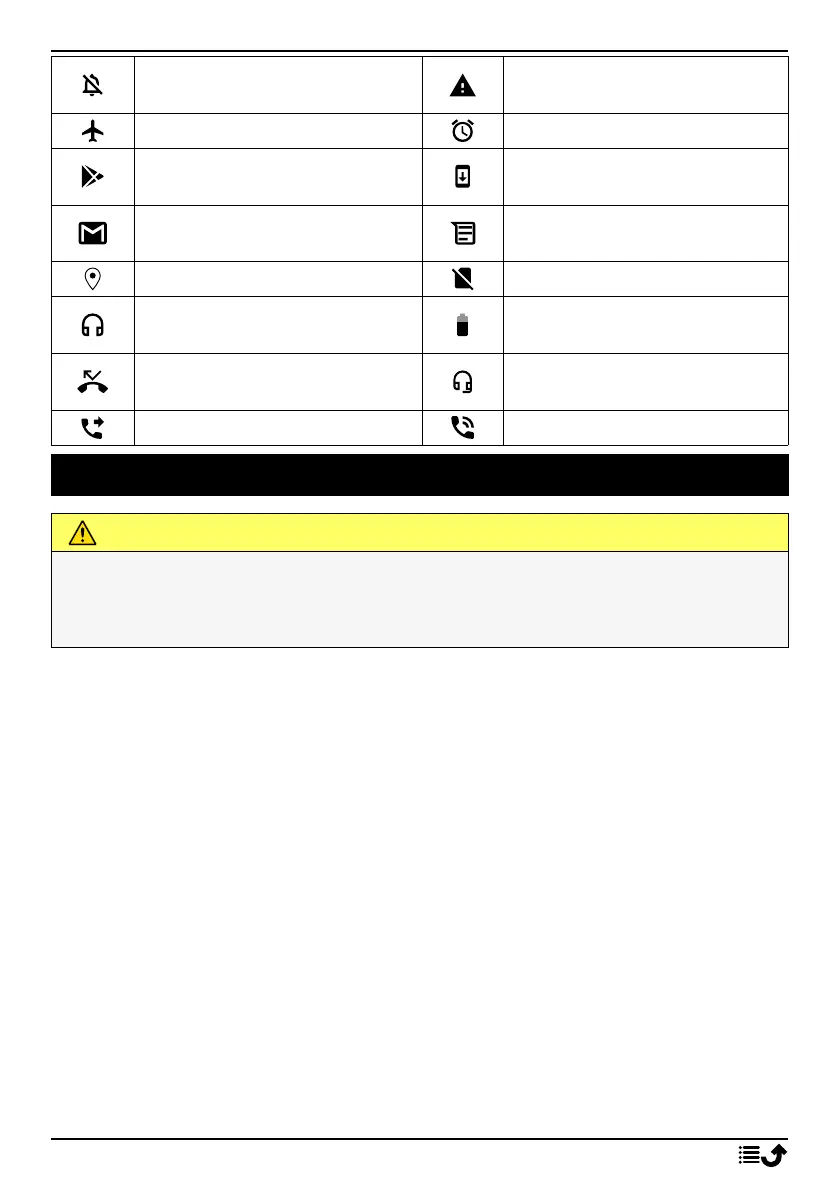
Silent mode
Error occurred or caution
required
Flight mode
Alarm active
Google Play Store software
updates available
System update available
Unread email (in the gmail
app)
New text message or multi-
media message
GPS activated SIM card not inserted
Headset connected (without
microphone)
Battery level
Missed call
Headset connected (with mi-
crophone )
Call forwarding on Call ongoing
Safety instructions
CAUTION
The unit and the accessories can contain small parts. Keep all of the equipment out of
the reach of small children.
The mains adapter is the disconnect device between the product and mains power. The
mains socket outlet must be close to the equipment and easily accessible.
Network services and costs
Your device is approved for use on the 4G LTE FDD: 1 (2100), 2 (1900), 3 (1800), 7 (2600),
8 (900), 20 (800), 28 (700) MHz / 4G LTE FDD: 38 (2600), 40 (2300) MHz / WCDMA: 1
(2100), 2 (1900), 5 (850), 8 (900) MHz / GSM: 850, 900, 1800, 1900 MHz networks. To use
the device, you need a subscription with a service provider.
Using network services may result in traffic costs. Some product features require support
from the network, and you may need to subscribe to them.
Operating environment
Follow the rules and laws that apply wherever you are, and always turn off the unit when-
ever its use is prohibited or can cause interference or hazards. Only use the unit in its nor-
mal user position.
Parts of the unit are magnetic. The unit can attract metal objects. Do not keep credit cards
or other magnetic media near the unit. There is a risk that information stored on them
can be erased.
Wi-Fi (WLAN)
This equipment may be operated in all European countries.
69



 To Next Page