8
Setting the Date, Time and Time Zone (continued)
Setting the Time Zone: (continued)
3) If a custom time offset is needed select CUSTOM and press
the Enter key.
4) Use the up/down buttons to set the offset at any value from
-12.00 HR to +14.00 HR in 0.25 (15 minute) increments. The
four sets of double-arrow cursors indicate that all digits will
increase or decrease at the same time.
5) When the correct custom time zone/offset is complete, press the
Enter key to save the setting.
SET UTC OFFSET
OK EXIT
- 06 . 00 HR
GMT
CET
EET
ICT
CST
CUSTOM
Western EU
Central EU
Eastern EU
Thailand
China
TIME ZONE
initial controller setup (continued)
controls
Overview
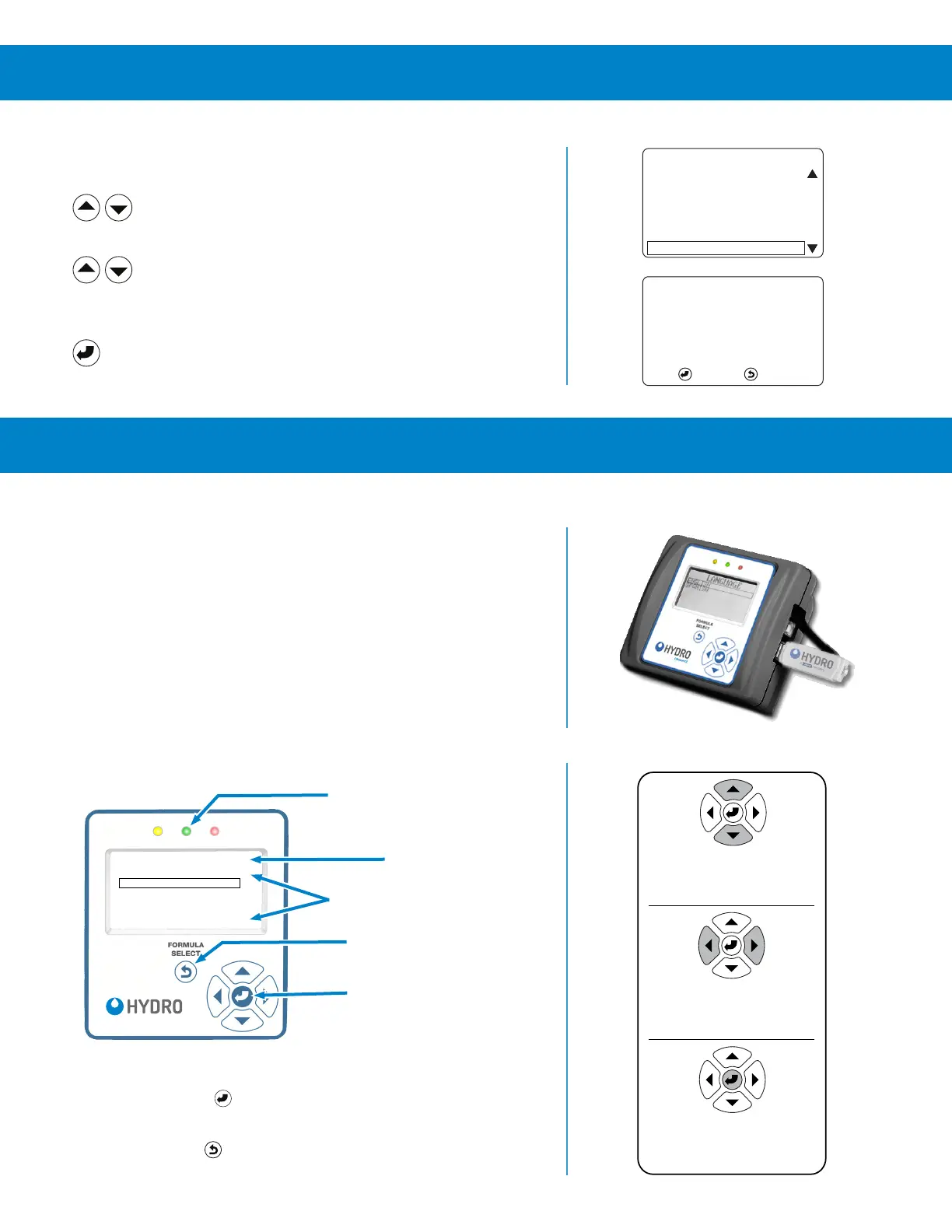
The Connected Total Eclipse Controller’s back-lit screen displays seven
lines of text, with on-screen prompts, in the operating language selected
by the installer.
A green LED indicates power is on. The six-button keypad is used by the
machine operator for formula selection and modification during normal
operation; and by the installer during installation, service, and data transfer.
The USB port accepts a Type-A USB flash drive (8 GB or smaller). It is
used to read and write formulas and settings between the flash drive and
the controller. A USB flash drive can also be used to write Report files
from the controller to the USB drive. These files can then be manually
uploaded to Hydro Connect in cases where a cellular gateway and real-
time streaming is not enabled.
Menu Navigation
NOTE: Press the Enter key to save your setting changes and return to
a previous menu.
Press the Exit key to cancel changes without saving, and
return to a previous menu.
F03 PRODUCTS
P1 PRE-WASH
P2 DETERGENT
P3 LIQUID BLEACH
P4 BLEACH ALTERNAT
P5 SOUR-CONDITIONR
P6 ENZYME LIFT
connect
Green LED On = Power On
Menu Title
More Menu Items Available
Exit without saving, or
Formula Select (on Home Screen)
Enter = Launch Menu
or Save Changes
Auto-Key Repeat: Press and hold
any key to repeat key press
Up / Down Arrows
Enter / Save Key
Left / Right Arrows
1) Moves Selection Box
2) Changes Digit Value
1) Launch Selected Menu
2) Save Changes and Exit
During edits they move the
Digit Selection Cursor:



 To Next Page