9
Unused Product (This product does not have any amount
programmed for this formula.)
Product Error (This product has an amount programmed for
this formula, but has not been calibrated.)
operator menus
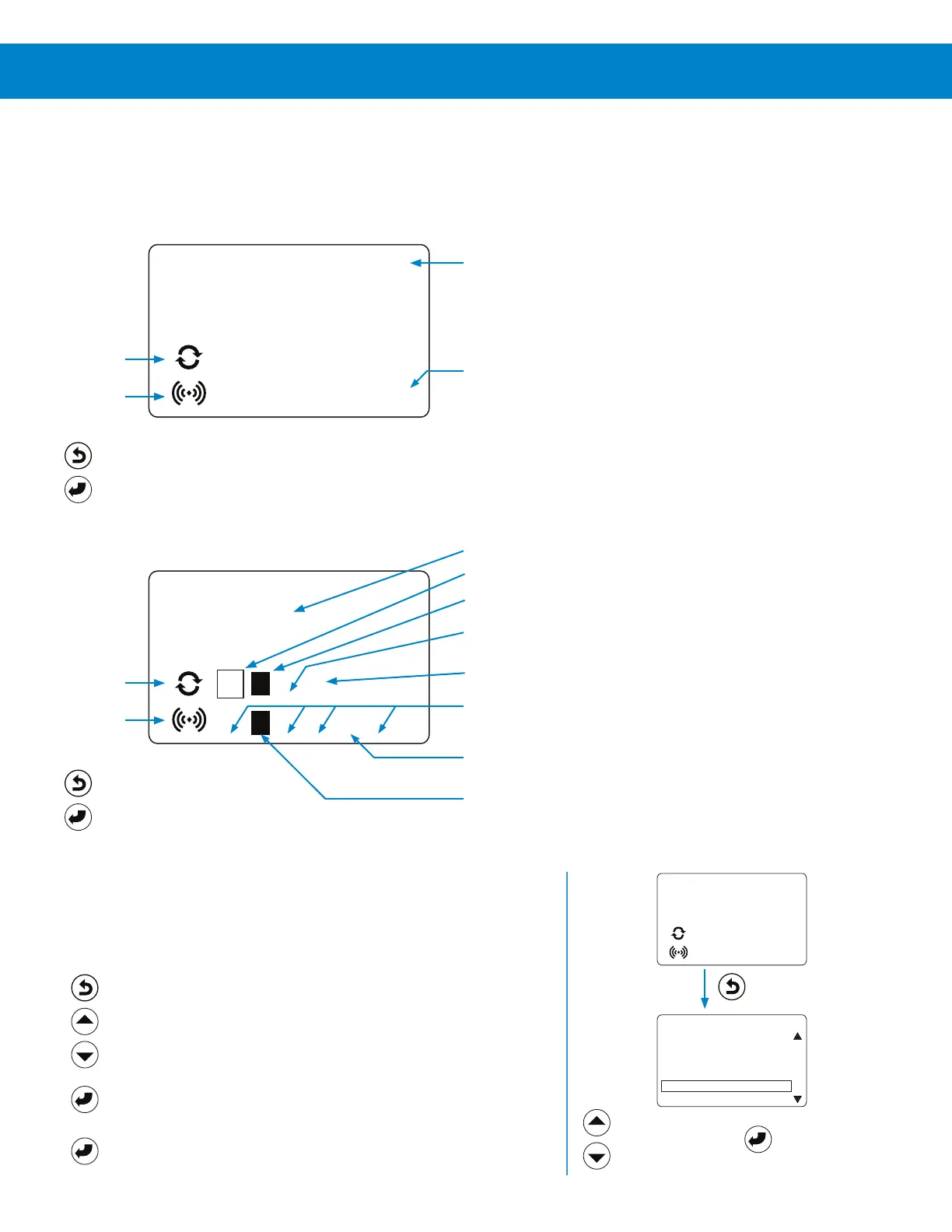
Home Screen
The Home Screen appears after the controller language has been selected (See Set Operating Language on page 5 for more
information) or whenever the controller is active.
Home Screen: (Idle - No formula running.)
Home Screen: (Active - Formula running.)
_ _ _ __ _
_ _ _ __ _
HYDRO SYSTEMS
SELECT FORMULA
HYDRO SYSTEMS
F03 RUNNING
2
21 _ 5X 6
_ _ 5_ _
Company Name
Active Formula (Formula name gets replaced by “RUNNING”.)
Product
Row
Product
Row
Trigger
Row
Trigger
Row
Completed (The programmed amount has been dispensed.)
Active Product (This product is being dispensed.)
No Signal (These triggers are not currently receiving a signal.)
Connectivity Heartbeat (Indicates that the cellular gateway
and the Connected Total Eclipse Controller are communicating
successfully.)
Qualified Signal(This trigger signal has been qualified, so the
product is being dispensed.)
Signal Received (This trigger signal is being received, but it
has not yet been qualified.)
Hot Keys:
Exit = Quick Formula Select.
Enter = Go To Main Menu.
Hot Keys:
Exit = Quick Formula Select.
Enter = Go To Main Menu.
Formula Quick-Select
To prevent data logging errors, the operator must select a formula before
washer oper ation starts; and all programmed products must be triggered
during the cycle.
1) From the Home Screen press the Exit / Formula Select key.
2) Press the Up / Down Arrow keys to move selection box to
the correct formula. All formulas appear, but only formulas with
programmed products are selectable.
3) Press the Enter key to select the formula and return to the Home
Screen, which will display the new formula selected.
4) (Optional) Press the Enter key to go the Main Menu where the
load weight can be adjusted.
_ _ _ __ _
_ _ _ __ _
HYDRO SYSTEMS
SELECT FORMULA
F01 PADS
F02 CURTAINS
F03 TOWELS
F04 BED LINEN
F05 BLANKETS
F06 TABLE LINEN
Press Up / Down
Arrows to move
Selection Box
Press Enter to
Select Formula
Press Exit to Launch
Select Formula Menu



 To Next Page