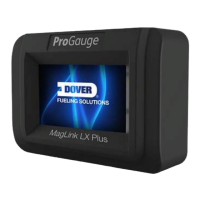
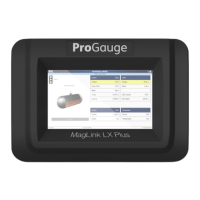
The MagLink LX is a console designed for monitoring probe levels and providing tank alarm notifications in fueling environments. It is a product of Dover Fueling Solutions, specifically under their ProGauge brand.
Function Description:
The primary function of the MagLink LX console is to monitor fuel tank levels and generate alarm notifications based on predefined thresholds. It can interface with a site's Forecourt Controller (FCC) or Point of Sale (POS) system via serial or Ethernet connections, enabling seamless integration into existing fueling infrastructure. The console supports a maximum of 16 on-board probes, four on-board relays with six inputs, and an external expansion module that can accommodate up to four expansion cards. Each expansion card can be configured with 8 relay outputs, 8 digital inputs, or 4-20mA inputs, allowing for flexible system expansion up to 32 relays and/or 32 inputs in increments of 8. The console also features an integrated web server for remote configuration, consultation, communication, and email notifications, as well as host communication.
Important Technical Specifications:
- Power Supply: 100-240 V~, 50-60 Hz
- Consumption: 15 VA
- Operating Temperature: -10 to +50 °C
- Relative Humidity: (5-95)%, non-condensing
- Number of Probes: Up to 32 (16 through internal barrier and 16 with added MagDirect modules). Compatible probes include XMT EXD 485, XMT SI 485, XMT RF (requires an RF receiver), and DMP-IS-485.
- Number of ON-OFF External Sensors: Up to 32
- Number of ON-OFF Internal Sensors: 6 (when Dipswitch 2 is ON)
- External Relay Outputs: Up to 32
- Internal Relay Outputs: 4
- Lower Power of Relay Output: 0.5 A, 33 V~, or 2 A, 30 V DC
- Output Power for Probes: 12 V DC, 100 mA per output for each probe (connectors MR3 MR4 support up to 8 probes per connector).
- Serial Communication of Probes: RS485
- Host Communication (Management): RS232 and TCP/IP (protocol integrated with most forecourt controllers).
- Printer Communication: RS232
- Integrated Web Server: TCP/IP for remote configuration, consultation, communication, and emails.
- GSM Modem for SMS Service: 1 Optional
- IFSF: 1 Optional
- Case: Plastic
- Protection: IP40
- Dimensions: 265 x 190 x 95 mm
- Intrinsically Safe Barrier: II (Surface industries different from mines), Category and type of potentially explosive atmosphere (1) G, Protection mode ia, Group of substances (gases, vapours or mists) IIB. The console contains an intrinsic safety barrier and two (2) channels (BRA-2SIP) for connecting XMT-SI-485 and DMP-IS-485 probes in hazardous areas.
Usage Features:
The MagLink LX console features a resistive touchscreen, allowing interaction with fingers (even gloved), stylus pens, or other applicable tools by applying light force. The Graphical User Interface (GUI) is organized into several sections:
- Inventory: Displays information related to tanks, showing up to four tanks per page. Users can swipe right to view more tanks and tap on a tank image for detailed information, including product volume (gross and compensated), water volume, ullage, and total capacity. It also shows level measurements (product and water height, safe capacity, maximum height), density (if a sensor is installed), and temperature (current and compensated).
- Status Icons: Provides visual cues for system status. A green "Traffic Light" indicates no alarms, while red signifies active alarms (e.g., High-High, High) with related fields colored pink. A yellow "Traffic Light" indicates acknowledged alarms, with related fields colored yellow.
- Inventory Detail: Shows configured thresholds for HH (High-High), H (High), L (Low), LL (Low-Low), and Water levels. Action buttons allow for diagnostics, email inventory, print inventory, and SMS inventory. Further details include tank settings and a strapping table.
- Main Menu: Provides navigation to various console functions, including Inventory, Status, Calendar, Notifications, History, Settings, Shifts, Reports, and Configuration.
- Status Page: Displays the condition of tanks or sensors, with icons showing green for no alarms and red for alarms.
- Calendar: Shows events related to the console, tanks, sensors, deliveries, alarms, warnings, and leak tests, with filtering options and tank selection.
- Notifications: Allows users to select the type of information to send (e.g., last delivery, leakage, daily shift, theft, reconciliation) and the method (print, email), then choose recipients.
- History: Displays tank volume over a selected period, typically the last seven days.
- Reports: Generates various reports:
- Sales Report: Shows daily tank sales for the last seven days.
- Shift Report: Provides a full report of each shift for the last seven days, including deliveries and tank sales.
- Delivery Report: Displays all tank delivery information for the last seven days.
- Leakage Report: Shows all leak test results for the last seven days.
- History (Report): Presents inventory data for each tank, recorded every minute for the last seven days.
- System/Alarms Report: Lists system alarms for the last seven days.
- Configuration: Accessed via the Main Menu, requiring a password. It includes:
- System Configuration: Allows modification of network settings (Static IP, Port, Mask, Gateway, DNS) and other system parameters.
- Tank Configuration: Enables changes to tank-specific parameters such as language, date format, level unit, volume unit, alarm tolerance, leak threshold, and leak algorithm.
- Protocol Settings: Configures serial and TCP/IP port parameters.
Maintenance Features:
The MagLink LX console offers several maintenance capabilities:
- Software Updates: Users can perform software updates using a USB thumb drive. The process involves obtaining the update file ("lx4_new.zip") from Dover Fueling Solutions, copying it to a FAT32-formatted USB drive, inserting the drive into the console's USB port, and pressing the "Read update from USB" button.
- Configuration Backup and Restore:
- Creating Backups: Backups of the console's configuration can be stored on a USB thumb drive (if inserted) or directly on the console's industrial-grade SD card.
- Restoring Backups: Configuration backups can be restored from a USB thumb drive by inserting the drive into the console and pressing the "Read backups from USB" button.
- Technical Support Data Export: The console facilitates sending diagnostic data to technical support. Users can connect a FAT32-formatted USB device (with at least 50 MB free space), create a folder named "lx-support" (lowercase), connect the USB device to the console, press the "INFO" button, and then "Export Log" to copy relevant files. The "lx-support" folder can then be zipped and emailed to support.
- Shifts Management: The "Shifts" screen allows users to manually close a shift and send the last shift information to a connected printer.
The MagLink LX is designed for reliable operation with an industrial-grade SD card for safe data storage, even in the event of power loss. It is crucial to adhere to all safety instructions and refer to the relevant installation and configuration manuals for proper setup and use.

 Need help?
 General

 To Next Page