Need help?
Do you have a question about the Dr.Dabber Switch and is the answer not in the manual?
Intended use, age restrictions, and health warnings for Dr. Dabber products.
Precautions regarding metallic materials and electromagnetic fields during operation.
How to turn the device on/off and adjust power settings.
Step-by-step guide for operating the SWITCH in Oil Mode.
Step-by-step guide for operating the SWITCH in Leaf Mode.
Explains LED error codes and basic troubleshooting steps.
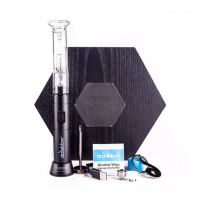
The Dr. Dabber SWITCH is an advanced induction heating unit designed for vaporizing both oil and leaf materials with precise power and carefully calibrated temperature profiles. Developed by a team of engineers, scientists, designers, and vaporizer experts in the United States, the SWITCH aims to address common shortcomings found in other vaporizing devices.
At its core, the SWITCH utilizes an induction heating system, which employs electromagnetic coupling to transmit energy into specialized induction cups. This process generates a high-frequency alternating magnetic field, which is then absorbed by the induction cups, creating heat. The device's advanced electronics allow for power control with an accuracy of 0.1%, precisely regulating the temperature of the induction cups throughout the heating cycle. These heating cycles are optimized for the best possible vaping experience, with most temperature profiles reaching readiness within 5 seconds of pressing the 'Go' button during the preheat phase.
A key advantage of induction heating is its speed, heating significantly faster than other methods. The induction cups are designed to create an even heating surface temperature, minimizing hot spots and ensuring consistent flavor. This design eliminates the need for atomizers, which often require replacement. The electronics are fully shielded from the vaporization environment, making the unit leakproof and preventing electrical connections to the heating element from wearing out or breaking over time.
The SWITCH is also engineered to reduce or eliminate oxygen from the vaporization environment. By minimizing oxygen, the device prevents combustion and oxidation of vapor compounds, resulting in a smoother vapor, less waste, and higher efficiency. This means your material cannot combust, as oxygen, an oxidizer, is largely absent, preventing it from combining with other molecules to form unwanted compounds.
The device offers two primary modes of operation: Oil Mode for essential oils and Leaf Mode for leaf-based products. Users can switch between these modes using a power switch, ensuring the device is off before transitioning. The SWITCH includes a removable battery pack, allowing for use while charging and providing up to 100 hits on a full charge in either mode. Only Dr. Dabber-approved charging cables, adapters, and battery packs should be used to avoid damage and voiding the warranty. Similarly, only authentic Dr. Dabber SWITCH Induction Cups should be used to prevent damage or bodily harm.
To operate the SWITCH, users first fill the glass percolator attachment with a few ounces of water, ensuring it doesn't splash into the mouthpiece when reattached. The glass percolator is then secured onto the SWITCH glass top. Depending on the material, the power switch is set to either 'OIL' or 'LEAF' mode.
In Oil Mode, users can set the desired power level using the (+) or (-) buttons. One yellow LED indicates a maximum flavor profile, while five yellow LEDs signify optimal vapor density. The ceramic induction cup (white for oil) can be pre-loaded or loaded after being placed in the glass top. Once the product is on the loading tool, the 'Go' button is pressed. The LEDs escalate red during heating and turn green when the temperature is reached. In standard mode, the device holds the heat profile for 15 seconds, followed by a cooldown mode indicated by cascading blue LEDs. The heating cycle can be canceled at any time by pressing the 'Go' button.
For Leaf Mode, the process is similar. After setting the power switch to 'LEAF', users select the desired power setting using the (+) or (-) buttons. One green LED indicates maximum flavor, and five green LEDs represent optimal vapor density. The ceramic induction cup (black for leaf) is fully packed and compressed with leaf material (approximately 0.35 grams) and placed into the glass top, covered with the ceramic leaf filter (prongs facing up). The 'Go' button is pressed, and the carb cap is placed atop the glass percolator. Like Oil Mode, LEDs escalate red during heating and turn green when ready, holding the heat profile for 15 seconds before a blue cascading cooldown.
The SWITCH features 25 different ambient light settings for Standby Mode, which can be customized by pressing and holding the (-) button and cycling through options with the 'Go' or (+) buttons. Releasing the (-) button saves the selection. A 'Stealth Mode' is also available, where the glass top does not illuminate, and functions are indicated only by the front LEDs.
An 'Advanced Mode' offers 25 power settings for more flexible tuning. To enter this mode, the device is powered on from the 'OFF' position while holding the 'Go' button. The front LEDs will illuminate in a rainbow pattern, indicating Advanced Mode. Power settings range from one purple LED (300-degree range) to one orange LED (800-degree range). In Advanced Mode, users can also "train" their hold time by pressing and holding the 'Go' button during heating. The device records the duration the user holds the button after reaching temperature, saving it as the new hold time (minimum 5 seconds, maximum 30 seconds).
A 'Crystal Mode' is available with an additional accessory (Dr. Dabber Crystal Induction Cup, sold separately). This mode is specifically calibrated for quartz crystal to produce optimal vapor density and flavor. It is not suitable for standard ceramic induction cups. To enter Crystal Mode, the device must be powered down from Advanced Mode, then powered on while holding the (+) button.
The SWITCH includes a self-cleaning cycle designed specifically for ceramic induction cups. This high-energy heat cycle burns away any remaining residue. To activate it, users press and release the (+) button (not available in Crystal Mode), then press and hold the (+) button until the power setting reaches maximum, continuing to hold for 5 seconds. The front LEDs will escalate red, indicating the cycle has begun. The device will revert to the previously selected power setting upon completion. The 'Go' button can cancel the cycle at any time. It is crucial not to use the device while it is in the self-cleaning cycle.
For general cleaning, ensure the SWITCH is powered off and all components (ceramic induction cups, glass top, glass percolator attachment) are cool. The unit, induction cups, ceramic filter, glass top, and glass percolator attachment can be cleaned with isopropyl alcohol and cotton swabs or wipes. All parts must be completely dry before reassembly and use. The Dr. Dabber Crystal Induction Cup can also be cleaned with isopropyl alcohol and a cotton swab.
The device also features an auto cool-down cycle, indicated by cascading blue LEDs, if the base unit becomes too warm. This prevents overheating and damage to the electronics. The length of the cool-down cycle varies based on internal temperature, ranging from a minimum of 5 seconds to a maximum of 4 minutes. Interrupting the cool-down by powering down the SWITCH will reset the cycle upon restart.
Battery management is straightforward. The SWITCH can be plugged in at any time for pass-through charging. Battery status is indicated by pink LEDs on the front display, with each LED representing 20% charge. Flashing pink lights indicate less than 10% charge, requiring immediate charging. Standard charging times are 60-90 minutes for a full battery. The charging unit has an indicator light (red for charging, green for fully charged). The removable battery pack can be accessed by rotating and removing the magnetic base plate, then positioning retainer clips out of the battery's path.
Troubleshooting guidance is provided for LED error sequences. Red and blue flashing LEDs indicate an internal error, requiring the device to be turned off, the battery pack removed for 10 seconds, and then reinserted. Red and yellow flashing LEDs indicate a different error, requiring a similar reset procedure. If issues persist, users are advised to contact Dr. Dabber Customer Service.
 General
| Brand | Dr.Dabber |
|---|---|
| Model | Switch |
| Category | Vaporizers |
| Language | English |

 To Next Page